Exchange Online Tenant Recipient Limits: 2026 Technical Guide
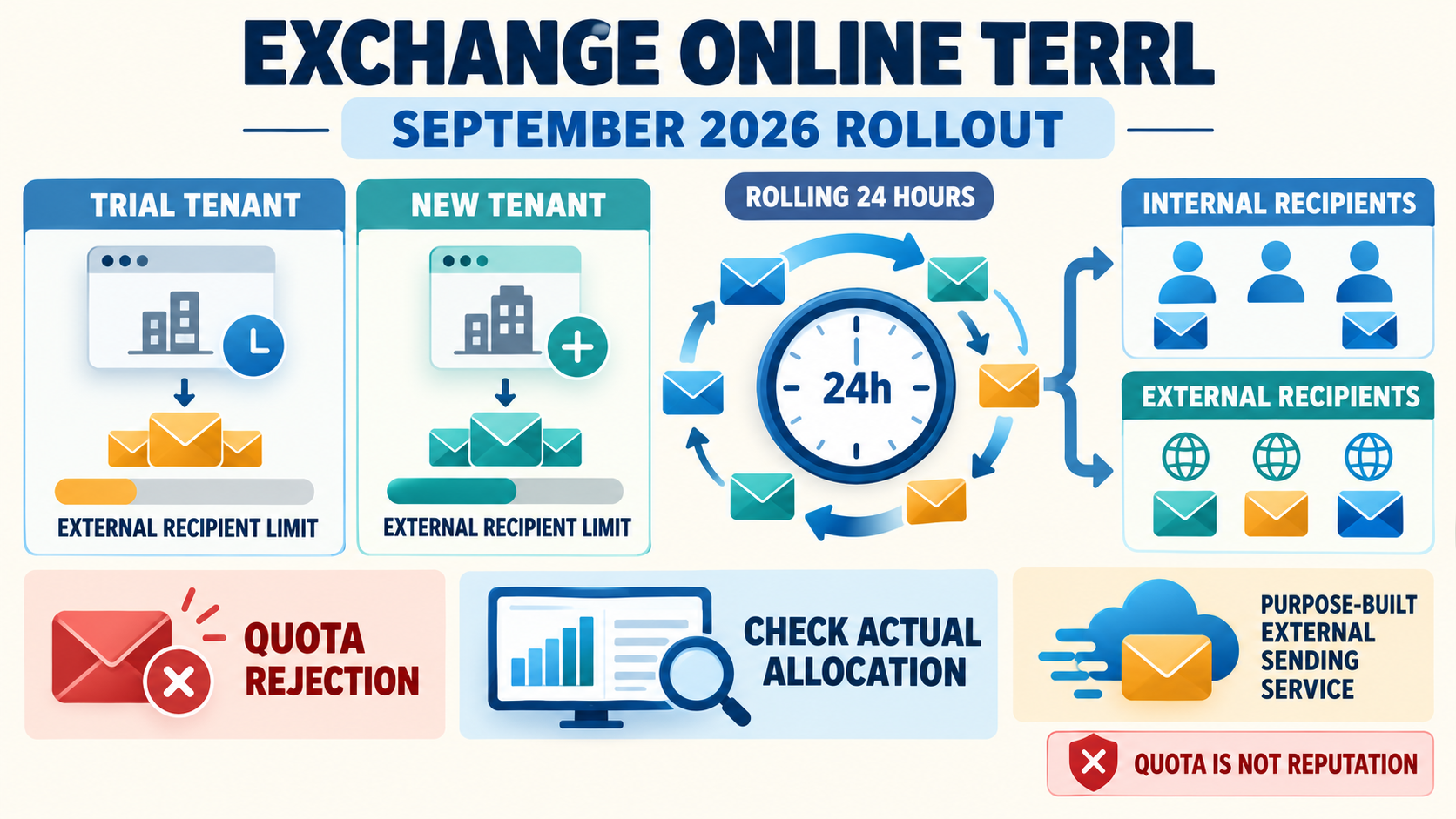
Microsoft began applying updated Tenant External Recipient Rate Limit calculations on September 14, 2026. TERRL limits how many external envelope recipients an Exchange Online tenant can send to during a rolling 24-hour window. It is shared across employee mailboxes, applications, connector relay and applicable hybrid traffic. When the tenant crosses its effective threshold, ordinary external business mail can fail even when each individual mailbox remains below its own sending limit.
This guide explains the 2026 calculation changes, the separately canceled 2,000-recipient mailbox proposal, qualifying licenses, internal and external recipient classification, distribution-group expansion, older Microsoft 365 sending methods, monitoring, incident recovery and workload migration. It is written for Exchange administrators, messaging engineers, application owners and deliverability teams that need one operating model rather than disconnected limit values.
What changed on September 14, 2026
Microsoft’s August update introduced an age multiplier for newly created paid tenants. A tenant younger than 31 days receives 10 percent of its standard calculated quota; a tenant from 31 through 60 days receives 25 percent; and a tenant older than 60 days receives the full calculated quota. The underlying standard formula still grows with qualifying Exchange Online or Exchange Online Protection licenses, but a new tenant cannot immediately use all of that calculated capacity.
This is a tenant-age control, not a domain-age control. Moving an established domain into a newly created Microsoft 365 tenant does not give the tenant the domain’s age. Adding mailboxes also does not create independent tenant pools. Every applicable external recipient continues to contribute to the same TERRL counter.
The proposed 2,000-recipient mailbox limit was canceled
On January 6, 2026, Microsoft canceled indefinitely the planned Mailbox External Recipient Rate Limit of 2,000 external recipients per mailbox in a rolling 24-hour window. It was not implemented and must not be presented as an active limit.
The cancellation did not remove the existing mailbox recipient-rate limit or TERRL. A mailbox remains subject to the documented 10,000 total recipients in a rolling 24-hour period. Separately, external recipients from all applicable senders contribute to the tenant-wide quota. A message can therefore pass one control and fail another.
TERRL is one layer in a stack of limits
| Control | Scope and window | What is counted | Typical documented value | Failure effect |
|---|---|---|---|---|
| Recipients per message | One submitted message | Every To, Cc and Bcc envelope recipient after expansion rules applicable to submission | Default 500; administrator-configurable from 1 to 1,000 | The individual message is rejected or must be split. |
| Message rate | One mailbox | Submitted messages, not recipients | 30 messages per minute | Submission is throttled; it is not extra TERRL capacity. |
| Recipient rate limit | One mailbox over a rolling 24 hours | Internal and external recipients; Exchange Online distribution groups in the address book count differently from personal contact lists | 10,000 recipients | That sender cannot send until enough earlier recipients age out. |
| Outbound spam policy | Sender and configured policy windows | External, internal and daily recipient thresholds configured by the tenant | Tenant-configured up to Microsoft-supported maxima | Sender can be restricted independently of TERRL. |
| TERRL | Entire tenant over a rolling 24 hours | External recipients whose domains are not accepted domains in the tenant | Calculated from qualifying licenses and tenant age | External delivery for the tenant is blocked when enforcement is active. |
| Initial onmicrosoft.com domain limit | Tenant over a rolling 24 hours | External recipients sent from the Microsoft Online Email Routing Address domain | 100 external recipients | NDR 550 5.7.236; a custom accepted domain is required for normal production use. |
Read this table from the narrowest scope to the widest. A message might exceed its recipient count before TERRL is considered. A mailbox might reach its rolling recipient limit while the tenant remains healthy. TERRL can also block external delivery tenant-wide while every mailbox is below 10,000 recipients. The SMTP response, affected scope and time window identify which control actually fired.
How Microsoft calculates the standard allocation
Standard tenant quota:
  TERRL = 500 × (qualifying paid email licenses ^ 0.7) + 9,500

Free education tenant quota:
  TERRL = 500 × (purchased email licenses ^ 0.7
                  + free EDU email licenses ^ 0.3) + 9,500

Tenant-age multiplier announced for the September 2026 rollout:
  tenant younger than 31 days  = 10% of calculated standard quota
  tenant age 31 through 60 days = 25% of calculated standard quota
  tenant older than 60 days     = 100% of calculated standard quota

Never replace the value displayed by Exchange Online with a spreadsheet result.
Rounding, license eligibility, tenant class and Microsoft changes can differ.
The exponent makes growth sublinear. Buying ten times as many licenses does not create ten times the external-recipient capacity. Licenses that contain Exchange Online or Exchange Online Protection can qualify; Microsoft states that the calculation uses licensed seats rather than only assigned seats. Shared mailboxes do not create a separate license contribution simply because they can send.
Published quota examples
| Qualifying paid email licenses | Standard formula result published by Microsoft | Planning interpretation |
|---|---|---|
| 1 | 10,000 | The base term dominates very small tenants. |
| 2 | 10,312 | A second license does not add 500 recipients linearly. |
| 10 | 12,006 | Capacity grows sublinearly because the exponent is 0.7. |
| 25 | 14,259 | Use the displayed tenant threshold, not a seat-times-rate estimate. |
| 100 | 22,059 | Maintain headroom below the calculated ceiling. |
| 1,000 | 72,446 | A tenfold seat increase produces less than a tenfold quota increase. |
| 10,000 | 324,979 | Bulk requirements can still exceed an enterprise tenant quota. |
| 100,000 | 1,590,639 | This remains a protection limit, not a recommended campaign volume. |
These are Microsoft’s examples of the formula, not guaranteed allocations for every tenant. The effective value shown in the Exchange admin center or returned by PowerShell is the number operators should use.
Which email licenses increase the TERRL calculation
Microsoft says the license count includes licenses for, or licenses that include, Exchange Online or Exchange Online Protection. This is a service-plan test, not a safe place for a permanently hard-coded list of commercial SKU names. Microsoft can rename bundles and change included service plans. Capacity automation should inspect current subscribed products and their service plans, then reconcile the result with the threshold Exchange Online actually displays.
The calculation uses the tenant’s total qualifying email licenses, not only seats currently assigned to users. Microsoft’s example says a tenant with 1,000 licenses has the same 72,446 calculated value regardless of how many seats are assigned. Do not multiply only active mailboxes by a rate, and do not assume disabling a user immediately changes the quota.
Mail objects do not add capacity by themselves. An unlicensed shared mailbox, room, equipment mailbox, mail contact, distribution group, mail-enabled security group or application sender address does not become a quota-producing license merely because it participates in mail flow. Its external recipients can still consume TERRL.
Purchased seats are not instant emergency capacity. The 0.7 exponent creates diminishing returns, and commercial provisioning, service-plan activation and Exchange recalculation can take time. Record the current threshold, verify that the product contains Exchange Online or EOP, model the expected change and confirm the new displayed threshold before planning against it.
A license audit should retain the subscription SKU, service-plan states, purchased quantity, suspended or warning state, observation time, calculated expectation and Exchange-reported threshold. If they differ, operate against the reported threshold and give Microsoft support the dated evidence.
Tenant age changes the available percentage
Apply the age percentage after calculating the standard license-based value. For example, Microsoft’s published value for 100 qualifying licenses is 22,059 recipients. A tenant in its first 30 days would expect roughly 2,206 at 10 percent; from day 31 through day 60 it would expect roughly 5,515 at 25 percent; after day 60 it reaches the full calculated value. Rounding and service state can differ, so the threshold shown by Exchange Online remains authoritative.
A rolling 24-hour window is not a daily reset
Assume Threshold = 20,000 external recipients.

09:00 yesterday   8,000 recipients enter the rolling window
15:00 yesterday   7,000 recipients enter the rolling window
08:30 today        5,500 recipients enter the rolling window
                   total in previous 24h = 20,500 -> threshold exceeded

The counter does not reset at midnight.
At 09:00 today, the first batch begins aging out recipient by recipient.
External submission can resume only after the preceding 24-hour total falls
below the effective threshold and enforcement reevaluates the tenant.
Capacity returns gradually as earlier events expire. Scheduling a campaign for 00:01 does not clear yesterday’s traffic. A forecast therefore needs every hour, or preferably smaller buckets, across the preceding 24 hours. Calendar-day totals can hide an overlapping peak.
Worked example: how an ordinary tenant reaches the limit
Consider an established tenant with 100 qualifying email licenses. Microsoft’s published formula example gives it 22,059 external recipients in a rolling 24-hour period. That number is shared by employees, applications, relays and any on-premises traffic that Exchange Online delivers externally.
During the morning, employee mail and transactional systems deliver to 7,200 external recipients. At 13:00, communications sends one message to a distribution group containing 11,500 external members. TERRL expands the group, so the counter rises to 18,700. At 15:00, a billing job sends 3,500 statements. The rolling total becomes 22,200, crossing the 22,059 threshold by 141 recipients.
The employees did not each exceed a mailbox limit, and the communications message had only one group in its visible recipient field. Neither fact protects the tenant. Once enforcement evaluates the tenant as blocked, later external messages can receive 550 5.7.233. Internal accepted-domain mail can continue, subject to its own controls.
Recovery is not “wait until midnight.” Operators pause the billing job and any broad external send, identify when the oldest recipient events entered the window, and allow enough of them to age out. If 2,000 recipients from yesterday leave the window at 16:10, capacity begins to return then. Critical transactional traffic should restart gradually while the observed value is watched.
How Exchange decides that a recipient is external
For TERRL, an external recipient has a domain that is not configured as an accepted domain in the tenant. A mailbox hosted by Microsoft in another tenant remains external. A hybrid recipient using your accepted domain remains internal for this classification even if a connector later routes the message on-premises.
A subdomain is not automatically internal merely because its parent appears in the tenant. Configure it as an accepted domain, or verify Microsoft’s documented Internal Relay and subdomain behavior. Do not add an unrelated customer or partner domain as accepted merely to influence counting; accepted domains change authoritative routing and can cause mail loss or security exposure.
How internal mailing is limited
Internal recipients do not consume TERRL when their domain is correctly covered by the tenant’s accepted-domain configuration. They still participate in other service protections. The ordinary mailbox recipient-rate limit is 10,000 recipients in a rolling 24-hour period and applies to outbound and internal messages. A mailbox that sends only internally can therefore exhaust its mailbox limit even while the tenant’s TERRL counter remains unchanged.
For the mailbox recipient-rate limit, a distribution group stored in the organization’s shared address book counts as one recipient. A personal distribution list stored in a mailbox Contacts folder is expanded and its members count individually. TERRL applies a different rule: external distribution-group members are counted individually after expansion. The same group send can therefore contribute one unit to a sender’s mailbox recipient-rate calculation while contributing hundreds or thousands of external units to TERRL.
Cross-tenant Microsoft 365 mail is external
A recipient hosted in another Microsoft 365 tenant is external unless that recipient domain is an accepted domain in the sending tenant. Being on Microsoft infrastructure, belonging to the same corporate group, or participating in a multitenant organization does not by itself make the recipient internal for TERRL.
Hybrid accepted-domain recipients remain internal. When the recipient uses an accepted domain and Exchange Online routes the message to an on-premises mailbox, the recipient is internal for TERRL classification. This does not make the route unlimited. Connectors, on-premises transport, receiving mailbox and sender mailbox controls can still throttle or reject it.
High Volume Email for internal applications
Microsoft positions Exchange Online High Volume Email for applications and devices that send large volumes to recipients inside the tenant. Current Microsoft documentation states no recipient-rate or message-rate limit for HVE, but documents other boundaries: up to 100 HVE accounts per tenant, up to 50 recipients per message, a 10 MB message size, internal recipients only, and connection limits. HVE is excluded from TERRL, but it cannot be used to deliver an internet campaign.
Direct Send is also internal-only
Direct Send submits anonymously to the tenant MX endpoint on port 25 and can deliver only to recipients in the organization. It does not authenticate as a mailbox, does not save a Sent Items copy, and remains subject to inbound anti-spam and receiving protections. An old device that appears to send externally through “Direct Send” is usually using a connector relay or another gateway and must be traced rather than classified by its local configuration label.
Recipient counting examples
| Scenario | TERRL treatment | Why |
|---|---|---|
| Message to 80 internal and 20 external recipients | 20 | Only recipient domains outside the tenant accepted-domain set count. |
| Ten messages to the same external address | 10 | TERRL counts deliveries, not unique people. |
| Distribution group expands to 1,000 external members | 1,000 | TERRL uses the fully expanded external membership, including nested groups. |
| Mail to a different Microsoft 365 tenant | External | Microsoft hosting does not make another tenant domain internal. |
| Mail to a subdomain not configured as accepted | External unless accepted-domain rules cover it | DNS ancestry alone does not classify a recipient as internal. |
| Hybrid recipient on an accepted domain | Internal | The accepted-domain classification applies even when routing continues on-premises. |
| On-premises application relays through Exchange Online to the internet | External recipients count | Relay origin does not bypass the tenant aggregate. |
| External mail sent to a signature service and returned to Exchange Online | Counted once according to Microsoft’s corrected behavior | A service loop should not be treated as free capacity or intentionally duplicated. |
Why distribution groups create sudden spikes
TERRL counts each external member after full group expansion, including nested groups. A message addressed to one group can therefore consume thousands of units. This differs from the per-user recipient-rate documentation, where an organization address-book distribution group can count as one recipient. Always name the limit when explaining group behavior.
Export group membership before a large send, resolve nested groups, classify every final domain, remove duplicates only where the sending application truly sends one delivery, and include dynamic-group variability. A friendly group name is not a safe unit of capacity.
Traffic Microsoft excludes from TERRL
| Traffic class | TERRL status | Operational caution |
|---|---|---|
| Journaling generated by Exchange Online rules | Excluded | A custom application copy is not automatically a journal report. |
| Automatic replies and out-of-office messages | Excluded | Application-generated replies may not be classified as system auto replies. |
| Delivery status notifications, NDRs and read receipts | Excluded | The original outbound message still counts when applicable. |
| Azure Communication Services Email | Excluded from Exchange Online TERRL | ACS has its own quotas, domains, authentication, reputation and compliance controls. |
| Exchange Online High Volume Email | Excluded | Microsoft positions HVE for high-volume internal recipients, not internet bulk campaigns. |
| SharePoint, Teams and Viva Engage service notifications | Excluded | Do not assume every application using a Microsoft identity is a cloud-service notification. |
Exclusion is based on how Exchange classifies the traffic, not the sender’s description of it. Preserve message trace evidence for a controlled sample before omitting a workload from capacity planning.
How older Microsoft 365 sending setups interact with the limits
Older environments commonly contain several sending methods with similar labels but different identities and limits. Inventory the real SMTP path, authenticated principal, connector match and final envelope recipients. A printer screen saying “Office 365 SMTP” is not enough evidence.
Authenticated client SMTP submission
SMTP AUTH normally submits to smtp.office365.com using port 587 with TLS and a licensed mailbox. It can send internally and externally. Microsoft documents 10,000 recipients per mailbox per rolling 24 hours and 30 messages per minute for this method. External recipients also enter TERRL. Modern authentication with OAuth is the supported strategic direction; a stored username and password is legacy authentication debt even when it still works today.
If the authenticated account sends as another mailbox, Send As permission is required. Microsoft’s Exchange Online limits documentation says sending through another mailbox by permission is counted against the delegate that has the rights, not the mailbox shown in From. TERRL still aggregates the external recipients at tenant level, so changing the visible sender or using a shared mailbox does not create another tenant pool.
Connector-based Microsoft 365 SMTP relay
SMTP relay sends to the tenant MX endpoint on port 25 and authenticates the source through an inbound connector, preferably with a TLS certificate or otherwise with a dedicated static public IP. It does not require a licensed mailbox and can use an address in an accepted domain even when that address is not a mailbox. It can send externally, but those external recipients count toward TERRL. Microsoft applies reasonable-use and abuse protections even though relay is not the same per-mailbox submission path.
IP-authenticated connectors become dangerous when an address is shared, reassigned or used by an uncontrolled NAT population. Certificate connectors fail when renewal changes the subject or SAN expected by the connector. Inventory public egress, certificate name and expiry, accepted sender domains, permitted source hosts, port 25 reachability, queue behavior and connector-match evidence.
On-premises Exchange hybrid and centralized transport
Mailboxes, applications or devices can submit to an on-premises Exchange server that relays through Exchange Online. If Exchange Online sends to external recipients, Microsoft says those recipients count toward TERRL. Centralized mail transport, a hybrid connector or an on-premises smart host does not make internet recipients internal. Correlate the on-premises queue ID, Exchange Online Message-ID and message trace so one logical message is not mistaken for separate workloads.
Shared mailboxes, service accounts and Send As
Unlicensed shared mailboxes do not add quota to the license formula. They can still originate messages through a licensed delegate, an application or a supported permission model. Record the authenticated identity, delegated identity, visible From, envelope sender and application ID separately. Rotating among shared From addresses does not evade the shared tenant limit and can hide the owner of abusive traffic.
Journaling, Bcc archives and compliance copies
Microsoft excludes journaling messages generated by Exchange Online journaling rules from TERRL. A transport rule that Bccs an archive, an application that sends a second copy, or a gateway that forks a message is not automatically the same as an Exchange journal report. Verify the mechanism and trace classification before excluding compliance traffic from a forecast.
Signature, encryption and security gateways require separate trace evidence. Many older tenants route outbound messages to an external signature, encryption or security service and then back to Exchange Online. Microsoft says corrected TERRL behavior counts an external message once, but routing loops, duplicated recipients or a service that creates new messages can produce different evidence. Preserve both trace legs, connector names and message identifiers. Test fail-open and fail-closed behavior without assuming the third party increases Microsoft capacity.
Legacy setup inventory commands
# Read-only Exchange Online inventory. Export the results with a UTC timestamp.
Connect-ExchangeOnline

# Domains define the internal/external boundary used by TERRL.
Get-AcceptedDomain |
  Select-Object Name,DomainName,DomainType,MatchSubDomains

# Find organization and mailbox SMTP AUTH state.
Get-TransportConfig |
  Select-Object SmtpClientAuthenticationDisabled
Get-CASMailbox -ResultSize Unlimited |
  Select-Object PrimarySmtpAddress,SmtpClientAuthenticationDisabled

# Inventory relay and hybrid routing paths.
Get-InboundConnector |
  Select-Object Name,Enabled,ConnectorType,SenderIPAddresses,TlsSenderCertificateName
Get-OutboundConnector |
  Select-Object Name,Enabled,ConnectorType,SmartHosts,TlsSettings,RouteAllMessagesViaOnPremises

# Identify rules that journal, redirect, Bcc, or route mail to external services.
Get-JournalRule
Get-TransportRule |
  Select-Object Name,State,Mode,RedirectMessageTo,BlindCopyTo,RouteMessageOutboundConnector
PowerShell output is only the control-plane view. Reconcile it with firewall flows, device configurations, SMTP logs, Entra sign-ins, certificates, secrets, application owners and Message Trace. For every sender capture method, endpoint, port, TLS, authentication, source IP, connector, envelope sender, From identity, internal and external volume, peak rolling window, retry behavior and migration owner.
Measure the tenant before changing it
The formula is useful for planning, but an incident must be managed with the state Exchange Online reports. Capture the threshold and observed value before buying licenses, moving traffic or assuming a sender is blocked. A calculation explains what you expected; telemetry shows what the service is enforcing.
Read the effective tenant state with PowerShell
# Exchange Online PowerShell
Connect-ExchangeOnline

# Read the tenant's effective enforcement state. Treat Threshold as the
# operational source of truth for this tenant at this time.
$state = Get-LimitsEnforcementStatus
$state | Format-List Verdict,EnforcementEnabled,Threshold,ObservedValue

# Interpret both fields together:
# Verdict=Block + EnforcementEnabled=True  => tenant is actively blocked
# Verdict=Block + EnforcementEnabled=False => calculated verdict, not enforced
# Verdict=None                             => below the evaluated threshold
Verdict and EnforcementEnabled answer different questions. A Block verdict with enforcement disabled is not an active block. Record all four values with a UTC timestamp, tenant identifier and operator identity. Never publish access tokens or recipient data in an incident ticket.
The Exchange admin center provides the companion report. Open Reports > Mail flow > Tenant Outbound External Recipients Rate to review current volume, quota, percentage used, blocked recipients and enforcement state. Compare the same UTC observation with PowerShell. If values disagree, preserve both and check refresh time before escalating.
Build proactive monitoring
# Illustrative operator check. Run through an approved automation identity and
# send results to monitoring without exporting message content or access tokens.
Connect-ExchangeOnline -ShowBanner:$false
$s = Get-LimitsEnforcementStatus

if ($s.Threshold -gt 0) {
    $usedPercent = [math]::Round(100 * $s.ObservedValue / $s.Threshold, 1)
    [pscustomobject]@{
        CheckedUtc        = (Get-Date).ToUniversalTime().ToString('o')
        Threshold         = $s.Threshold
        ObservedValue     = $s.ObservedValue
        UsedPercent       = $usedPercent
        Verdict           = $s.Verdict
        EnforcementActive = $s.EnforcementEnabled
    }
}

# Alert internally before the ceiling. This local alert is not a claim that
# Microsoft supplies a built-in proactive 80% TERRL alert.
Microsoft documents an alert when the sending limit is exceeded, while its TERRL FAQ says an 80-percent warning was not available at the time of that statement. Treat exceedance alerting and proactive headroom alerting as separate controls. Run a supported scheduled check, alert at internal thresholds such as 70, 80 and 90 percent, and link the alert to a runbook. Reconfirm cmdlet availability and permissions whenever the Exchange Online module changes.
Find the workload consuming the quota
Use Message Trace and, where licensed, the Microsoft Defender Top senders and recipients report. Aggregate external envelope recipients by submitting identity, application, connector, source system and hour. Attribution by visible From alone is weak: SendAs, delegated sending, relays and compromised accounts can make the displayed author differ from the authenticated or connecting principal.
For shared platforms, assign each workload an owner, sender identity or connector where possible. Maintain an internal chargeback table with observed recipients, peak rolling window, business purpose and approved route. That turns a tenant-wide mystery into an accountable capacity model.
Forecast capacity with headroom
Calculate the maximum sum of any consecutive 24-hour interval, not the largest calendar day. Add ordinary human mail, applications, relays, group expansion, retry behavior and planned campaigns. Keep a safety reserve for incidents and measurement delay. A planning ceiling of 70 to 80 percent may be sensible for a volatile tenant, but it is an internal risk decision, not a Microsoft guarantee.
License purchases have diminishing returns under the 0.7 exponent and may not update instantly. Do not buy licenses during an outage without confirming eligibility, commercial timing and the displayed threshold. Re-architect high-volume workloads instead of treating seats as mailing credits.
Differentiate the NDRs
SMTP enhanced status: 550 5.7.233
Meaning in this context: Tenant external-recipient limit reached
First checks: EnforcementEnabled, Verdict, rolling volume and largest senders
Recovery direction: Wait for older recipients to age out while containing the workload that caused the spike.
SMTP enhanced status: 550 5.7.236
Meaning in this context: External sending limit for the initial onmicrosoft.com domain reached
First checks: Envelope sender and configured custom accepted domain
Recovery direction: Use a verified custom accepted domain; do not rotate onmicrosoft.com senders.
SMTP enhanced status: User restricted or outbound-spam response
Meaning in this context: A sender-level protection may have fired
First checks: Restricted entities, outbound spam alerts, account compromise and message trace
Recovery direction: Secure the account and follow the specific restriction workflow; TERRL capacity will not clear it.
Incident response when TERRL blocks the tenant
- Confirm: capture the NDR, UTC time,
Get-LimitsEnforcementStatusoutput and EAC report. - Contain: pause campaigns, application loops and wide groups. Do not repeatedly resubmit rejected messages.
- Secure: investigate unusual top senders, revoke compromised sessions, reset credentials and restrict malicious applications.
- Protect queues: retain one durable copy with stable message identifiers and exponential retry. Prevent duplicate fan-out.
- Estimate release: use time-bucketed events to calculate when enough volume will leave the previous 24 hours.
- Communicate: tell service owners that internal mail may work while external delivery is blocked and avoid speculative recovery times.
- Recover gradually: restart critical transactional traffic first, verify traces and watch the rolling value before releasing lower-priority traffic.
- Review: document the workload, trigger, recipient expansion, detection gap and architectural correction.
An immediate retry storm makes recovery worse. A 5.7.233 response is a permanent failure for that SMTP transaction, not permission to loop continuously. Blind retries add load, duplicate business actions and can refill capacity as soon as it returns. Applications should distinguish transient 4xx replies from permanent 5xx replies, use idempotency keys, preserve the original Message-ID where appropriate, and require operator release after a tenant-wide limit incident.
Choose a sending architecture by workload
| Workload | Appropriate path | Reason | Boundary |
|---|---|---|---|
| Human and ordinary business mail | Exchange Online mailboxes | Mailbox controls, calendaring, trace and ordinary tenant delivery | Still subject to mailbox and tenant protection limits. |
| Internal high-volume notifications | Exchange Online HVE where supported | Designed for high-volume internal-recipient scenarios | Not the internet campaign escape path. |
| Application transactional mail to external users | Azure Communication Services Email or an approved transactional provider | API-oriented sending, workload isolation and service-specific scale controls | Separate domain authentication, quota, suppression, privacy and deliverability operations are required. |
| Marketing or bulk commercial mail | Purpose-built email service provider | List management, unsubscribe, complaint, bounce and campaign controls | Do not conceal bulk traffic behind mailbox identities. |
| Device or on-premises relay | Supported Microsoft 365 relay or approved gateway | Centralized authentication and queueing | Relayed external recipients still count toward TERRL when Exchange Online sends them. |
Moving traffic does not remove responsibility. The new service needs SPF, DKIM and DMARC alignment, bounce and complaint handling, suppression, consent or other lawful basis, list hygiene, secrets management, rate control and received-message testing. Use a distinct subdomain when it improves operational isolation, but do not use domain rotation to evade reputation or policy enforcement.
TERRL restriction is not an inbox-placement decision
TERRL acts at outbound submission and transport. When it blocks a message, Exchange Online does not deliver that message to the external receiver, so Gmail, Yahoo or another Outlook tenant never makes an inbox-versus-spam decision for that attempt. When Exchange Online accepts and transmits a message below the limit, TERRL does not guarantee inbox placement and does not improve sender reputation.
Inbox placement is evaluated through a different set of signals, including SPF, DKIM and DMARC alignment, IP and domain reputation, complaint rates, recipient engagement, content, list acquisition and receiver policy. Keep three outcomes separate in reporting: Exchange submission accepted, remote server accepted, and mailbox placement observed. A 5.7.233 rejection belongs to the first layer.
The deliverability risk is architectural. When transactional, employee, application and marketing traffic share one tenant quota, a campaign or malfunction can prevent business-critical external mail from leaving the organization. Multiple mailboxes do not isolate that risk because TERRL is aggregated at tenant level. Microsoft’s cancellation of the proposed 2,000-per-mailbox external limit does not turn Exchange Online into a bulk delivery platform.
Treat an unexpected spike as a security signal. A sudden quota increase may indicate compromised credentials, malicious OAuth consent, an open relay, a broken notification job or unauthorized bulk sending. Correlate Message Trace with Entra sign-ins, audit logs, connector changes, application credentials and outbound-spam alerts. Blocking the workload is not enough: revoke access, determine the data and recipient impact, preserve evidence and follow the organization’s incident process.
Minimum production runbook
- Named owner and backup owner for tenant external-recipient capacity.
- Dated capture of Threshold, ObservedValue, Verdict and EnforcementEnabled.
- Hourly rolling-volume dashboard and proactive internal alerts.
- Inventory of every automated sender, relay, connector and large distribution group.
- Approved traffic priorities and a controlled pause mechanism.
- NDR-specific diagnosis for 5.7.233 and 5.7.236.
- Compromise investigation path and emergency credential revocation.
- Queue, idempotency and staged-release procedure.
- Quarterly review of license eligibility, tenant age assumptions, exclusions and Microsoft documentation.
- Capacity test before large organizational announcements or migrations.
Technical acceptance gates
- The EAC and PowerShell threshold are captured with matching observation times.
- All recipient domains used in a test are classified against the accepted-domain configuration.
- A nested external distribution group is expanded and its actual TERRL effect is observed safely.
- Twenty-four-hour forecasting uses overlapping windows and includes ordinary background traffic.
- The monitoring alert fires below the internal planning ceiling and links to the correct runbook.
- A controlled NDR is parsed without treating every 5.7.x response as TERRL.
- Queues stop on permanent rejection and resume without duplicates.
- High-volume external traffic has an approved non-mailbox architecture.
- Security response covers compromised users, applications and connectors.
- Documentation names its review date and records Microsoft documentation conflicts.
Current status as of November 15, 2026
Microsoft’s maintained Exchange Team article says TERRL is fully implemented in the worldwide environment. It says rollout for GCC, GCC High, DoD and Microsoft 365 operated by 21Vianet is postponed with dates to be announced. Administrators in those environments should verify current service documentation and their tenant’s enforcement output rather than infer status from the worldwide rollout.
For an enforced tenant, the safe source of truth is its current threshold and enforcement state, not a license spreadsheet. Operators need rolling-window telemetry, accepted-domain classification, group-expansion awareness, workload attribution and a rehearsed release plan. A workload whose normal volume approaches the ceiling belongs on a service designed for that traffic.
Primary Microsoft references
- Microsoft Exchange Team: Introducing Exchange Online tenant outbound email limits: Current rollout status, formulas, tenant-age multipliers, counting rules, exclusions, report, PowerShell status and NDRs.
- Microsoft Exchange Team: Canceling the Mailbox External Recipient Rate Limit: January 6, 2026 cancellation of the proposed 2,000-external-recipient per-mailbox limit.
- Microsoft Learn: Exchange Online limits: Per-message, message-rate, recipient-rate, TERRL and onmicrosoft.com limits.
- Microsoft Learn: Troubleshoot outbound email sending limits: Limit interactions, alerting, relay boundaries, message trace and remediation.
- Microsoft Learn: Accepted domains in Exchange Online: Authoritative and internal-relay domain behavior used for routing classification.
- Microsoft Learn: Set up a multifunction device or application to send email: SMTP AUTH, connector relay, Direct Send and HVE requirements and boundaries.
- Microsoft Learn: Manage High Volume Email for Microsoft 365: Internal-only HVE scope, account, recipient, size and connection limits.