Microsoft SNDS Trap Count Removal: Monitoring After July 2026
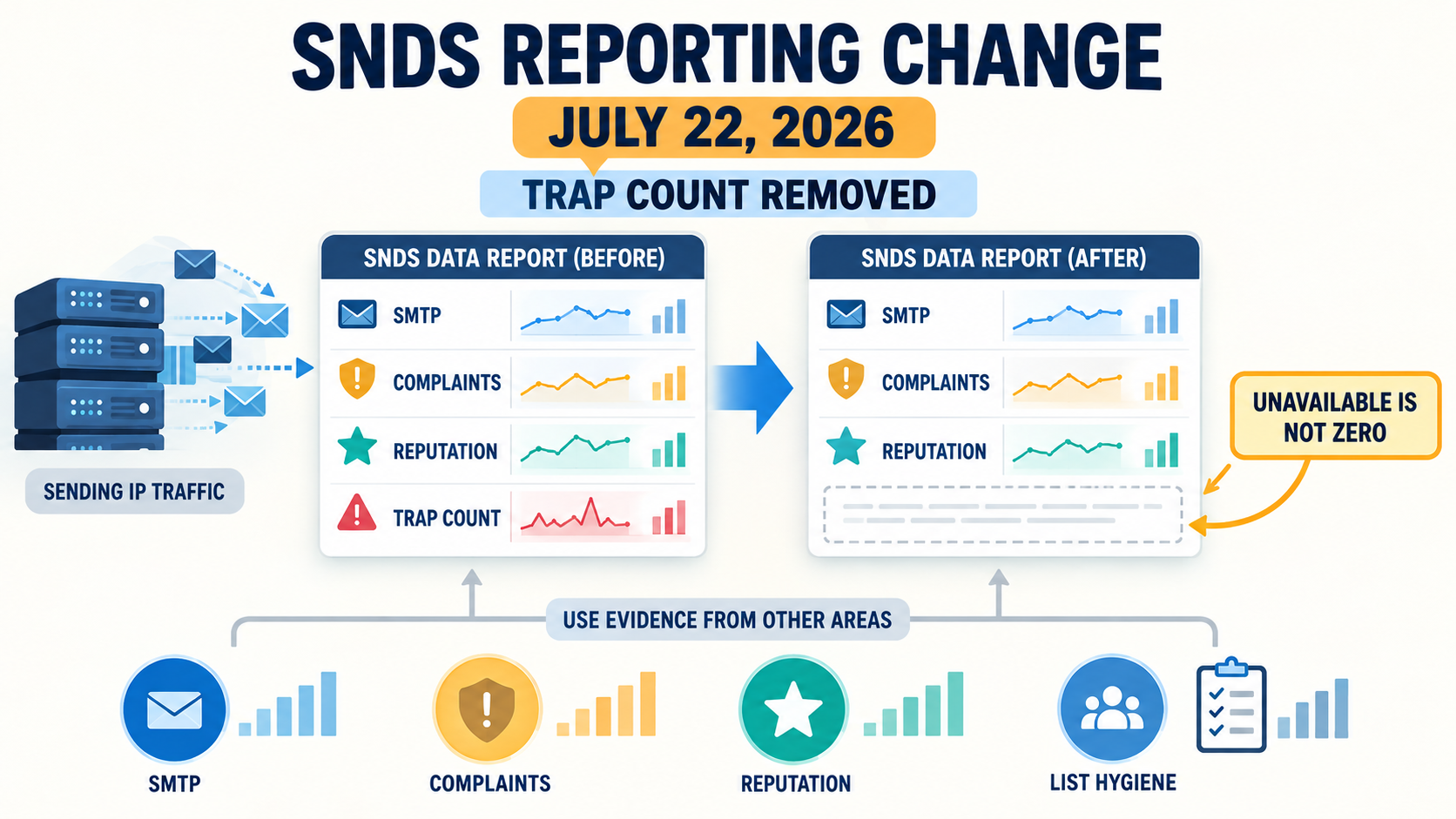
Microsoft removed trap-hit counts from Smart Network Data Services Data Reports starting July 22, 2026. The announcement says the change protects the integrity and effectiveness of Microsoft anti-abuse systems and warns that transition-period values may differ from earlier reports. The field disappeared; the underlying risk did not become zero.
This guide explains how to update SNDS ingestion, dashboards, alerting and investigations without inventing a replacement metric. It focuses on evidence that remains available from Microsoft and evidence senders must retain themselves.
The exact reporting change
| Evidence | Before July 22, 2026 | After the change | Correct interpretation |
|---|---|---|---|
| SNDS trap-hit count | A count could appear in the Data Report, with transition values later warned as potentially different from earlier reports. | The count is no longer included. | Unavailable is not zero. Do not fabricate, carry forward or infer an exact count. |
| SNDS traffic data | RCPT, DATA and message-recipient evidence was available for qualifying IP activity. | Still documented as available. | Use it to understand sending activity and anomalies, not recipient engagement. |
| SNDS filter result | Green, yellow or red aggregate filtering evidence was available. | Still documented as available. | It is a broad IP-level signal, not a folder-placement guarantee. |
| SNDS complaint rate | Complaints divided by message recipients were reported by activity period. | Still documented as available. | Complaint timing and denominator behavior must be preserved. |
| JMRP reports | Complaint messages could be supplied to enrolled senders. | Remain a separate source from the removed trap count. | Use authorized complaint evidence for suppression and investigation. |
| Sender SMTP and campaign logs | Owned by the sender or ESP. | Unaffected by the SNDS field removal. | Preserve accepted, deferred, rejected, bounce and campaign evidence independently. |
The effective event is field removal, not a declaration that Microsoft stopped operating spam traps or stopped using anti-abuse evidence internally. Microsoft did not publish a substitute trap-count API, conversion formula or threshold. Any system that displays zero after July 22 is misrepresenting an unavailable observation.
Why Microsoft removed the count
Microsoft states that the removal supports the integrity and effectiveness of its anti-abuse systems. Detailed trap telemetry can help abusive senders tune around detection. The operator response is to improve first-party hygiene and incident evidence, not to reverse-engineer a hidden count.
Do not market an internal estimate as Microsoft data. A model can identify unusual acquisition or engagement patterns, but it cannot recreate a receiver-only measurement without ground truth.
Unavailable is not zero
Store at least four different states: observed numeric value, observed zero, unavailable because the provider removed the field, and missing because the report was not obtained. These states have different operational meanings and must not collapse into 0, blank or false.
Preserve the final historical values exactly as received. Do not forward-fill them into later dates, recalculate them from unrelated signals or rewrite old reports to match the new schema.
How to handle transition-period values
Microsoft warned that reported trap-hit values during the transition could differ from previous reports and should not be interpreted as exact. Tag transition records with that limitation. Avoid using a transition value to prove a precise increase, decrease, SLA breach or recovery.
If a dashboard already made such a claim, correct the annotation and recompute decisions that depended on exact counts. Keep the original raw export and the corrected interpretation.
What SNDS still provides
| Current SNDS field or signal | Meaning | Useful question | What it cannot prove |
|---|---|---|---|
| Activity period | First and last hour of observed activity within the SNDS reporting day. | When did Microsoft observe the IP sending? | Exact per-message time or campaign attribution. |
| RCPT commands | SMTP recipient commands issued by the IP. | Is recipient probing, invalid-address traffic or unusual fan-out plausible? | How many inboxes received or displayed the mail. |
| DATA commands | SMTP message-data transactions. | Did transaction volume change relative to recipients? | Message quality, inbox placement or human attention. |
| Message recipients | Recipients on messages actually transmitted. | What denominator should be used for the displayed complaint rate? | A sender-side delivered metric across all providers. |
| Filter result | Aggregate spam-filter verdict range shown as green, yellow or red. | Did Microsoft filtering evidence deteriorate at the IP level? | A precise percentage, universal reputation score or individual folder decision. |
| Complaint rate | Complaints reported during the activity period divided by message recipients. | Are Outlook.com user complaints increasing? | Zero complaints for mail users did not see or a universal complaint rate. |
| Comments | Conditions such as blocked, bot-like behavior, junking, virus, malware-hosting or open-proxy evidence where applicable. | Is there a concrete security or blocking condition to investigate? | The complete reason for every delivery outcome. |
Read filter colors correctly
The current FAQ describes green as less than 10 percent spam verdicts, red as greater than 90 percent, and yellow as the broad range between them. These are intentionally coarse ranges. One message to ten recipients counts as ten verdicts in the documented calculation.
The filter result does not directly state inbox or Junk placement for each user. User settings, safe lists and other controls can change individual outcomes. Keep the source color, do not convert yellow into a fabricated midpoint score.
Read complaint rate with its denominator and timing
SNDS defines complaint rate using complaints reported in the activity period divided by message recipients. Complaints are shown for the day they were reported, not moved back to the original delivery date. That timing difference can produce rates over 100 percent.
A falling rate can be misleading when filtering prevents recipients from seeing mail. Compare complaint count and rate with message recipients, filter result, volume and JMRP evidence before claiming improvement.
Use SMTP traffic evidence to find anomalies
RCPT commands, DATA commands and message recipients help identify namespace mining, stale recipients, unusual fan-out, retry storms or compromised applications. Reconcile the Microsoft view with MTA logs by source IP and provider day.
Differences do not automatically prove abuse. NAT, shared pools, provider aggregation, rejected recipients and measurement boundaries can change counts. Preserve both sources and explain the bounded conclusion.
JMRP is not the removed trap metric
The Junk Mail Reporting Program provides complaint evidence from Outlook.com users to enrolled and authorized senders. It supports recipient suppression, campaign investigation and abuse handling. A JMRP spam complaint is not a spam-trap hit and must not be relabelled as one.
Protect complaint content and recipient data. Limit access, validate reports, suppress promptly, prevent forwarding into broad analytics and retain only what the authorized operational purpose requires.
Build a replacement evidence model, not a replacement number
| Layer | Evidence to retain | Join key | Decision supported |
|---|---|---|---|
| SNDS | Raw CSV or automated export, IP, reporting date, activity period, traffic fields, filter color, complaint rate and comments. | Sending IP plus provider reporting day. | Microsoft-observed IP trend and exceptional conditions. |
| JMRP | Authorized complaint report, original campaign identifiers, recipient suppression result and processing time. | Message-ID, campaign ID, sending IP or internal recipient token. | Complaint source, affected stream and suppression completion. |
| MTA/ESP | Queue ID, source IP, envelope domain, Header From, DKIM identity, SMTP response, retry and final state. | Queue ID and Message-ID. | Acceptance, deferral, rejection and route behavior. |
| Authentication | Received headers and receiver Authentication-Results for SPF, DKIM and DMARC. | Message-ID and controlled mailbox. | Identity, alignment and observed receiver result. |
| Audience | Permission source, acquisition cohort, last confirmed action, bounce and suppression state. | Protected internal recipient identifier. | List quality and whether a cohort should remain sendable. |
| Placement tests | Controlled mailbox, client, timestamp, message source and observed folder. | Test ID and Message-ID. | Directional placement evidence for a defined test, not all recipients. |
Preserve raw exports before normalization
Save the original CSV or automated download with retrieval time, source URL identifier, byte length and SHA-256. Normalize into a versioned schema while retaining the raw file for audit and parser replay. Do not store automated-access credentials in the file, logs or repository.
Microsoft documents a 90-day SNDS display window. Your authorized retention policy may preserve normalized operational history longer, but it should have an owner, security controls and a stated purpose.
Migrate the data schema safely
A positional CSV parser can silently shift comments or later columns when a field disappears. Parse by header where possible, reject unknown schema changes and keep provider-schema version metadata.
ip,date,rcpt_commands,data_commands,message_recipients,filter_result,complaint_rate,trap_hits,comments
192.0.2.10,2026-07-20,12500,11800,11940,YELLOW,0.12,VALUE_REPORTED,
{
"source": "Microsoft SNDS",
"report_date": "2026-07-23",
"sending_ip": "192.0.2.10",
"filter_result": "YELLOW",
"complaint_rate": 0.12,
"trap_hits": null,
"trap_hits_state": "unavailable_after_2026_07_22",
"raw_export_sha256": "store-real-hash-at-ingest"
}The example uses documentation-only addresses and placeholder values. Production ingestion must use the exact current export headers and a real hash calculated at ingestion.
Correct dashboards and historical charts
End the trap-count line on the last valid observation and place a visible provider-field-removal marker on July 22, 2026. Do not draw a line to zero. Tooltips and exports should state unavailable after the change.
Keep transition-period warnings on affected points. Separate provider-reported evidence from internal risk indicators by color, label and data lineage.
Remove broken alerts and composite scores
Disable alerts that depend on new trap counts. If a composite reputation score included that field, version the score and create a measurement break. Reweighting the remaining inputs changes the score definition and prevents direct comparison with the earlier series.
Prefer direct alerts on observable conditions: sudden volume, RCPT rejection ratio, filter-color deterioration, complaint change, authentication failure, block comments, bounce pattern, new acquisition source or unauthorized IP activity.
Incident investigation after the removal
| Observed condition | First checks | Do not conclude | Bounded response |
|---|---|---|---|
| Trap column disappears | Confirm report date, export schema, portal announcement and parser behavior. | Trap hits became zero. | Mark the field unavailable from the effective date and preserve prior history unchanged. |
| Filter result worsens | Segment by IP, stream, volume, authentication, complaint evidence and SMTP responses. | A hidden trap count caused the change. | Stop risky traffic where evidence supports it; investigate acquisition and compromised sources. |
| Complaint rate falls while filtering worsens | Check delivered/visible population, volume and JMRP reports. | Recipients are happier. | Treat lower complaints as inconclusive when fewer messages may reach visible folders. |
| No SNDS row for an IP/day | Check qualifying volume, authorization, date boundary, source-IP mapping and export job. | The IP sent no mail or had perfect reputation. | Record missing data separately and reconcile with sender logs. |
| Shared IP shows a problem | Map all tenants and streams using the IP during the reporting window. | The reviewed customer caused it. | Use provider and ESP evidence to isolate authorized contributors before remediation. |
| Sudden volume or RCPT discrepancy | Inspect credentials, queues, recipient validation, retries and application changes. | It is merely a Microsoft reporting defect. | Contain possible compromise or list-quality failure and preserve evidence. |
List hygiene without a trap counter
Maintain permission source, acquisition time, form controls, confirmed action, bounce state, complaint suppression and inactivity policy. Protect signup endpoints from automation and do not purchase, scrape or append addresses. These controls reduce risk regardless of whether a receiver publishes trap telemetry.
Do not delete legitimate recipients solely because an opaque model labels them trap-like. Use evidence-based acquisition controls and suppression rules.
Shared IP attribution
SNDS is primarily IP-level evidence. On a shared IP, the observed condition can reflect several tenants, domains or streams. Maintain a time-bounded IP assignment and traffic map so each incident can be scoped without accusing the wrong sender.
ESP customers should request their own campaign, complaint, bounce and pool evidence. A shared-pool SNDS color is context, not proof that one customer caused the result.
Dedicated IP does not create complete visibility
A dedicated IP simplifies attribution but does not expose Microsoft's hidden anti-abuse signals or guarantee delivery. Domain reputation, authentication, complaints, recipient response, content, list quality and sending behavior still matter.
Monitor the IP and aligned domains together. Preserve Received headers from controlled Outlook.com mailboxes and correlate them with SMTP responses and SNDS dates.
No SNDS data is not a clean bill of health
Microsoft notes that mail and spam data may be absent for IPs sending fewer than 100 messages on a day. Authorization, report timing and source-IP mapping can also create gaps. Store no row as missing or below reporting visibility, never as zero spam or perfect reputation.
Automated access and portal migration
Microsoft announced deprecation of automated URLs on the former sender-support host and provides current links through the SNDS Automated Data Access page. Treat those links as secrets. Rotate them if exposed and keep them outside source control, chat transcripts and ordinary logs.
Validate HTTP status, content type, header schema, row count and report date on every retrieval. An HTTP 200 with a login page or error document is not a successful data import.
Normalize the Microsoft reporting day carefully
The SNDS FAQ describes activity by the first and last observed hour of a Pacific-time reporting day, including daylight-saving adjustments. Store the provider date and displayed activity period exactly as supplied. Add UTC conversion only as a derived field with the timezone rule and conversion version recorded.
Do not join a campaign to SNDS using calendar date alone. A campaign crossing midnight, delayed delivery, retries or an ESP operating in another timezone can span several provider days. Join by sending IP, bounded transmission times and message-recipient volume, then state when attribution remains approximate.
Define the parser contract before deployment
A safe importer validates required headers, permits explicitly known optional headers, rejects duplicate columns, records unknown columns and never assigns values by a stale numeric position. It should publish counts for source rows, accepted rows, rejected rows and each missing-state reason.
Replay three immutable fixtures: a pre-change report with a trap field, a transition report whose trap value is marked non-exact, and a post-change report without that field. Expected output must retain the historical value only in the first two records and emit the explicit unavailable state only after the effective boundary. A parser that emits numeric zero fails the migration.
Worked investigation: shared pool turns yellow
A shared outbound IP changes from green to yellow two days after the trap field disappears. The operator does not assume hidden trap activity and does not rotate the IP. First, the raw SNDS export is preserved. The team maps every tenant and stream on that IP during the Pacific reporting window, checks message recipients, complaint rate, comments and SMTP responses, and obtains JMRP evidence where authorized.
One newly imported audience accounts for most of the volume increase and has a higher invalid-recipient rate, while authentication and infrastructure remain stable. The bounded response is to pause that acquisition cohort, preserve its permission evidence, suppress confirmed failures, inspect the import controls and watch complete Microsoft and sender-side windows. The finding is list-quality risk correlated with the yellow result, not a claim about an undisclosed trap count.
What evidence supports recovery?
Recovery requires stable behavior across enough complete reporting windows for the traffic pattern involved. Retain the corrected acquisition control, volume and cohort mix, SMTP outcomes, JMRP handling, complaint trend, filter result and controlled mailbox observations. A single green day is useful evidence but not proof that every stream, domain or recipient experience recovered.
Define the observation window and stop conditions before resuming volume. If the same defect returns, roll back the resumed cohort rather than changing IP, domain, content and cadence together.
Quality gates for the updated pipeline
| Control | Pass condition | Test | Failure action |
|---|---|---|---|
| Schema-aware import | The importer tolerates removal of the trap field without shifting later columns. | Replay exports from before, during and after the change. | Stop ingestion and quarantine malformed rows. |
| Unknown-state model | Unavailable, not reported, zero and not applicable remain distinct values. | Run unit fixtures for each state. | Correct storage and dashboards before trend analysis. |
| Source preservation | Raw Microsoft exports are immutable and timestamped before normalization. | Compare stored SHA-256 and row counts. | Re-fetch when possible and label gaps honestly. |
| IP ownership map | Every SNDS IP maps to current pools, tenants, streams and accountable owners. | Reconcile against MTA and cloud-provider assignments. | Suspend attribution until the map is corrected. |
| Alert redesign | No alert or score treats the absent trap field as zero or improvement. | Backtest the effective-date boundary. | Disable the affected score and recompute history. |
| JMRP processing | Authorized complaints reach suppression and investigation within the documented SLA. | Inject a sanitized test report or trace a recent authorized sample. | Repair parsing and manually contain affected recipients. |
Operational runbook
- Capture the last historical export and identify the effective schema boundary.
- Update storage to represent unavailable separately from zero and missing.
- Replay pre-change, transition and post-change fixtures.
- Correct charts, alerts, reports and composite scores.
- Verify current SNDS automated access and protect its URL.
- Map IPs to pools, streams and owners.
- Join SNDS with JMRP, SMTP, authentication, bounce and acquisition evidence.
- Document the new investigation procedure and train operators.
- Review the current Microsoft FAQ at each material portal or schema change.
Failure modes that should block release
- The missing trap field becomes zero through a database default.
- A positional parser shifts the comments column into trap_hits.
- Transition values are treated as exact.
- JMRP complaints are renamed trap hits.
- A composite score changes definition without a version break.
- A shared-IP condition is attributed to one tenant without evidence.
- Automated-access URLs appear in Git, screenshots or logs.
- A missing SNDS row is presented as clean reputation.
Current operating conclusion
As reviewed on November 13, 2026, Microsoft no longer includes trap-hit counts in SNDS Data Reports. Current SNDS documentation still describes IP traffic, filter results, complaint evidence, comments and automated exports. None of those fields is a numeric replacement for the removed trap count.
The correct response is a schema and evidence redesign: preserve history, represent unknown states honestly, protect raw exports, combine independent signals and investigate acquisition and infrastructure directly. A sender should be able to improve hygiene without knowing the address or count of Microsoft spam traps.
Primary and contemporaneous references
- Microsoft SNDS portal and announcements: Official trap-count removal announcement and current portal status.
- Microsoft SNDS FAQ: Current field definitions, reporting window, authorization and automated access behavior.
- Microsoft Postmaster troubleshooting: Official sender troubleshooting and reputation context.
- Microsoft Postmaster policies: Current Outlook.com sender policy and reputation references.