Validity Heatwave Blocklist: Domain Lookup and Investigation Guide
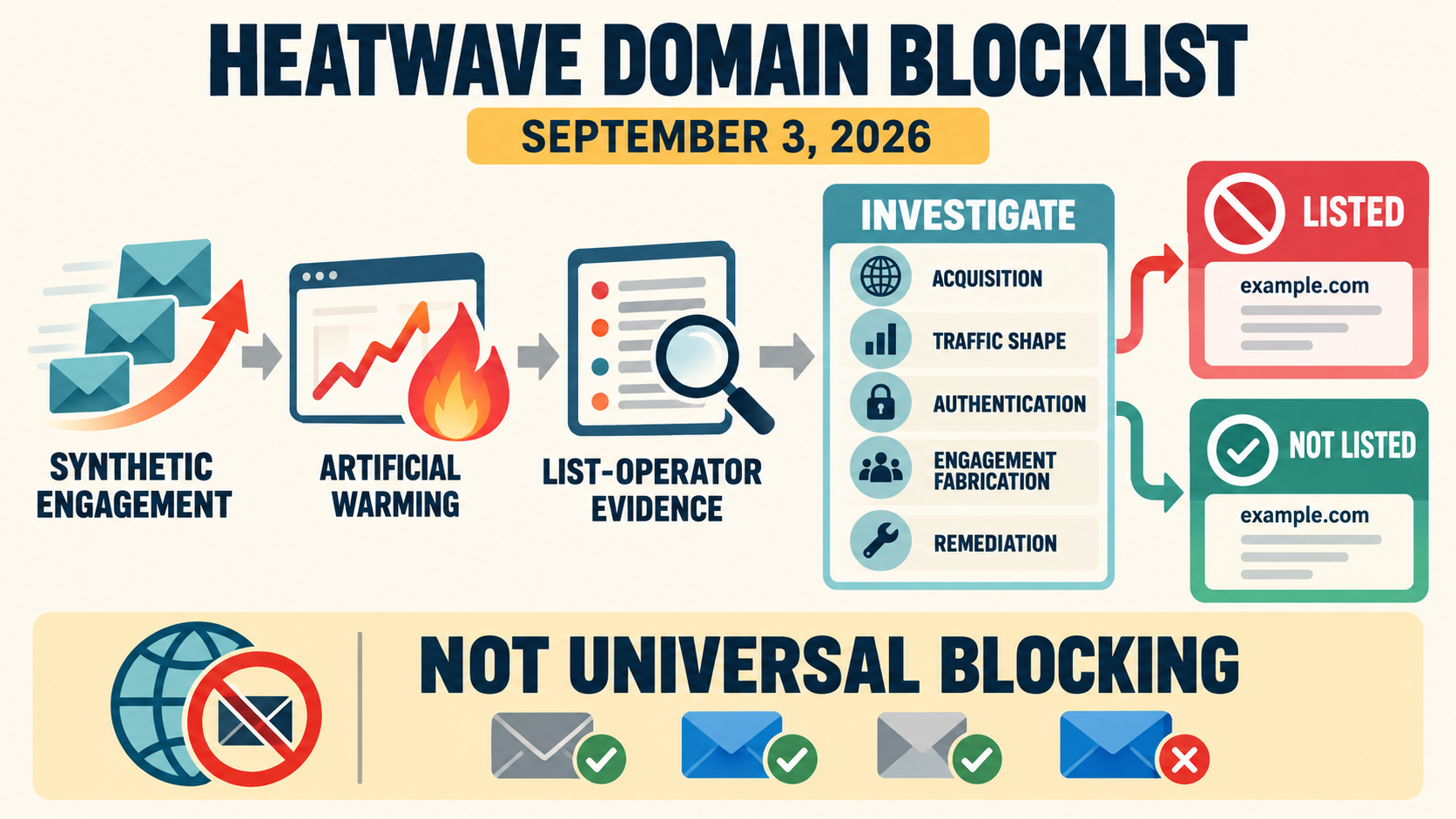
Validity launched the Heatwave Domain Blocklist on September 3, 2026 to identify sending domains associated with synthetic reputation warming. Its public lookup now exposes exact-domain status, recent listings and pre-listings, while approved partners can obtain bulk or DNS-zone access. A Heatwave result is an investigation signal, not proof of universal mailbox blocking.
This guide explains how the live lookup works, how to decode stages and confidence, how to inventory the real domains behind email, and how to investigate a listing without overclaiming. It also identifies services that publicly advertise automated mailbox warm-up. That provider directory is informational: offering warm-up does not prove a company, platform or customer domain is listed.
What Validity Heatwave is
Heatwave is a domain blocklist focused on synthetic reputation warming and cold-email infrastructure. Validity describes synthetic warming as automated exchanges among controlled mailboxes that manufacture positive signals such as opens, replies, importance marking and removal from spam.
The list follows sending domains rather than connecting IP addresses. That matters because operators can rotate IPs while continuing to authenticate mail with the same domain. An IP-list query is therefore not a substitute for a Heatwave domain lookup.
What changed on September 3, 2026
Validity’s launch announcement said the list was built from Validity Intelligence Network signals and had already identified more than one million domains at launch. The maintained lookup has since evolved with live metrics, recent-domain tables, a detailed listing policy, partner access and a formal review form.
Do not freeze the launch-day count into a current dashboard. The live site changes continuously. Link to the current lookup and attach a timestamp to any count or status quoted in an incident record.
Use the live lookup correctly
Open lookup.validity.tools and enter a domain such as example.com. Do not enter a URL, email address or IP address. The free interface is documented for occasional spot checks and currently limits a source IP to 100 lookups per day.
The homepage also publishes dynamic tables for recently pre-listed, recently listed and recently updated domains. These are examples from a moving dataset, not the complete blocklist. For a business decision, query the exact domain and save its own result.
Is there a public downloadable list of every domain?
The public website exposes individual exact-domain lookup and recent-domain tables. Full CSV, incremental feed or DNS-zone access is offered through the partner program for mailbox providers, message-security services and ESPs. The correct article practice is to link to the live list, not copy millions of changing domains into a static page.
Partner access is also the supported automation path. Scraping the public web form would ignore rate limits, lose update semantics and create a stale local copy without a defined license or refresh contract.
Which domain should you query?
| Lookup input | Correct handling | Reason |
|---|---|---|
| example.com | Query the exact sending domain. | Heatwave is a domain blocklist, not an IP blocklist. |
| mail.example.com | Query separately from example.com. | Public and partner lookups are exact-match; subdomains are independent names. |
| [email protected] | Extract and verify the relevant sending domain instead of submitting an email address. | The public form asks for a domain, not an address. |
| https://example.com/path | Remove scheme and path; validate the resulting domain before lookup. | A URL is not a supported lookup value. |
| 192.0.2.10 | Use IP reputation sources appropriate to the connecting IP. | Heatwave follows the sending domain even when IPs rotate. |
| DKIM d=, Header From and Return-Path domains | Inventory and query each domain that actually identifies a production mail stream. | A brand’s website domain may not be the domain Heatwave observed authenticating. |
Build the domain list from received headers
1. Start with a complete received message from each real sending stream.
2. Record the RFC 5322 From domain.
3. Record every DKIM d= domain and whether that signature passed.
4. Record the SMTP MAIL FROM / Return-Path domain.
5. Record the source IP separately; Heatwave is not an IP list.
6. Query each exact domain that acted as a sender identity.
7. Preserve the result, time, stage, confidence and related-domain view.
8. Join the domains to tenant, mailbox, OAuth grant, vendor and campaign evidence.
A campaign can use different domains for visible From, DKIM signing, Return-Path, tracking and landing pages. Heatwave documentation says it lists the sending domain that authenticated the observed mail. Start with domains that actually acted as authenticated sender identities; keep link reputation as a separate question.
Maintain a domain-to-owner inventory
domain,purpose,header_from,dkim_d,return_path,tenant,vendor,owner,heatwave_checked_at,heatwave_result
mail.example.com,outreach,sales.example.com,mail.example.com,bounce.example.net,workspace-1,agency-a,revops,,
news.example.com,newsletter,news.example.com,news.example.com,bounce.example.com,esp-2,esp-b,marketing,,
alerts.example.com,transactional,alerts.example.com,alerts.example.com,bounce.example.com,app-prod,esp-b,engineering,,
Populate the inventory from message evidence and system configuration, not from memory. Include domains created by agencies, sales-development vendors and mailbox-provisioning services. A brand can be affected by infrastructure it did not know a subcontractor created.
Exact-match behavior changes the investigation
Heatwave evaluates example.com and mail.example.com independently. A not-listed result for the apex says nothing about a sending subdomain, and a listed subdomain does not automatically mean every sibling is listed.
Query every domain in the authenticated sending inventory. Record the exact case-normalized name so a later analyst can reproduce the lookup.
Interpret results without overclaiming
| Result or signal | What Validity says it means | What it does not prove | Operator action |
|---|---|---|---|
| Exact domain listed | Heatwave associated that sending domain with verified or scored synthetic reputation warming, or an analyst listed it after review. | It does not by itself prove every message is unwanted, unsafe or blocked by every receiver. | Preserve the lookup result and investigate the authenticated sending activity and vendors. |
| Not currently listed | The exact name queried is not in the current public result. | It does not certify permission, inbox placement, security or absence of a listing on a different subdomain. | Check every sending identity separately and continue normal compliance monitoring. |
| Active outreach | A synthetically warmed domain was subsequently observed sending live cold-outreach campaigns. | Cold outreach by itself does not create the base Heatwave listing. | Separate current campaign activity from the historical warming observation. |
| Pre-warming, stage 4 | A registered domain belongs to a family associated with synthetic warming and is published before observed sending. | It does not assert that the domain has sent a message. | Verify ownership and family association; treat the state as advisory and reviewable. |
| Related domains | The lookup may surface other domains associated with the searched primary domain or operating family. | Association is not proof that every domain has the same owner, sender or stage. | Verify registration, DNS, tenant, vendor and authorization evidence domain by domain. |
How Validity says domains get listed
The current listing policy says signals arrive through the Validity Intelligence Network. Captured messages are assessed as synthetic warming, outreach or transactional mail. A domain can be listed when a captured message authenticates as that domain and carries evidence verified as synthetic warming; analysts may also list a domain after review.
Mail that fails authentication and appears spoofed does not list the impersonated domain under the published policy. Outreach alone also does not create a listing. These boundaries are important when reviewing a compromised mailbox or forged From address.
Synthetic warming and active outreach are separate states
Synthetic warming is automated traffic designed to manufacture reputation. Active outreach is live campaigning to real recipients. Heatwave’s base listing depends on synthetic warming; when outreach is later observed, the stage can indicate both activities.
Do not call every gradual volume increase synthetic. A permissioned sender can ramp slowly to real recipients without bots opening, replying or moving messages from spam. The question is whether engagement was earned from actual recipients or generated by a controlled network.
Confidence is not a deliverability percentage
Validity documents a confidence score from 1 to 100, measured against human review of sampled evidence. A score of 100 indicates verified evidence or a manual analyst listing. A lower score is described as likely synthetic but not yet verified.
Do not convert confidence into inbox-placement probability, complaint rate or percentage of messages that were synthetic. It is the list operator’s confidence classification for the evidence.
Partner DNS answer format
| Answer component | Documented interpretation | Important boundary |
|---|---|---|
| 127 | Any answer in 127/8 means the queried domain is listed. | The public DNS resolver is retired; this encoding is for approved partner-fed local zones. |
| AGE, second octet | Observation-age bucket for stage 2 or 3; registration-age bucket for stage 4. | It is encoded context, not an exact timestamp. |
| CONFIDENCE, third octet | 1 through 100 confidence that the domain sends synthetic-warming mail; 100 is verified or manually listed. | Below 100 is likely, not yet verified; confidence can change with evidence review. |
| STAGE 2 | Synthetic warming observed. | It does not state that active outreach was also observed. |
| STAGE 3 | Synthetic warming and outreach both observed. | It does not mean every recipient or message was part of that campaign. |
| STAGE 4 | Pre-warming family association; registered sibling, not yet observed sending. | Confidence is zero and the state is advisory and reversible. |
| NXDOMAIN | The exact queried name is not currently listed. | It does not cover parent, child, cousin or other sending domains. |
Partner-zone answer format: 127.AGE.CONFIDENCE.STAGE

127.x.100.2  = listed; verified synthetic warming observed
127.x.100.3  = listed; verified warming plus active outreach observed
127.x.0.4    = pre-warming family association; no sending observed
NXDOMAIN     = exact queried domain is not currently listed

Do not query an old public Heatwave DNS resolver. It has been retired.
Approved partners load a supplied zone into their own compatible resolver.
The public DNS resolver is retired
Validity’s current DNS page says approved partners receive full and incremental zone files to serve from their own rbldnsd-compatible resolver. Public single-domain checking belongs on the web lookup. Do not publish an old DNS query command that no longer represents the supported service.
Stage 4 pre-warming requires careful language
A stage 4 domain is a registered sibling in a family associated with synthetic warming, published before observed sending. The age field refers to registration age, confidence is zero and the state can be removed automatically when the family assessment changes.
Say “pre-listed through family association” rather than “caught sending warm-up mail.” If the owner disputes the relationship, preserve registration and control evidence and use the review process.
How long a listing remains
The published policy treats a confirmed synthetic-warming listing as a permanent historical observation. Stopping later activity does not make the original observation inaccurate. Active-outreach classification can update independently, and stage 4 pre-warming status is reversible.
Removal of the base historical listing is described for cases where review finds the original determination erroneous or incorrectly attributed. Build remediation around stopping harmful activity and protecting real recipients, not a promise that inactivity automatically erases history.
Does a Heatwave listing block all email?
No public source establishes universal rejection. Validity calls Heatwave an additional signal available to filtering and security partners. Each receiver can decide whether and how to use reputation data alongside authentication, complaints, content, recipient behavior and local policy.
Measure actual SMTP acceptance, deferral, rejection and controlled folder placement by receiver. Do not claim Gmail, Microsoft or another mailbox provider blocked a domain solely because the Heatwave lookup returned listed.
Who may consume the signal?
The launch announcement says the signal was used or evaluated by existing mailbox, message-security and reputation partners including Comcast, Proofpoint, Spamhaus and SURBL, as well as ESPs. “Used or evaluated” does not reveal each partner’s production policy, weighting or rollout.
When diagnosing delivery, rely on the receiver’s actual SMTP and mailbox evidence. A partner mention is context, not proof of one message decision.
Providers that publicly advertise automated email warm-up
| Provider or product | Publicly described automated behavior | Official source | Heatwave-list status |
|---|---|---|---|
| Instantly Warmup | Warm-up pools, sent and received warm-up mail, spam rescue and configurable opens, replies and importance actions. | Instantly help center | Not asserted. Check exact customer sending domains in the live Validity lookup. |
| lemwarm by lemlist | Connected mailboxes send warm-up traffic with scheduled ramp-up, reply settings and ongoing reputation reporting. | lemwarm setup guide | Not asserted. Product availability is not evidence of a domain listing. |
| Smartlead AI Warmup | A shared warm-up pool automatically sends, opens, saves from spam and replies to warm-up messages. | Smartlead help center | Not asserted. Query the actual authenticated sending domain. |
| Warmup Inbox | Connected accounts exchange automated messages; the service reports replies and moves warm-up messages out of spam. | Warmup Inbox help center | Not asserted. No provider-level conclusion follows from the feature description. |
| MailReach | A network of connected inboxes exchanges messages with opens, replies, importance actions and removal from spam. | MailReach product explanation | Not asserted. The Heatwave lookup evaluates domains, not this product name. |
| Warmy | The provider describes automated warm-up with adaptive sending and reply behavior. | Warmy FAQ | Not asserted. Verify any domain-level result independently. |
| Saleshandy warm-up | Saleshandy documents connecting accounts and activating email warm-up according to plan eligibility. | Saleshandy help center | Not asserted. Feature availability does not establish Heatwave evidence. |
| Woodpecker warm-up add-on | Woodpecker documents automatic warm-up through integrations with Mailivery and Warmy. | Woodpecker help center | Not asserted. Investigate the connected mailbox and sending domain. |
The directory was verified from provider-controlled pages on November 14, 2026. It is not exhaustive, not an endorsement and not a Heatwave listing. Product names, features and availability can change. Recheck the cited page and inspect the exact connected domain before making a decision.
Why the provider list must remain separate from the blocklist
Heatwave publishes domain-level evidence and operating-family relationships. A product page describes features. Combining those facts into “provider X is blocked” would be unsupported unless a specific exact domain lookup and attribution evidence establish it.
A company may use a vendor only for inbox-placement testing, may have disabled warm-up, or may have a third party operating without authorization. Investigate configuration, traffic and authenticated messages instead of inferring from a subscription invoice alone.
How to discover hidden warm-up services
- Review OAuth grants and enterprise applications in Google Workspace and Microsoft Entra ID.
- Inspect IMAP, SMTP and app-password use for sales mailboxes.
- Search finance and procurement records for warm-up and outreach products.
- Interview sales, RevOps, agencies and subcontractors.
- Review mailbox rules that archive, mark important or move messages from spam.
- Inspect repetitive reply graphs and traffic to unrelated controlled mailboxes.
- Map newly registered cousin domains and delegated DNS accounts.
Do not access mailboxes or vendor accounts without authority. Preserve audit logs before revoking access so incident scope can be established.
Evidence model for a listing investigation
| Evidence layer | Collect | Question answered |
|---|---|---|
| Heatwave | Exact queried domain, result, stage, confidence if available, related domains, lookup time and source URL. | What did the list report at the investigation time? |
| Message authentication | Full headers, Authentication-Results, DKIM d=, Header From, Return-Path, source IP and queue ID. | Which domain authenticated the observed production or warm-up message? |
| DNS and registration | Current and historical DNS, registrar, nameservers, MX, DKIM selectors and creation data from an authorized source. | Who controlled infrastructure and when did it change? |
| Tenant and mailbox | Google Workspace or Microsoft 365 tenant, connected applications, OAuth grants, SMTP credentials and audit logs. | Which person or tool sent or manipulated mailbox traffic? |
| Vendor and agency | Contract, subprocessor list, configured domains, connected mailboxes, warm-up settings and termination evidence. | Was synthetic activity authorized directly or indirectly? |
| Campaign | Audience source, permission, actual recipients, send schedule, content and complaints. | What real outreach followed the warming activity? |
| Remediation | Revoked grants, rotated credentials, stopped jobs, removed DNS, disabled users and owner approvals. | What changed, and can the control be tested? |
Preserve a reproducible lookup record
{
  "checked_at": "2026-11-14T22:45:00+05:30",
  "source": "https://lookup.validity.tools/",
  "query_type": "exact_sending_domain",
  "domain": "mail.example.com",
  "result": "store-observed-result",
  "stage": "store-if-present",
  "confidence": "store-if-present",
  "related_domains_reviewed": true,
  "analyst": "named-owner",
  "evidence_hash": "sha256-of-saved-response-or-screenshot"
}
Use the actual observed values and calculate a real hash for saved evidence. Do not store secrets or full sensitive messages in the article repository. The investigation system should enforce access control and retention.
Incident-response workflow
| Phase | Required action | Stop condition |
|---|---|---|
| Confirm | Run an exact lookup, save the result, identify stage/confidence and enumerate related domains. | Do not proceed from a screenshot missing the queried name and time. |
| Contain | Pause synthetic warm-up and risky cold outreach; revoke unneeded mailbox grants and secure credentials. | Do not destroy logs or rewrite history. |
| Scope | Map every domain, mailbox, tenant, vendor, DKIM identity and campaign in the operating family. | Do not assume the primary brand domain is the only affected name. |
| Explain | Separate verified Heatwave facts, internal observations, vendor statements and remaining hypotheses. | Do not call a vendor or employee responsible without evidence. |
| Remediate | Remove unauthorized automation, repair account security and replace synthetic activity with permissioned sending. | Do not resume because a dashboard score improved. |
| Review | Request Validity review only when the original listing appears erroneous or incorrectly attributed, with supporting evidence. | Stopping accurate past activity alone is not a delisting basis under the published policy. |
| Monitor | Recheck exact domains and observe real mail outcomes without fabricating engagement. | Do not treat one not-listed result as universal clearance. |
Contain without destroying evidence
Pause suspected automated warm-up and high-risk campaigns. Revoke unneeded OAuth grants, app passwords and vendor users through an approved change. Preserve provider audit logs, warm-up settings, message samples, DNS history and contracts first.
Do not immediately abandon the domain and repeat the same behavior on a new one. Domain rotation hides the symptom, fragments evidence and does not correct audience, authorization or vendor controls.
Requesting a Validity listing review
Validity’s review form asks for the exact listed domain, a named email address at that domain, the requester’s relationship, reason for dispute, third-party involvement, compromise or impersonation detail, associated tools and supporting evidence. The site says reviews are normally handled in two to five business days.
A review is appropriate for misclassification, misattribution, domain confusion, impersonation, compromise or unauthorized use. The policy states that simply ending previously accurate synthetic warming or outreach does not invalidate the historical observation.
After a review or status change
Save the response and recheck the exact domain after the stated processing window. If Validity finds an error, the site says the listing and DNS zone will be updated. Continue monitoring mail outcomes because a Heatwave change does not automatically repair complaints, authentication, other blocklists or receiver reputation.
What to do instead of synthetic engagement
| Objective | Evidence-based alternative | Measurement |
|---|---|---|
| Start a new permissioned program | Send first to recipients who explicitly requested the mail and have a recent relationship; increase volume only after real outcomes remain healthy. | Accepted mail, bounces, complaints, unsubscribes and provider-specific evidence. |
| Move to a new sending domain | Authenticate the domain, keep identity stable, migrate a bounded engaged cohort and avoid simultaneous content, list and infrastructure changes. | SPF, DKIM, DMARC, SMTP outcomes and cohort comparison. |
| Recover after poor placement | Stop the source of complaints or invalid traffic, clean acquisition, honor suppression and resume only with a justified audience. | Complaint and bounce trend, controlled placement tests and recipient behavior. |
| Test a template | Use inbox-placement tests and controlled mailboxes without manufacturing public reputation signals. | Test ID, message source, provider, folder and timestamp. |
| Increase volume | Use a planned ramp based on real permissioned recipients and provider limits. | Volume, unique recipients, complaint denominator and throttling responses. |
Real warming is a controlled production ramp to people who actually asked for the mail. It cannot be outsourced to bots that manufacture opens, replies and not-spam actions. Keep the audience, purpose, consent and expected volume documented.
Measurement after synthetic warm-up is removed
Create a measurement break. Earlier engagement may include automated actions and cannot be compared directly with later human behavior. Separate warm-up-network messages from real campaigns and label any period where removal is incomplete.
Focus on hard evidence: valid-recipient rate, SMTP results, complaints, unsubscribes, controlled placement and conversion from permissioned recipients. Open rates alone are noisy and can be affected by privacy proxies as well as automation.
Common analytical failures
| Failure | Why it is wrong | Correct interpretation |
|---|---|---|
| Querying only the apex | A listed mail subdomain can be missed because lookups are exact. | Inventory actual sending domains from authenticated messages. |
| Treating not listed as certified | Heatwave answers one blocklist question only. | Keep permission, authentication, security and placement checks separate. |
| Calling any ramp-up abusive | Validity distinguishes real permissioned ramping from automated synthetic engagement. | Examine who received mail and whether engagement was fabricated. |
| Naming every warm-up vendor as listed | Vendor feature documentation is not domain-level Heatwave evidence. | Use provider names only for tool inventory; use live domain lookup for listing status. |
| Deleting or rotating every domain immediately | It can destroy evidence and disrupt legitimate transactional mail. | Contain risky flows, preserve evidence and change infrastructure through an owned plan. |
| Submitting review because activity stopped | The base listing records a historical observation. | Seek review for error, misattribution, compromise, impersonation or unauthorized use with evidence. |
| Using the retired public DNS endpoint | Validity moved DNS access to partner-fed local zones. | Use the web lookup for single domains or request partner access for integration. |
Safe enterprise automation
Organizations that need bulk screening should apply for supported partner access. Ingest full and incremental zone files into an internal resolver or approved pipeline, version every feed, validate row counts and prevent an empty update from wiping the last known-good zone.
Log query name, result, feed version and decision. Keep the blocklist signal separate from final policy so security teams can tune, review and reverse actions without rewriting source evidence.
Do not make one list the entire policy
A defensible control combines Heatwave with authentication, permission, security, domain ownership, complaint and message evidence. A stage 4 pre-listing may justify review or temporary friction, while a verified stage 3 result may justify stronger containment. The exact action belongs to the organization’s risk policy.
Provide an appeal path and audit trail where decisions affect customers. Domain families, agencies and compromised accounts create legitimate attribution disputes.
Heatwave investigation checklist
- Query the exact sending domain in the live Validity lookup.
- Check apex, subdomain, DKIM and Return-Path identities independently.
- Record status, stage, confidence, related domains and timestamp.
- Distinguish verified warming, warming plus outreach and pre-warming association.
- Inventory mailbox grants, vendors, agencies and newly registered cousin domains.
- Preserve headers, authentication, tenant logs and vendor configuration.
- Stop synthetic activity without destroying evidence.
- Use real permissioned recipients for any legitimate volume ramp.
- Request review only with a documented reason and supporting evidence.
- Measure actual receiver outcomes and avoid claiming universal blocking.
Current status as of November 14, 2026
The Heatwave public lookup is active. It publishes live metrics and recent-domain tables, supports exact-domain checks, and documents a 100-lookups-per-day-per-IP public limit. Public DNS access is retired; supported DNS and bulk list use is a partner channel.
Because the list and provider products change continuously, use the live sources below for any current decision. Do not rely on a copied domain list or an undated screenshot.
Primary and provider-controlled sources
- Validity Heatwave live domain lookup: Exact-domain lookup, live metrics and recent pre-listed, listed and updated domains.
- Heatwave listing policy: Listing criteria, confidence, stages, duration and review boundaries.
- Heatwave DNS access: Partner-zone access and 127.AGE.CONFIDENCE.STAGE encoding.
- Heatwave partner access: Supported CSV, incremental and DNS-zone access for infrastructure partners.
- Heatwave listing-review form: Review requirements, evidence fields and stated processing time.
- Validity Heatwave launch announcement: Launch scope, ecosystem context and partner statements.