Build an Awesome Email: A Production-Ready Guide
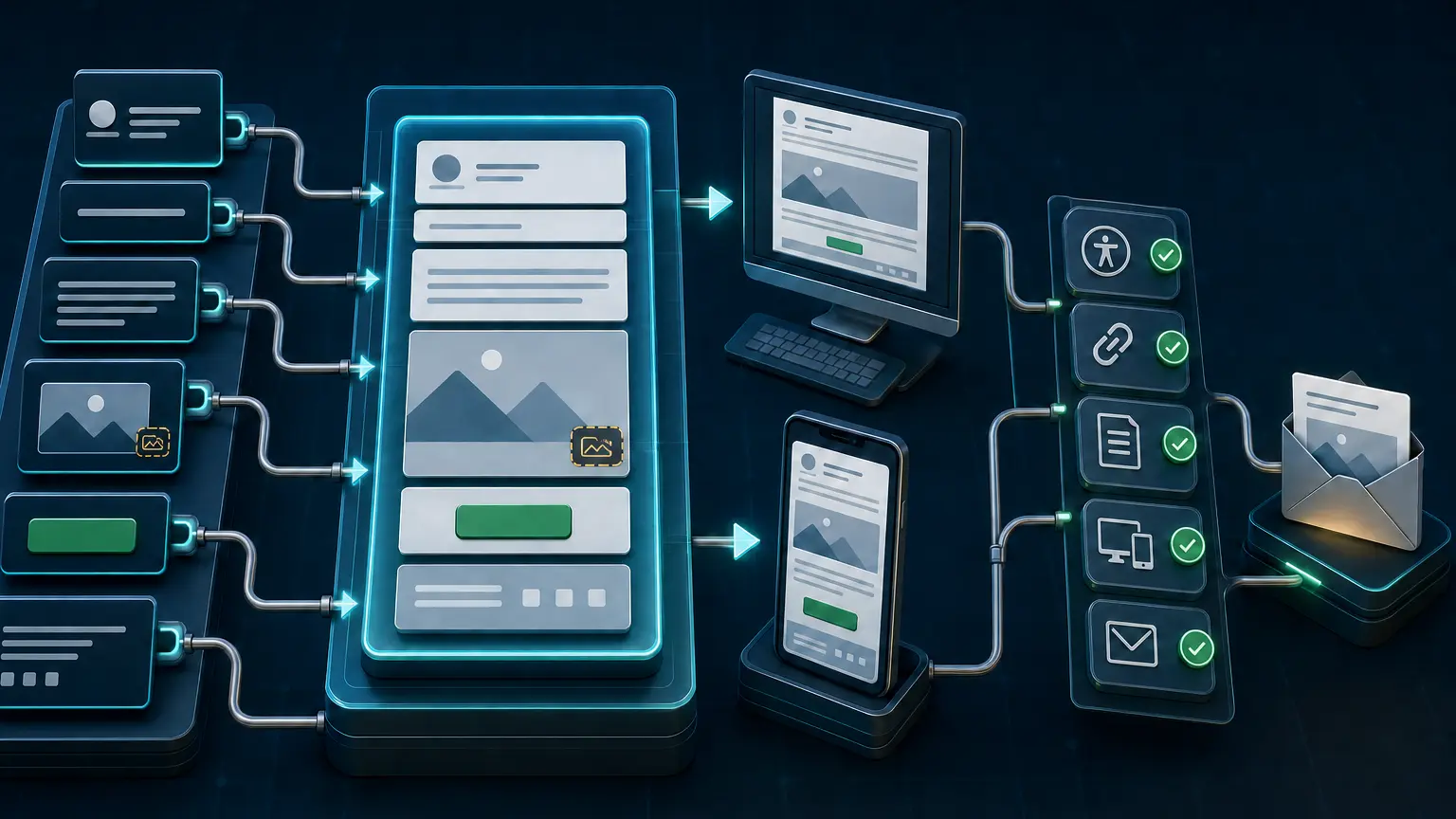
A good email is not a miniature website and it is not a single clever subject line. It is a complete message that identifies the sender, explains its purpose quickly, survives image blocking and narrow screens, gives the recipient an honest next step, and reaches production with its links, MIME structure, authentication, and unsubscribe path intact.
Newsletters, mobile layout, images, footers, and testing all need decisions based on the actual audience, message stream, and client mix. Avoid fixed subject-line lengths, universal send times, image-to-text ratios, and one coding recipe. Validate the message that leaves production rather than relying on a design preview.
Define the job before opening the template
Start with one sentence: “After reading this message, the recipient should understand this and be able to do that.” If the sentence contains several unrelated outcomes, split the work into separate messages or choose one primary action.
| Message type | Primary job | Failure to prevent |
|---|---|---|
| Account or security notice | Explain what changed and what the account holder must do | Hiding the required action under promotional content or ambiguous links |
| Receipt or operational update | Confirm a transaction, state, schedule, or delivery event | Making essential facts dependent on images or a website visit |
| Newsletter | Help a known audience scan and choose relevant material | Presenting every item with the same visual weight and no clear reading path |
| Promotion | Present one honest offer and its conditions | Using urgency, identity, or reply cues that do not match the actual offer |
| Onboarding or lifecycle message | Move the recipient through the next useful product step | Sending generic advice that ignores the account state or previous action |
Record the stream owner, audience, consent basis, trigger, expected frequency, suppression rules, and success event. These are not template details, but they determine whether the message is useful and whether it should be sent at all.
Make the inbox view accurate and recognizable
The inbox usually exposes some combination of display name, From address, subject, preview text, time, and provider-added indicators. Treat those fields as one promise.
- Display name: identify the organization, product, or operating team consistently. Do not stuff urgency, the recipient name, emojis that imitate verification, or subject text into it.
- From address: use a stable, monitored identity appropriate to the stream. A no-reply address may be necessary in a narrow workflow, but it should not hide the real support or response path.
- Reply-To: route genuine replies somewhere owned and tested. Confirm how automated replies and out-of-office messages are handled.
- Subject: state the message value or required action truthfully. Put the distinguishing information early, but do not write to a universal character limit. Clients, screen widths, fonts, and provider interfaces truncate differently.
- Preheader: add useful context rather than repeating the subject. Test the hidden-preheader technique because excessive spacing characters and brittle hiding rules can leak into some views.
Google’s current email sender guidelines explicitly require accurate, non-deceptive sender information, headers, display names, subjects, and links. That is a better standard than a list of supposedly forbidden words. Clear language can be urgent when the situation is genuinely urgent. It should not manufacture a reply, forward, security status, or deadline.
Build a reading path, not a pile of modules
Design the plain content hierarchy before adding decoration. A durable structure is usually simple:
- A recognizable sender and, where useful, a short view-in-browser path.
- One headline that states the reason for the message.
- A short explanation containing the information needed to decide.
- One primary action with descriptive link text.
- Supporting detail, secondary links, or related items.
- A footer containing identity, preference, support, and unsubscribe information appropriate to the stream.
Keep the most important meaning in live text. Do not make the recipient download an image to discover the offer, verification code, event change, price condition, or next step. A web version can help with client defects, but it should not be the only readable version of the message.
There is no universal 60/40 editorial ratio, printed-page length, or left-column formula. A receipt and a weekly digest need different densities. Use analytics and recipient feedback to shorten sections that people skip, not an inherited percentage.
Code for known client behavior
Email HTML runs inside many independent rendering engines, sanitizers, mobile applications, webmail interfaces, and security layers. Support changes over time and differs even between versions of a product. Choose a target client matrix from real audience data and business risk.
- Use a complete document with a declared language, UTF-8 character encoding, a useful title, and a mobile viewport declaration where the sending platform preserves them.
- Use semantic headings, paragraphs, lists, and links for content. Use presentation tables only where the required client support still makes them necessary, and mark layout tables with
role="presentation". - Prefer a simple single-column reading order. Multi-column sections should stack predictably without changing the meaning.
- Give the main container a sensible maximum width while allowing it to shrink to the viewport. The old 600-pixel convention can be a useful starting point, not a protocol limit.
- Use inline styles for critical presentation when the platform or client matrix requires them. A build step can inline CSS while retaining a controlled
<style>block for responsive rules. - Provide fallback colors behind background images, fallback fonts behind web fonts, and a readable state when decorative effects are ignored.
- Use absolute HTTPS URLs for remotely hosted images and destinations. Confirm that redirects, tracking parameters, and signed URLs still work after the sending platform rewrites them.
- Do not depend on JavaScript, Flash, forms, hover, or interaction that disappears when a client strips or ignores it.
Modern CSS support is not all-or-nothing. For example, Gmail documents support for style blocks, common selectors, properties, and media queries, while unsupported rules can still be ignored. Build a strong base state first, then layer responsive or enhanced behavior on top.
Test mailbox-provider webmail and app surfaces separately
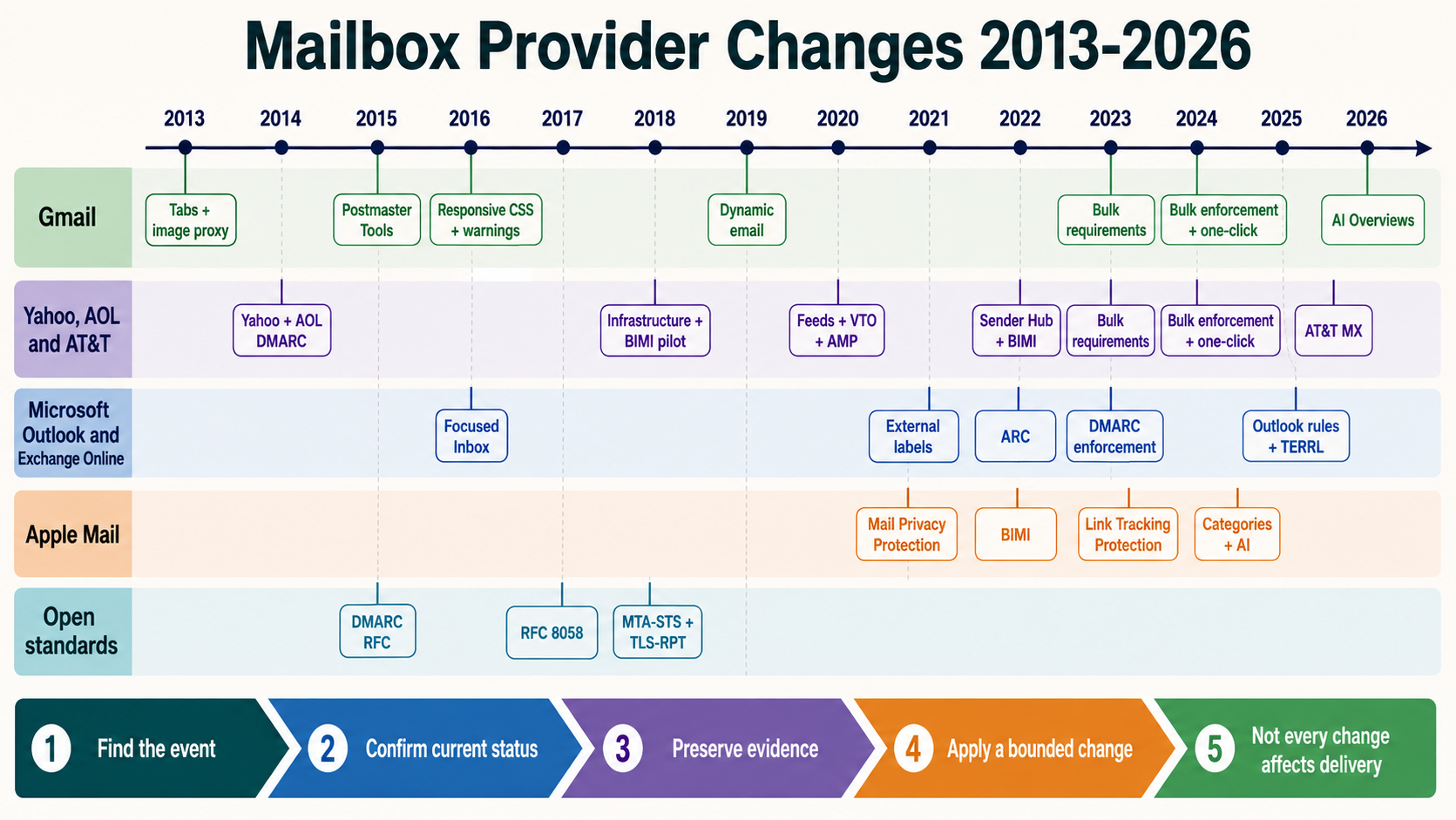
A mailbox provider is not the same thing as a rendering client. A Gmail mailbox can be opened in Gmail on the web, a Gmail mobile app, Apple Mail, Outlook, or another IMAP client. An Outlook application can display Microsoft, Gmail, Yahoo, iCloud, and other accounts. The recipient domain alone therefore cannot tell you which rendering engine, viewport, theme, or security layer will touch the message.
Build the matrix from provider data, client analytics where available, support cases, audience type, and message risk. Record the exact surface instead of writing only “Gmail” or “Outlook.”
| Surface group | Keep as separate test targets | Checks that commonly expose defects |
|---|---|---|
| Gmail | Webmail in supported browsers, Android app, iPhone and iPad app | Sanitized CSS, responsive rules, dark interface, image behavior, long content, clipping, links, and unsubscribe visibility |
| Microsoft mail surfaces | Outlook on the web, new Outlook for Windows, classic Outlook for Windows, Outlook for macOS, iOS, and Android | Layout fallbacks, conditional code used by the tested template, background treatment, scaling, dark interface, and link rewriting |
| Yahoo and AOL | Webmail and supported mobile apps | Responsive layout, image blocking, dark interface, long modules, visible unsubscribe, and tracked destinations |
| Apple Mail | macOS, iPhone, and iPad at the operating-system versions represented by the audience | Automatic appearance changes, text enlargement, privacy behavior, image scale, animation, and narrow-screen stacking |
| Enterprise and third-party clients | Managed desktop clients, mobile work profiles, IMAP clients, secure mail gateways, and accessibility tools | Security banners, URL rewriting, image proxying, content conversion, remote-image policy, large text, and keyboard or screen-reader order |
Microsoft maintains new and classic Outlook as distinct products and supports side-by-side use during transition. A pass in one Outlook surface is not evidence that the other surface renders the message correctly. The same rule applies to a provider’s webmail and its mobile apps.
Mailbox-provider rules, client rendering, and template safety
A mailbox provider (MBP) decides whether a message is accepted, rejected, placed in spam, or shown with provider controls. An email client or app renders the accepted message. They are not the same thing. For example, a Gmail mailbox can be read in Gmail webmail, Gmail for Android, Gmail for iPhone, Apple Mail, Outlook, or another IMAP app. Record both the receiving provider and the exact client in every test.
There is no dependable rule that Android always shows 24 subject characters or Apple always shows 31. The visible text changes with the app, device width, sender length, font, text-size setting, notification style, and inbox layout. Put the useful words first, then test the actual combination. Example: use Payment failed for invoice NW-10482 with preheader Update the card ending 4242 by 12 August to keep service active.
Mailbox-provider requirements
| Destination | Current rule or behavior | What the sender must do | Proof before release |
|---|---|---|---|
| Personal Gmail, every sender | Google requires SPF or DKIM, valid forward and reverse DNS, TLS, RFC 5322 formatting, and low user-reported spam. It warns against misleading subjects, display names, headers, hidden HTML content, and unclear links. | Use an accurate identity such as NitWings Billing <[email protected]>. Authenticate the real stream, use a valid Message-ID, show understandable link text, and keep Gmail Postmaster spam below 0.1% as the operating target and always below 0.3%. | Receive a seed message at a personal Gmail address. Inspect Authentication-Results, the visible From, subject, links, spam placement, and Google Postmaster Tools. Follow Google's sender guidelines. |
| Personal Gmail, more than 5,000 messages a day | Google additionally requires SPF and DKIM, DMARC with at least p=none, DMARC alignment, and one-click unsubscribe for marketing or subscribed mail. Gmail counts mail to personal Gmail addresses by the same primary domain. | DKIM-sign the RFC 8058 unsubscribe headers, include an HTTPS one-click endpoint and a visible body link, and apply suppression within 48 hours. Transactional mail is not subject to Gmail's one-click requirement, but it still needs accurate identity and authentication. | Inspect the received raw headers, submit the one-click POST in staging, confirm suppression before the next audience selection, and check the sender-requirements status in Postmaster Tools. A header alone does not guarantee Gmail will display its top unsubscribe control. |
| Yahoo Mail and AOL Mail | All senders need SPF or DKIM, forward and reverse DNS, RFC 5321/5322 compliance, and spam complaints below 0.3%. Bulk senders need SPF and DKIM, passing aligned DMARC with at least p=none, one-click unsubscribe, and a visible body link. Yahoo does not publish one numeric bulk threshold. | Send only expected mail, keep the subject helpful, honor unsubscribe within two days, enroll the DKIM signing domain in Yahoo's Complaint Feedback Loop, and suppress every complaint. These requirements apply to Yahoo consumer brands including AOL. | Test in Yahoo webmail as Yahoo recommends, inspect authentication, exercise both unsubscribe paths, review SMTP responses, and monitor Sender Hub. Do not promise a whitelist or guaranteed inbox placement. |
| Outlook.com, Hotmail.com, and Live.com consumer mailboxes | Microsoft's high-volume rules apply above 5,000 messages per day to these consumer domains and require SPF, DKIM, and DMARC. Microsoft also expects a valid From or Reply-To address that represents the real sending domain and can receive replies. | Authenticate and align each sending stream, publish a real reply path, include a visible functional unsubscribe link for subscription mail, and separate promotional content from receipts or security notices. | Deliver seeds to the three named consumer domains, inspect raw authentication results and SMTP responses, and follow Microsoft's high-volume sender checklist. Do not use an Exchange Online test as proof of Outlook.com delivery. |
| iCloud Mail | Apple requires bulk mail to use explicit opt-in, immediate unsubscribe, SPF, DKIM, DMARC, reverse DNS, stable sending identities, RFC 5321/5322, and separated marketing and transactional streams. Forwarders need ARC. Apple provides neither a sender allowlist nor a complaint feedback loop. | Never use bought, rented, or appended addresses. Process bounces, remove inactive recipients, never reactivate suppressed addresses, and make the visible From consistently identify the brand. | Inspect an iCloud seed, authentication, SMTP logs, bounce handling, consent evidence, and suppression. Use Apple's iCloud Mail postmaster requirements rather than waiting for an allowlist or complaint feed that does not exist. |
| Company and custom-domain mailboxes | The address suffix does not reveal the complete receiving stack. Microsoft 365, Google Workspace, Proofpoint, Mimecast, Barracuda, or a private gateway can add filtering, banners, link rewriting, image proxying, and attachment policy. | Identify the MX and the real security path for important customer domains. Use dedicated seeds or a consenting contact and preserve the final received source after every gateway modification. | Record recipient domain, MX, gateway, mailbox product, client, SMTP result, folder, added banner, rewritten URL, and screenshot. Do not label a test only as business email passed. |
Exact client and device release matrix
| Surface | Behavior or common failure | Template practice | Required test |
|---|---|---|---|
| Gmail web on desktop | Gmail supports a documented subset of CSS selectors, properties, and media queries; unsupported CSS can be ignored. Long compiled messages can be shortened, and provider unsubscribe UI appears only for eligible traffic. | Inline the critical base style, use a style block only as enhancement, keep the footer early enough to survive the internal size budget, and never hide keyword blocks with HTML or CSS. | Test the largest personalized production message in inbox and spam, images on and off, light and dark interfaces, links after rewriting, footer visibility, and top unsubscribe behavior. Check current Gmail CSS support. |
| Gmail app on Android phone | Narrow screens, notification previews, font scaling, dark presentation, remote-image handling, and sender length alter what is visible. There is no fixed 24-character subject limit. | Use one readable column, front-load the subject, pair it with a useful preheader, use live text for the main promise, and give links generous separated touch areas. | Use the smallest supported phone with increased system text, portrait and landscape, images off, light and dark settings. Capture the notification, inbox row, open message, and scrolled footer. |
| Gmail app on Android tablet | A tablet can use a multi-pane layout and a different content width from the phone app. | Keep the wrapper fluid, use a tested maximum width, and ensure columns stack or remain readable without depending on one media query. | Test portrait, landscape, split view where available, increased text size, and touch navigation. Do not treat the Android phone screenshot as tablet approval. |
| Gmail app on iPhone and iPad | The same Gmail mailbox is rendered by the Gmail iOS/iPadOS app, not Apple Mail. iPad split view and accessibility text can narrow the content. | Use the same mobile-first fallback, visible preheader, resilient live-text action, and responsive images. Keep the subject's identifying words first rather than targeting a character count. | Test iPhone portrait and landscape plus iPad portrait, landscape, and split view. Include light and dark settings, large text, images off, notification, inbox, message, and footer. |
| Outlook on the web | Outlook.com consumer mail and Microsoft 365 work mail can have different provider policies even when the web interfaces look related. Outlook.com can load external images through a proxy. | Use absolute HTTPS image URLs, durable cache-safe assets, visible text for essential facts, and links that remain valid after security rewriting. | Test one Outlook.com consumer seed and one Microsoft 365 tenant seed separately. Inspect proxied images, rewritten links, dark display, image blocking, junk placement, banners, and unsubscribe. |
| New Outlook for Windows | Microsoft documents new Outlook and classic Outlook as distinct products. A result in one is not evidence for the other. | Start with standards-based HTML, fluid tables where needed, explicit fallback colors, and a simple source order. Do not add classic-Outlook-only code unless the target matrix requires it. | Record new Outlook for Windows, account provider, version, theme, image setting, reading-pane width, opened-message view, and result. |
| Classic Outlook for Windows | Complex modern layout, background treatments, spacing, and external images are common failure points. Classic Outlook can block automatic picture downloads. | Use simple presentation tables, explicit cell spacing and fallback colors. If a tested design needs Microsoft conditional markup or VML, isolate it and keep equivalent live text outside the fallback. | Test the oldest and newest supported classic Outlook versions with reading pane narrow and wide, images blocked and loaded, 100% and enlarged display scaling, and every primary link. |
| Outlook for macOS | It is a separate renderer and operating environment from either Windows Outlook product. | Use the standards-based base layout, normal HTML links, responsive images, and dark-safe colors. Do not copy a Windows-only fix into the Mac path without a failing test. | Test the supported macOS and Outlook versions, light and dark settings, reading pane and open window, remote images, large text, and keyboard link order. |
| Outlook app on Android, iPhone, and iPad | Mobile Outlook has different width, touch, preview, dark, and image behavior from desktop Outlook. The connected mailbox provider can still apply its own filtering first. | Front-load sender, subject, and preheader meaning; use a single-column base; keep tap targets separated; and make the action understandable without its image. | Test each supported operating system and form factor, not one mobile screenshot. Record the mailbox provider, notification, inbox preview, orientation, text scaling, images off, dark setting, and footer. |
| Yahoo Mail and AOL Mail web | Webmail columns and reading panes change the available width. There is no guaranteed 640-pixel Yahoo or 660-pixel AOL content area. Yahoo's provider-level unsubscribe control also depends on valid setup and sender standing. | Use a fluid outer wrapper with a chosen maximum, live text, clear links, and both header-based and visible unsubscribe for subscription mail. | Test clean-cache web sessions at narrow and wide browser widths, images on and off, light and dark settings, spam placement, raw authentication, and the provider unsubscribe control. |
| Yahoo Mail and AOL Mail mobile apps | Mobile previews, narrow widths, touch interaction, dark display, and image behavior differ from webmail. | Use a mobile-first single column, useful preheader, responsive images, separated links, and visible identity and unsubscribe text. | Test the app actually used by the audience on Android and iOS. Capture notification, inbox row, opened message, images off, dark setting, rotated view, large text, and footer. |
| Apple Mail on macOS | Apple Mail can protect Mail activity and prevent a sender from knowing whether the recipient opened the message. Remote content settings also affect images. | Keep important content in live text, use meaningful alt text, make dark backgrounds and logos intentional, and never use an open pixel as proof that a person read the message. | Test light and dark settings, Protect Mail Activity where applicable, remote content restricted and loaded, message list preview, open message, keyboard order, and links. |
| Apple Mail on iPhone and iPad | Dynamic text, notification layout, orientation, iPad split view, privacy settings, and sender length change the presentation. There is no dependable 31-character Apple subject limit. | Lead with the subject's useful words, add a complementary preheader, use a fluid one-column base, responsive images, and comfortably sized touch targets. | Test iPhone and iPad separately with large text, portrait, landscape, iPad split view, light and dark settings, Mail Privacy Protection, images restricted, notification, inbox, message, and footer. |
| Android OEM and third-party mail apps | Samsung Email and other clients can render the same Gmail, Yahoo, Outlook, or IMAP mailbox differently from the provider's own app. | Depend only on the simple base state for critical information. Treat media queries, web fonts, advanced positioning, background images, and interaction as enhancements. | Test only the apps supported by audience data or contract. Record the exact app, version, Android version, device, mailbox provider, text scale, theme, image setting, and result. |
Spam-risk signals and misleading template myths
| Risk | Do not do this | Safer practice and evidence |
|---|---|---|
| Permission and expectation | Do not buy, rent, append, scrape, or silently pre-check consent. Do not send a different program from the one the person requested. | Store source, form, disclosure version, time, address, and confirmation evidence. Send the promised message type and frequency. Permission prevents complaints more reliably than copy tricks. |
| Authentication and identity | Do not send with missing SPF, DKIM, DMARC alignment, reverse DNS, TLS, or a misleading From or Reply-To identity. | Inspect a received message at every major provider. Require the expected aligned authentication results and keep each stream's identity stable. |
| Subject and display name | Do not add fake Re: or Fwd:, fake verification symbols, a recipient's name in the display name, false urgency, or a subject that hides the real purpose. | Identify the sender in the display name and the job in the subject. Example: NitWings Security and New sign-in to your account. Gmail and Yahoo explicitly warn against deceptive identity and subject practices. |
| Hidden content | Do not put white-on-white keywords, off-screen keyword blocks, invisible unrelated copy, or CSS-hidden content into the message to influence filters. | Hide only a purposeful preheader or client fallback, keep it short and related, and inspect the final DOM and text extraction. Google warns that hiding content can cause spam classification. |
| Links and domains | Do not disguise the destination, use confusing anchor text, send through unapproved shorteners, mix unrelated tracking domains, or retain a domain reported as unsafe. | Use understandable text such as Review invoice NW-10482, branded HTTPS domains, short tested redirects, and safe destinations. Click every received link after provider or gateway rewriting. |
| Complaints | Do not keep sending to a person after a spam complaint or dismiss a rate near 0.3% as acceptable performance. | Suppress complaint feedback immediately. For Gmail, operate below 0.1% and avoid ever reaching 0.3%; for Yahoo, remain below 0.3%. Review campaign, source, and segment, not only the template. |
| Unsubscribe | Do not hide the body link, require a login, make the person answer a survey, leave the RFC 8058 endpoint broken, or allow another campaign after suppression. | Use a visible body link plus correctly signed one-click headers where required. Test the POST, preference path, database write, export, and next audience query. |
| Mixed message purpose | Do not place promotions inside receipts, password resets, alerts, or other transactional streams to borrow their stronger engagement. | Separate transactional and marketing identities, content, lists, cadence, and where practical sending infrastructure. Google specifically advises against mixing promotions into receipts. |
| Volume and change | Do not start with a sudden blast, double volume without history, send in bursts, or replace every header and template at once. | Increase engaged traffic gradually, send at a consistent rate, segment material changes, and monitor SMTP deferrals, bounces, complaints, and provider reputation before expanding. |
| Stale and failing addresses | Do not retry permanent failures indefinitely, reactivate suppressed recipients, or keep inactive addresses only to preserve list size. | Classify SMTP responses, suppress hard failures and complaints, use a documented inactivity policy, and preserve the evidence that caused each status change. |
| Affiliates and phishing simulations | Do not let affiliates send uncontrolled mail using your brand. Do not run phishing simulations from production sending domains. | Approve and monitor every sender and linked domain. Isolate authorized security testing. Google warns that affiliate abuse and phishing exercises can damage the associated domain's reputation. |
| Words, punctuation, and image ratio | Do not treat one word such as free, one exclamation mark, a fixed subject length, or a universal image-to-text ratio as a provider rule. | Providers evaluate a wider combination of identity, authentication, reputation, recipient feedback, sending behavior, links, message structure, and content. Make the claim accurate and useful, then test placement and user response with the same audience. |
Production HTML email template rules
There is no single HTML-email rendering standard implemented identically by every client. The globally useful baseline is valid email structure, simple progressively enhanced HTML, accessible content, and testing on the actual support matrix.
| Template area | Use this baseline | Do not do this | Example or release check |
|---|---|---|---|
| MIME and document | Send multipart/alternative with equivalent plain-text and HTML parts. Use one valid From, Date, Message-ID, and Subject, plus a declared character set and language. | Do not send only a fragment that depends on a browser, duplicate single-instance headers, or let the text part contradict the HTML. | Read both received MIME parts and inspect the raw headers. The plain-text part must contain the same identity, action, conditions, and unsubscribe meaning. |
| Reading order | Use a logical source order with real headings, paragraphs, lists, and descriptive links. | Do not use visual position, color, or an image to supply information that is absent from the reading order. | Read the message as plain text and with a screen reader. It should still say who sent it, why, what happened, and what action is available. |
| Layout | Use a fluid width="100%" wrapper and a tested maximum width. Use simple tables only where client compatibility requires them and mark layout tables role="presentation". | Do not publish a fixed desktop canvas, deeply nested table maze, or claim that one provider guarantees a specific pixel width. | A common template may choose max-width:640px, but it must remain readable at 320 CSS pixels, enlarged text, and wide reading panes. |
| CSS | Inline the critical visual base. Add supported style-block CSS and media queries as progressive enhancement, with a usable fallback when ignored. | Do not depend on JavaScript, Flash, external stylesheets, advanced positioning, CSS-only content, or one client-specific hack for the primary message. | Temporarily remove the style block. The sender, headline, body, action, conditions, identity, and unsubscribe must remain readable. |
| Images | Use absolute HTTPS URLs, explicit dimensions where useful, responsive sizing, meaningful alt text for informative images, and empty alt="" for decoration. | Do not make the entire email one image, put required text only in a background, use filename alt text, or depend on a tracking pixel for proof of reading. | Disable images. The offer, amount, deadline, button purpose, identity, and unsubscribe must still be understood. |
| Backgrounds and dark display | Supply readable HTML background and text colors before optional background imagery. Give transparent logos an intentional light and dark treatment. | Do not communicate status by color alone or assume every client honors dark-mode metadata and color overrides. | Test light, dark, forced image blocking, and high-contrast or increased-text settings on every priority surface. |
| Typography | Use live text, a fallback font stack such as Arial, Helvetica, sans-serif, comfortable line height, and a body size that remains readable when enlarged. | Do not depend on a web font, lock text inside images, use tiny legal copy, or prevent operating-system text scaling. | Start around 16 CSS pixels for body copy, then verify the actual design at 200% text scaling without overlap, clipping, or missing controls. |
| Links and buttons | Build actions as HTTPS anchor links with descriptive text and sufficient padding and separation. Keep the visible wording consistent with the destination. | Do not use Click here for every link, an image-only button, a JavaScript action, or a misleading destination. | Review invoice NW-10482 is clearer than Click here. About 44 by 44 CSS pixels is a practical touch target, not an MBP rule. |
| Accessibility | Apply the relevant WCAG 2.2 principles: meaningful sequence, text alternatives, sufficient contrast, visible link purpose, reflow, text resize, and no color-only meaning. | Do not call a template accessible because it passed only an automated checker. | Combine automated checks with keyboard, screen-reader, image-off, contrast, zoom, and real-device review. Confirm decorative images are ignored and informative images have useful alternatives. |
| Forms and rich interaction | Link to an accessible authenticated HTTPS page for payment, profile edits, surveys, or other state-changing work. | Do not make an embedded form, iframe, video player, hover interaction, or animation the only way to complete the task. | If the enhancement disappears, the recipient must still have a normal link and know what will happen after selecting it. |
| Footer and unsubscribe | Keep the sender's legal identity, physical address where applicable, preferences, unsubscribe, and support path visible as live text. | Do not hide controls in an image, low-contrast tiny text, an inaccessible preference page, or content likely to fall after clipping. | Test the body link and RFC 8058 one-click path separately. RFC 8058 requires the HTTPS URI and List-Unsubscribe headers to be covered by valid DKIM. |
| Compiled size and personalization | Measure the final message after personalization, conditional modules, tracking, CSS inlining, and link rewriting. Set an internal size budget based on tested clients. | Do not measure only the source template, rely on a folklore clipping number, or allow missing data to produce blank headings and broken URLs. | Render the longest names, largest order, optional modules on and off, and every locale. Confirm the footer remains visible in Gmail web and mobile. |
| Release evidence | Test a real message sent through production authentication and tracking to provider-specific seeds and the exact priority apps. | Do not approve from a browser preview, an ESP screenshot alone, or a note that says only Gmail passed or Outlook passed. | Save provider, client, operating system, version, device or viewport, theme, image setting, folder, raw source, screenshot, link result, date, and tester. |
Keep release HTML clean without breaking fallbacks
Development comments are shipped with the message unless the build removes them. They add bytes and can expose ticket numbers, internal URLs, unfinished copy, customer data, template instructions, or disabled modules. Remove comments that exist only for authors, debugging, or old experiments before release.
- Delete dead modules, abandoned style rules, debugging attributes, editor metadata, and comments such as
<!-- replace after approval -->. - Never put secrets, recipient data, unpublished offers, internal hostnames, or operational instructions in HTML comments.
- Do not hide recipient-facing copy in comments. A sanitizer, template compiler, forward, reply, or content transformation may remove or expose it unpredictably.
- Preserve comments that are a functional part of a tested fallback. Some templates deliberately use conditional comment blocks for selected Outlook targets. Mark those blocks in source control and protect them from a blanket comment-removal step.
- Minify only after rendering and accessibility tests. An aggressive minifier can alter conditional structures, whitespace-sensitive preheaders, table markup, or templating delimiters.
Keep a readable source template for maintenance and produce a clean release artifact through a controlled build. Compare the compiled HTML with the HTML part in the received message so that inlining, personalization, tracking, and transport processing cannot make an unnoticed structural change.
Make narrow screens the default design constraint
A responsive email should remain understandable without pinching, horizontal scrolling, or hunting for the main action. It does not need to look identical everywhere.
- Use fluid containers and images with a safe maximum width.
- Keep body text comfortably readable without client-side zoom or auto-enlargement.
- Give linked text and buttons generous touch space and enough separation to prevent accidental activation.
- Stack columns in a logical order. If the visual desktop order differs from the source order, test what a small screen and screen reader receive.
- Avoid essential content in a wide table. When tabular data is genuinely necessary, reduce columns, use concise labels, or link to an accessible full view.
- Check long names, translated copy, unbroken URLs, large dynamic values, and an empty optional field. Real data breaks layouts that sample copy does not.
Do not assume “mobile” means one viewport or one client. Test the actual provider apps and third-party mail apps represented in the audience at narrow and wide widths, with increased text size, device rotation, and both light and dark interface settings. Open the message from a notification or inbox list as well as directly inside the app so the subject, preheader, first screen, and return path are reviewed together.
Use white space to make the message scannable
White space is part of the reading system. It separates ideas, makes the primary action easier to find, and prevents a mobile screen from becoming one uninterrupted block. It is not empty decoration and it should not depend on a stack of blank paragraphs.
- Use a small, consistent spacing scale for the outer container, modules, headings, paragraphs, lists, images, and actions.
- Give a new section more separation than two paragraphs inside the same section. The spacing should reveal the hierarchy before the words are read.
- Use line height for readable text and padding on tested container cells for structural space. Repeated
<br>elements, empty text blocks, and long runs of non-breaking spaces are difficult to maintain and can behave differently across clients. - Leave enough space around linked elements to distinguish their clickable areas, especially when two actions stack on a narrow screen.
- Do not use enormous empty regions to force content below the fold or manipulate the preview. Excessive spacer markup increases size and can contribute to clipping.
- Test spacing with images blocked, long translated text, large accessibility text, missing optional modules, and dark interface adjustments. A layout that feels balanced with sample content can collapse or become wasteful with real data.
Whitespace in the source file is not the same as visible space in the rendered message. Let the template system control presentation deliberately, then inspect the result across the client matrix.
Use images as support, not as the message
Images can establish context, show a product, explain a process, or create visual rhythm. They should not carry every word. An image-to-text ratio is not a universal spam-filter threshold, and adding filler text to satisfy a ratio does not repair poor consent, complaints, reputation, identity, or content.
- Compress images to the dimensions they need and avoid downloading a large source only to display it small.
- Set explicit width and height attributes where supported so the surrounding layout remains stable.
- Write alternative text that conveys the image purpose. Use an empty
alt=""for a purely decorative image so assistive technology can skip it. - Do not repeat a paragraph inside an image and its alternative text. Put the paragraph in live HTML.
- Choose JPEG, PNG, GIF, WebP, or another format only after checking the actual client matrix. A format supported on the website is not automatically safe for every mailbox.
- Use animation sparingly. The first frame must communicate the essential state, and the message must still work when motion is blocked or reduced.
Test with remote images enabled, blocked, delayed, and replaced by alternative text. The From identity, headline, offer or event detail, main action, and unsubscribe path should remain understandable.
Treat accessibility as part of rendering quality
The WCAG 2.2 principles and success criteria provide a useful baseline even though email clients do not expose every web feature consistently.
- Declare the message language and keep the source order aligned with the reading order.
- Use headings to describe sections rather than styling ordinary paragraphs to look like headings.
- Provide meaningful alternative text for informative images and empty alternative text for decoration.
- Maintain at least 4.5:1 contrast for normal text and 3:1 for large text. Check the actual foreground and background pair, including fallback colors.
- Do not rely on color alone to communicate error, urgency, availability, or status.
- Use descriptive links such as “Review the migration plan” instead of a page full of “Click here” links.
- Keep text resizable, avoid text baked into images, and test increased text spacing where the client permits it.
- Avoid flashing content and respect reduced-motion behavior when using animation or transitions.
Run automated checks, then read the message with images off and with a screen reader. Automation can find missing attributes and contrast failures. It cannot decide whether the alternative text, heading order, or link purpose makes sense.
Make the primary action clear and safe
A button is still a link. Its visible label should describe what happens next, and its destination should match that label. Avoid link shorteners and unrelated tracking domains that make the path difficult to understand.
Use one visually primary action. Secondary actions can remain normal text links or quieter buttons. Repeat the primary action only when the message is long enough that returning to the first one is unreasonable.
For sensitive actions, do not place reusable credentials or unrestricted personal data in the URL. Use short-lived, single-purpose tokens, protect the landing page, and define what happens when the link expires or is opened by a security scanner before the recipient clicks it.
| Link type | Release checks |
|---|---|
| Primary action | Visible label matches the final HTTPS destination, the landing state works without hidden context, and an expired or already-used token returns a useful result. |
| Inline editorial link | The linked words describe the destination, the sentence still makes sense in plain text, and repeated generic labels do not make navigation ambiguous. |
| Linked image | The image has useful alternative text, the clickable area is intentional, and the same destination is available in live text when the image is blocked. |
| Tracked or redirected link | Every redirect uses the expected domain, parameters remain correctly encoded, the chain ends at the approved page, and no open redirect is introduced. |
| Application or deep link | A safe web fallback exists when the app is absent, the operating system asks for confirmation where appropriate, and the destination does not expose credentials. |
| View online, preference, and unsubscribe links | The hosted copy matches the intended message, recipient identification is protected, preferences persist, and unsubscribe reaches every downstream audience system. |
mailto: and tel: | The visible address or number is understandable without activation and the action is tested on desktop and mobile clients represented in the matrix. |
Run an automated link inventory on the compiled message, then manually test the high-risk destinations from a received copy. Link scanners cannot confirm that a page shows the correct account, offer, locale, confirmation state, or recovery path.
Design the footer around identity and control
The footer is operational content, not a place to hide obligations. Include the sender identity and contact information required for the message type and recipient jurisdiction. Give recipients a visible, working way to stop marketing mail or change preferences.
Requirements differ. The US Federal Trade Commission’s CAN-SPAM compliance guide covers accurate headers, non-deceptive subjects, postal-address disclosure, opt-out handling, and responsibility for vendors. Canada’s regulator describes consent, identification, and unsubscribe requirements under CASL. Obtain legal guidance for the jurisdictions, audience, and message purpose involved rather than copying one global footer.
Mailbox-provider requirements also matter. Gmail requires one-click unsubscribe plus a visible body link for relevant bulk marketing and subscribed messages. Yahoo’s sender requirements and recommendations also require easy unsubscribe for bulk promotional mail. The header-based mechanism defined by RFC 8058 uses an authenticated HTTPS POST; it does not replace the visible unsubscribe link in the message.
Test the entire route: click, preference page, confirmation state, suppression write, downstream synchronization, and a later campaign selection. A perfect footer is useless when the next send ignores the suppression.
Send a complete message, not only HTML
Build a useful plain-text alternative and send it with the HTML as multipart/alternative. RFC 2046 defines the alternatives as different representations of the same content. The plain-text part should preserve the meaning, actions, full destinations where useful, identity, and unsubscribe path. A broken automatic strip of the HTML is not a quality fallback.
The final message should also have correct From, To, Date, Subject, Message-ID, MIME-Version, Content-Type, and transfer encoding. Add list and unsubscribe headers where appropriate. Validate that the sending platform has not duplicated singleton headers, damaged line endings, changed the character set, or signed one version and transmitted another.
HTML quality does not replace sender controls. Authenticate the production stream with SPF and DKIM, align the visible From domain through DMARC, use TLS, maintain forward and reverse DNS where required, and separate promotional and transactional behavior deliberately. The practical structure of headers and MIME is covered in E-mail Format and Structure; authentication diagnosis is covered in How to Fix SPF, DKIM, and DMARC.
Control message size and prevent clipping
“Email size” can describe several different measurements. Track them separately because each produces a different failure.
| Measurement | What it includes | Primary risk |
|---|---|---|
| HTML part | Compiled markup after CSS inlining, comments, personalization, repeated modules, tracking rewrites, and dynamic content | A client clips or shortens the displayed body, potentially hiding later content, the footer, or the visible unsubscribe link |
| Total MIME message | Headers, plain text, HTML, boundaries, transfer encoding, embedded assets, and attachments | A sending or receiving system rejects the message at a configured size limit |
| Remote asset payload | Images, fonts, and other resources fetched after open | Slow display, unnecessary mobile data use, layout movement, or abandoned reading |
These numbers are not interchangeable. Compressing a remotely hosted hero image reduces download weight but usually does not reduce the HTML part. Embedding that image as base64 or a MIME part changes the message itself and can increase transfer size substantially.
Gmail is widely observed to clip sufficiently large message bodies, but Google does not publish the frequently repeated 102 KB figure as a stable contractual threshold. Do not design to sit one byte below a folklore limit. Establish a conservative internal HTML budget from current received-message tests and leave room for the longest personalization, tracking parameters, translated copy, conditional fallbacks, and platform-added markup.
- Measure the source template, compiled HTML, encoded HTML part, and complete received MIME message in the release report.
- Use the largest realistic data case, not a short test recipient. Long names, product rows, recommendations, legal text, and dynamic modules can change the final size.
- Remove dead CSS, editor markup, duplicate declarations, development comments, unused modules, and unnecessary tracking parameters before release.
- Do not remove meaningful text, alternative text, accessibility structure, identity, or unsubscribe information merely to meet a size target.
- Place the primary purpose and action early, but never treat that as permission for a clipped footer. The complete message must remain available and compliant in every supported surface.
- Send through the production pipeline to controlled Gmail and other target accounts, then look for clipping in webmail and mobile apps. Confirm that the visible unsubscribe path and tracking behavior still work.
A “View entire message” link is a recovery mechanism, not a successful rendering outcome. Clipping adds friction, can hide the preference or unsubscribe footer, and can distort measurements when a tracking element or important link falls outside the initially displayed body.
Test the message that leaves production
A template preview proves only that the editor can render its own markup. Send through the real production path to controlled accounts, capture the delivered source, and compare it with the release candidate.
| Layer | What to verify | Evidence to keep |
|---|---|---|
| Content | Names, dates, prices, conditions, dynamic blocks, fallback copy, translations | Approved content version and representative personalization cases |
| Links | Destinations, redirects, parameters, expiry, login state, unsubscribe and preference actions | Link-check result plus manual checks of sensitive flows |
| Rendering | Target desktop, mobile, webmail, dark mode, image blocking, large text, long data | Named client and version matrix with screenshots or render captures |
| Accessibility | Language, order, headings, alternative text, contrast, link purpose, motion | Automated report and manual reading notes |
| Message structure | Plain text, HTML, MIME boundaries, encoding, singleton headers, list headers | Raw sent message and received source |
| Identity and transport | SPF, DKIM, DMARC alignment, TLS, Message-ID, From and Reply-To | Trusted Authentication-Results and SMTP delivery evidence |
| Operations | Audience query, exclusions, suppression state, schedule, rate controls, rollback owner | Campaign approval and release record |
Seed accounts can reveal obvious placement and rendering failures, but they do not predict every recipient outcome. Test the content and rendering path before launch, then monitor real SMTP responses, complaints, unsubscribes, replies, conversions, and provider-specific behavior after release.
Measure the job, not a fashionable benchmark
Choose metrics from the message purpose. A security notice may need successful delivery and completed account action. A newsletter may need qualified clicks, reading depth on the destination, replies, or retained subscriptions. A receipt may need low failure and low support contact. Record negative outcomes such as complaints, unsubscribes, bounces, and repeated retries alongside positive actions.
Open tracking is incomplete. Apple states that Mail Privacy Protection prevents senders from seeing whether a protected message was opened, and other proxying or image-blocking behavior also changes the signal. Use opens directionally, not as proof that one person read one message.
There is no universal best subject length, send day, or send hour. Test a hypothesis against an appropriate audience with one meaningful variable at a time. Keep the control, sample size, sending conditions, and success event visible. A statistically interesting lift is not useful if it also raises complaints or harms the longer-term relationship.
Production release checklist
- Confirm the message purpose, stream, owner, audience, trigger, consent basis, and suppression rules.
- Verify that display name, From, Reply-To, subject, and preheader form one accurate promise.
- Keep the essential meaning and primary action in live text.
- Use a simple source order that works on narrow screens and with assistive technology.
- Test the provider, webmail or app, operating system, version, theme, viewport, and image setting as separate matrix fields.
- Use a consistent whitespace system that survives long content, missing modules, large text, and image blocking.
- Provide fallbacks for images, background treatments, fonts, columns, and enhanced CSS.
- Remove development comments, dead modules, editor metadata, and unused CSS while preserving tested functional conditional blocks.
- Check alternative text, headings, link purpose, contrast, text resizing, and motion.
- Validate every destination, redirect, token, preference page, and unsubscribe write.
- Send useful plain text and HTML in a correct MIME structure.
- Measure worst-case compiled HTML, encoded parts, total MIME size, and remote asset weight, then verify clipping behavior in received messages.
- Inspect the delivered source for From identity, Message-ID, encoding, list headers, SPF, DKIM, DMARC alignment, and TLS evidence.
- Render with representative data across the client matrix, including image blocking, dark interfaces, and long content.
- Approve the exact audience query, exclusions, schedule, rate, monitoring owner, and stop condition.
- Archive the content version, raw message, test evidence, and release decision so an operator can reproduce what was sent.
An awesome email is not the one that looked best in the editor. It is the one the right recipient can recognize, understand, act on, decline, and trust across the real delivery path. Build that behavior into the message, then prove it before the full audience receives it.