Seed List Testing: Measure Email Placement Without Misreading It
Seed testing answers a narrow but valuable question: where did this exact test message land in a controlled set of mailboxes at this time? It does not measure the placement of an entire recipient population. Real users have different histories, contacts, preferences and behavior, so seed evidence belongs beside SMTP logs and provider telemetry, not above them.
What a seed test can and cannot measure
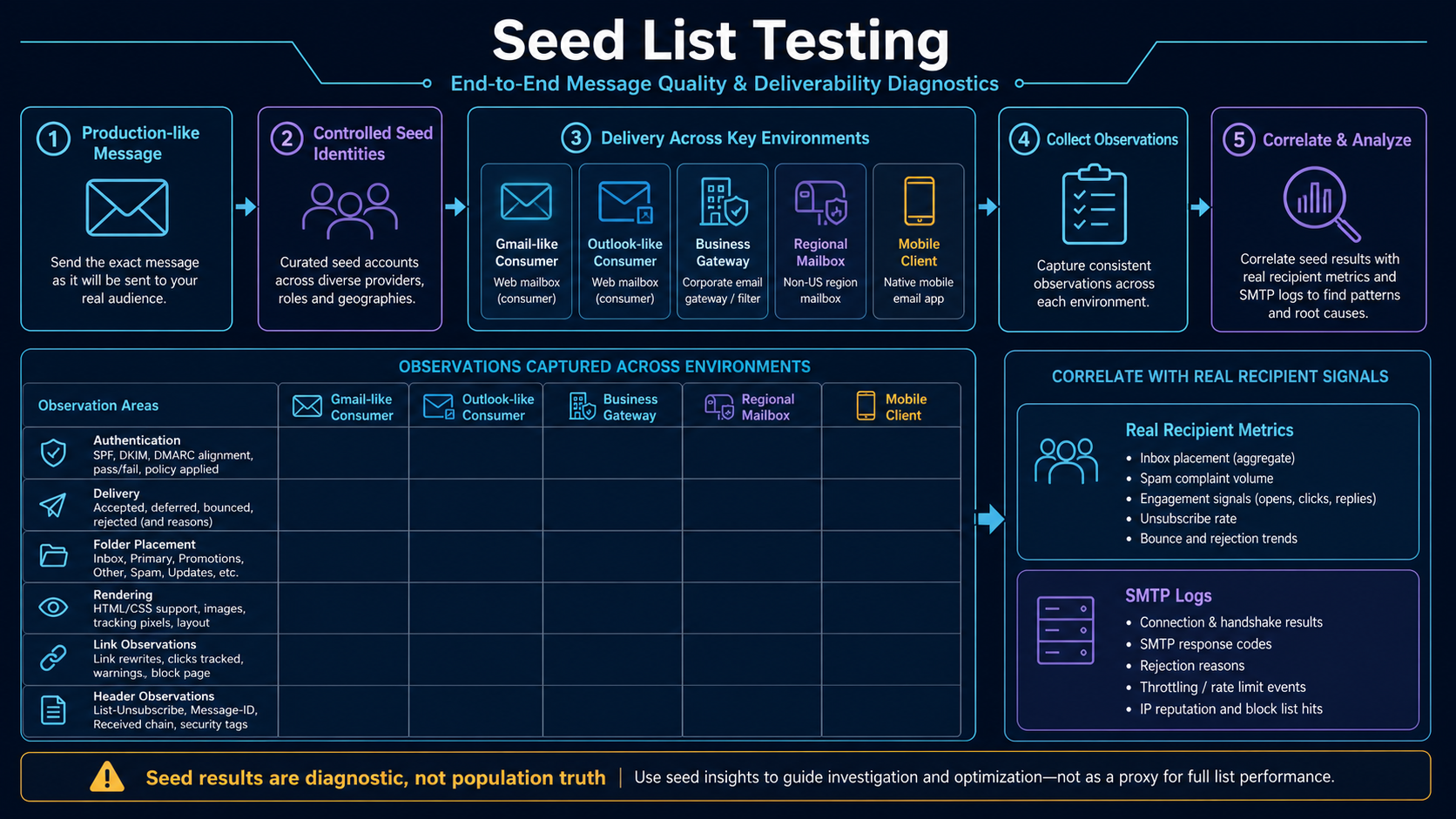
A seed list is a maintained set of test identities across representative mailbox providers, business gateways, regions and client types. Operators send a production-like message through the real sending path, then record acceptance, folder placement, authentication, headers, rendering, links and security warnings. The identities must be stable enough to produce comparable observations and protected from ordinary employee use.
The test design should match the decision. A pre-send QA run may emphasize rendering and links. An incident test may emphasize SMTP acceptance, folder placement, headers and provider differences. A recurring monitor may use fixed message fixtures and consistent timing. In every case, label the result as a controlled sample.
How seed-account behavior creates false certainty
Seeds can mislead when their accounts have no natural engagement history or when testers repeatedly rescue messages from junk, open every send or add the sender to contacts. Those actions train the mailbox in ways that do not represent customers. New accounts can also behave differently from aged accounts, and one seed per provider cannot represent millions of personalized recipient decisions.
Seed testing remains useful because it exposes reproducible failures: broken authentication, a block page, a missing plain-text part, one provider-wide junk result, a link rewrite problem or a rendering regression. Its strength is controlled diagnosis, not an “inbox rate” presented without sampling context.
Build and operate a controlled seed-test program
- Define the test question. State whether the run evaluates release QA, a provider incident, rendering, authentication or a recurring baseline.
- Design the matrix. Choose consumer, business, regional, mobile and gateway environments that reflect audience and rendering-engine risk.
- Govern seed identities. Use documented accounts, recovery controls, access roles and behavior rules. Keep normal personal mail out of the test inboxes.
- Send the production artifact. Use the same authenticated domains, IP stream, headers, personalization engine, link rewriting and content compilation as the intended campaign.
- Capture consistently. Record send and receipt time, folder, headers, Authentication-Results, ARC where present, warning banners, rendering, links and unsubscribe behavior.
- Avoid contaminating behavior. Do not repeatedly mark messages safe, move folders, add contacts or click indiscriminately unless that action is the explicit experiment.
- Correlate external evidence. Compare seeds with SMTP replies, complaints, provider dashboards, real-recipient actions and campaign changes.
- Retain test provenance. Store seed ID, environment, account age, behavior history, message checksum, result, observer and screenshot or raw-header evidence.
Interpret seed observations within their limits
| Observation | What it supports | What it does not prove |
|---|---|---|
| All seeds are accepted | The controlled addresses reached their mail systems | All production recipients were delivered |
| Several seeds at one provider go to junk | A provider-specific pattern worth investigation | The whole provider population has the same placement |
| Authentication fails in raw headers | A reproducible identity or configuration defect | That authentication alone caused every placement result |
| One seed shows a rendering defect | That client combination needs repair | Other clients share the same engine or failure |
| Seed results improve after a fix | Controlled evidence supports recovery | Business outcomes and population placement are fully recovered |
Worked provider-specific placement investigation
A campaign’s delivered count remains high while clicks fall sharply at one mailbox provider. Two stable seeds at that provider begin landing in junk, while other environments remain in the inbox. Headers show authentication still passes. SMTP logs reveal no rejection spike, but provider telemetry shows a reputation change.
The team uses the seeds to confirm a provider-specific placement symptom, then investigates the audience and recent volume change rather than rewriting HTML blindly. After pausing a disengaged cohort and stabilizing volume, later seed runs and real-recipient signals improve. The report describes the seed sample explicitly and does not convert two mailboxes into a universal placement percentage.
Seed, message and observation evidence to retain
- Seed inventory: provider, account type, region, client, age, behavior rules, owner and access review.
- Message identity: campaign, message ID, checksum, From and DKIM domains, sending IP, template and send time.
- Transport: SMTP result, receipt time, delay, Received chain, Authentication-Results and security gateway action.
- Placement and rendering: folder, tab, warning, image state, dark mode, layout, links, unsubscribe and plain text.
- Correlation: provider telemetry, SMTP population, complaints, clicks, replies, conversions and changes deployed near the test.
Seed-test design and reporting mistakes
- Reporting seeds as population truth: the sample is controlled and usually very small.
- Training the accounts accidentally: repeated opens, moves and contact additions change future results.
- Testing a preview: editor output can differ from the production MIME and link-rewritten message.
- Using unstable accounts: recycled or shared test identities make comparisons difficult to explain.
- Ignoring business gateways: corporate filtering and quarantine paths differ from consumer mailbox placement.
Seed-list testing checklist
- Define the decision and limits of each seed run.
- Represent important providers, gateways, regions and clients.
- Govern account access and interaction behavior.
- Send the exact production-like compiled message.
- Capture raw headers, folder, delay, rendering and link outcomes.
- Keep screenshots tied to seed, message and time.
- Correlate with provider, SMTP and real-recipient evidence.
- Report results as controlled observations, never universal inbox truth.
Build the seed matrix around receiving environments
| Environment | What to observe | Why it belongs |
|---|---|---|
| Major consumer mailbox | Inbox/category/junk, headers and warnings | Represents important audience provider paths |
| Business mailbox | Mailbox placement plus tenant policy | Behavior can differ from consumer service |
| Enterprise security gateway | Quarantine, URL rewriting and banners | Filtering can occur before the user mailbox |
| Regional provider | Acceptance, latency and folder | Global averages can hide local problems |
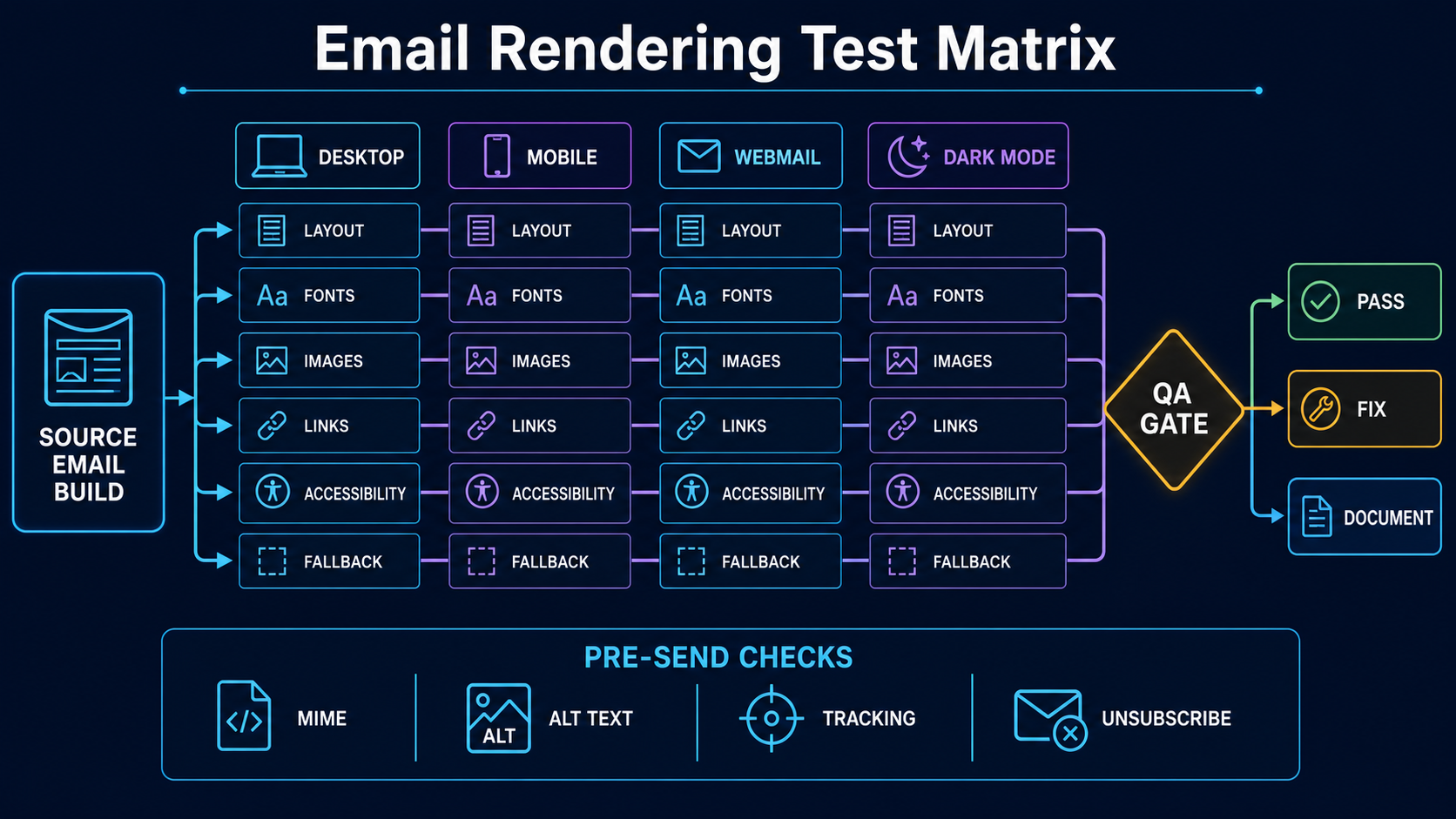
| Mobile and desktop clients | Rendering, dark mode, links and unsubscribe | Placement alone does not verify usability |
Document provider, account type, region, client, account age and behavior policy. One account in an environment is an observation, not a representative sample of its entire recipient population.
Create a repeatable seed-test manifest
test_id: seed-20260829-01
purpose: provider placement incident
compiled_message_sha256: ...
from_domain: mail.example.com
dkim_domain: mail.example.com
return_path_domain: bounce.example.com
sending_ip: 192.0.2.45
send_window_utc: 2026-08-29T10:00:00Z/10:05:00Z
seed_matrix_version: 7
interaction_policy: observe-only
owner: deliverability-operations
The checksum ties observations to the exact MIME artifact. If the ESP rewrites links or compiles personalization after the saved template, capture the final received message and its identifiers too.
Capture more than the folder label
| Evidence | Fields |
|---|---|
| Transport | Send time, receipt time, delay, Message-ID and Received chain |
| Authentication | Authentication-Results, SPF identity, DKIM domains/selectors, DMARC alignment and ARC |
| Placement | Inbox, category, junk, quarantine, missing or delayed |
| Mailbox UI | Warning banners, sender identity, unsubscribe controls and clipping |
| Rendering | Client, viewport, image state, dark mode and primary action |
| Links | Visible destination, rewritten destination, response and security interstitial |
Save raw headers and screenshots under access control. A screenshot without seed ID, message ID, time and client version cannot support later comparison.
Prevent seed-account behavior from contaminating results
| Action | Effect on future observations | Policy |
|---|---|---|
| Move message from junk to inbox | May train account-level classification | Do only in an explicit recovery experiment |
| Add sender to contacts | Creates an unrepresentative relationship | Prohibit on neutral monitoring seeds |
| Open and click every message | Creates artificial positive engagement | Use observe-only or documented interaction cohorts |
| Use account for personal mail | Adds uncontrolled history | Keep seed identities dedicated |
| Frequently replace accounts | Destroys longitudinal comparability | Maintain age and replacement records |
Report seed observations without inventing an inbox rate
A defensible report states the number of observed accounts, environments, run time, behavior policy and exact message. Report “7 of 10 controlled seeds landed in the inbox in this run,” not “70% inbox placement” without qualification.
Correlate the observation with production SMTP acceptance, provider dashboards, complaints, real-recipient replies/clicks and recent cohort changes. If two stable seeds at one provider move to junk while authentication and acceptance remain stable, that is a useful placement symptom. It still does not prove the same folder for every customer at that provider.
Use repeated identical fixtures for trend monitoring and production-like campaign artifacts for incident reproduction. Keep those use cases separate so content changes do not appear as reputation changes.
Separate release QA, incident reproduction and trend monitoring
| Test type | Artifact | Decision |
|---|---|---|
| Release QA | Final production-equivalent campaign | Whether links, authentication, rendering and controls are ready |
| Incident reproduction | Affected message and sending route | Whether the reported provider/client symptom can be reproduced |
| Trend monitor | Stable fixture sent on a controlled schedule | Whether observed behavior changed while the fixture remained stable |
| Recovery validation | Original fixture plus corrected production stream | Whether the specific controlled symptom improved |
Do not mix these results into one inbox score. A stable monitoring fixture may not represent a campaign’s content, while campaign QA cannot reveal a clean longitudinal trend when the message changes every run.
Automate collection without automating false conclusions
Where mailbox access and terms permit, automation can record arrival time, folder identifier, raw headers and message checksum. Keep credentials in a secret manager, restrict mailbox scope, log access and use provider-supported APIs or protocols. Do not scrape consumer interfaces or bypass access controls.
seed_observation(
  test_id, seed_id, received_at, folder,
  message_id, message_checksum, header_checksum,
  collector_version, observed_at
)
Automation should flag missing messages, authentication changes or folder movement for review. It should not declare global inbox placement from a small seed count. Preserve manual evidence for rendering, warning banners and gateway behavior that the collector cannot represent.
Audit the seed accounts themselves
- Confirm recovery addresses, MFA and ownership on a fixed schedule.
- Record account creation date and every intentional interaction.
- Test that the collector can distinguish inbox, category, junk and quarantine where exposed.
- Remove accounts only through a documented replacement process.
- Keep test traffic and ordinary subscriptions out of neutral seeds.
- Detect forwarding, filters or mailbox rules that could move messages independently of provider placement.
A changed seed account can look exactly like a sender-reputation change. Account health belongs in every test report.
Design a seed panel as controlled instrumentation
| Panel dimension | Control |
|---|---|
| Mailbox provider | Represent material receiving organizations, not every consumer domain label |
| Account history | Document age, prior interactions and filtering changes |
| Client/access method | Separate mailbox placement from rendering client behavior |
| Geography | Use only when the receiving service or campaign path differs |
| Message variant | Unique IDs and identical production route |
A seed is not a normal subscriber. It has artificial history, receives repeated tests and may be recognized by vendors. Seed results are controlled observations of particular accounts, not a direct estimate of audience-wide inbox rate. Use them to detect changes and reproduce issues.
Ensure the test uses the production path and final artifact
test_case(
  run_id, seed_account_id, provider_org,
  campaign_id, message_id, outbound_ip,
  envelope_domain, dkim_domain, from_domain,
  content_hash, sent_at_utc, observed_folder,
  observed_at_utc, observer_version
)
Send through the same ESP account, IP pool, return path, DKIM selector, link rewrite, MIME builder and cadence controls as production. A message pasted into another system is a content test, not a production-delivery test. Preserve the received EML and headers so authentication, ARC, Received path and list headers can be examined.
Use unique recipient tokens that do not alter the structural content under test. Prevent test accounts from clicking every link automatically or training spam/not-spam inconsistently.
Define folder observation and unknown states
Inbox, tab, spam, quarantine, missing and observation-failed are distinct states. An API or IMAP collector must record authentication failures, polling interval, server folder mapping, message match method and time limit. “Missing” can mean delayed, rejected, delivered under another folder, collector failure or unmatched ID.
| Observation | Next evidence |
|---|---|
| SMTP rejected | Complete enhanced reply and route log |
| Accepted but missing | Queue handoff, account search, quarantine and observer health |
| Spam in one provider | Compare production complaints/reputation and repeat controlled fixture |
| All providers missing | Inspect sending release, message IDs and collector |
Do not calculate placement using failed observations as spam. Publish sample size and unknown count.
Use seed results with recipient and provider evidence
When a seed result changes, first verify route, message artifact and observer health. Then compare SMTP acceptance, authentication, complaints, provider dashboards and production recipient behavior. A one-account spam result is a hypothesis. Repeated movement across several stable accounts and production signals is stronger evidence.
seed_inbox_rate = observed_inbox / observable_delivered
unknown_rate = observation_failed_or_missing / test_attempts

report both counts and rates; never hide unknowns
Keep a stable control message or route where possible. Change one major variable at a time: content, identity, audience simulation or infrastructure. Seed tests cannot validate consent, predict every personalized message or prove future placement. Their value is early warning and reproducible comparison.
Operate repeatable seed experiments instead of ad hoc screenshots
Create a test plan with a hypothesis, production artifact, stable control, providers, accounts, send window, expected observations and stop condition. Randomize message variants across comparable accounts where possible. If every Gmail seed receives variant A and every Outlook seed receives variant B, provider and treatment are confounded.
| Variable | Hold constant | Change deliberately |
|---|---|---|
| Content test | Route, identities, cadence and panel | One content component |
| Route test | Content, audience simulation and timing | IP/pool or MTA path |
| Identity test | Content and route capacity | Reviewed From/DKIM configuration |
| Rendering test | Received MIME fixture | Client and viewport |
Placement and rendering are different. A mailbox may put the message in inbox while Outlook desktop breaks its layout. Preserve the received artifact, then use it for rendering tests so transport modifications are included.
Account maintenance must be documented. Manual “not spam” training, opening every campaign, forwarding, inactivity or provider account resets change history. Do not manipulate seeds to manufacture a favorable result. Mark compromised or inaccessible accounts unavailable and exclude them from the denominator until repaired.
Alert on changes relative to the panel’s own baseline, not a promised universal inbox percentage. Require repeated evidence or corroboration before pausing wanted traffic. Conversely, a widespread seed shift combined with complaints and provider telemetry deserves immediate investigation even when overall SMTP acceptance remains high.
Retain run ID, account inventory version, raw received messages, observer logs and result classification. This makes the finding reproducible when the vendor UI later shows only an aggregate score.
Worked investigation: one provider panel moves to spam
A creative release appears in spam in five of six stable Yahoo seed accounts while the control remains in inbox. First, confirm that both variants used the same outbound route, DKIM identity, return path, send time band and observer. Compare the final received MIME; a link-rewrite release changed the tracking hostname only in the new creative.
Do not conclude that one hostname universally caused filtering. Check production Yahoo SMTP acceptance, complaint feedback, link-domain security, campaign audience and repeated tests. If the hostname was newly created or compromised, repair that identity and run a bounded resend to seeds. If production evidence is stable and subsequent balanced tests do not reproduce the shift, record an inconclusive seed anomaly.
The incident record should contain the hypothesis, stable control, account results, raw EML hashes, route identities, observer logs, provider evidence and decision. This prevents a screenshot from becoming permanent folklore. Seed testing is most useful when it can reject false hypotheses as well as detect real changes.
Monitor the monitoring system itself
Track login/API success, polling lag, message-match failures, missing folders, mailbox quota, provider account warnings and sudden changes in baseline behavior. One broken collector can make every message appear missing. Keep synthetic fixtures that confirm the observer can locate a known message in each expected folder.
Rotate credentials through a controlled secret store and limit who can alter account behavior. Mark maintenance windows and account replacements in results. When the panel composition changes, preserve the former inventory version so pre-change and post-change rates are not presented as directly comparable.
For vendor-supplied panels, ask how accounts are maintained, how “missing” is classified, whether messages traverse production routes, and whether raw received headers are available. A polished percentage without these answers is not sufficient incident evidence.
Require an evidence package for every material finding
Keep the test hypothesis, panel version, route and identity inventory, final MIME hashes, per-account result, observer state, production comparison and named decision owner. Record inconclusive outcomes instead of forcing inbox or spam. Re-run after the suspected cause is corrected and compare the same stable control. This discipline turns a seed panel into repeatable instrumentation rather than a collection of screenshots. Review retention and access because received messages may contain personalized or confidential content. Audit the panel quarterly.