Gmail Inbox Tabs in 2013: How Primary and Promotions Changed Email Visibility
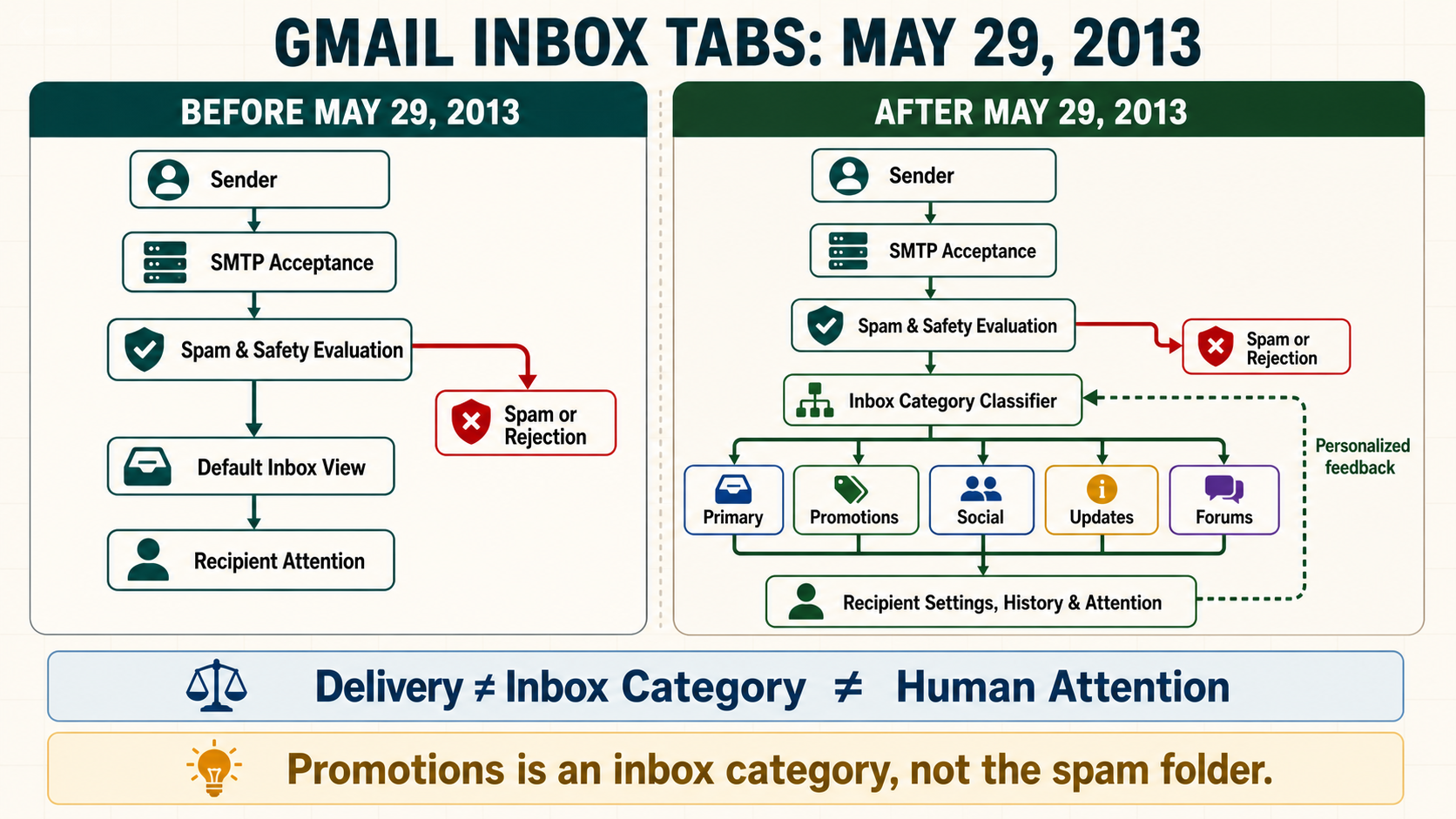
On May 29, 2013, Google announced a tabbed Gmail inbox that organized accepted inbox mail into categories. For email marketers, the change added a visibility decision after delivery and spam filtering. A message could be wanted, accepted and placed in the inbox while appearing under Promotions instead of the initially visible Primary tab. That distinction still matters because Primary placement is not the same thing as deliverability, and Promotions placement is not evidence that a sender has been penalized.
The dated mailbox-provider change
| Event field | Verified value | Why it matters |
|---|---|---|
| Historical event date | May 29, 2013 | This is the provider-change date, not the NitWings publication date. |
| Mailbox provider | Gmail | The affected provider estate determines which recipient cohorts require separate evidence. |
| Change area | Inbox organization | This identifies whether the change altered authentication, filtering, visibility, measurement or sender operations. |
| Current status | active-and-evolved | Historical instructions are interpreted against the feature or standard that exists now. |
Google introduced the new inbox on desktop and mobile with up to five configurable categories: Primary, Promotions, Social, Updates and Forums. The rollout was gradual, and users could select fewer tabs, move messages between them, set future behavior for a sender and star a message so it also appeared in Primary. The provider change therefore combined automated classification with recipient-level control from the beginning.
This date matters because reporting language changed more slowly than the inbox itself. Many dashboards continued to show accepted or delivered mail without identifying category placement. Marketing teams often interpreted a decline in opens as a delivery failure even when messages remained in the inbox under Promotions. The correct investigation needed at least three separate questions: did Gmail accept the message, did Gmail place it in inbox or spam, and which configured inbox view exposed it to that recipient?
The announcement did not promise that every Gmail account would use all five tabs or that every message type would always receive the same classification. The system was designed around content, sender, recipient behavior and user configuration. Any historical analysis that reduces the change to a universal rule such as “marketing goes to Promotions” loses the personalized and configurable nature of the product.
How the system worked before the change
Before the tabbed inbox, the default Gmail experience presented accepted inbox mail in a more unified chronological view, although Gmail already used spam filtering, importance signals, labels and alternate inbox configurations. A marketer’s practical visibility model was simpler: successful SMTP acceptance could lead to inbox, spam or another user-controlled state, and the main inbox chronology strongly influenced what a recipient saw first.
That model encouraged teams to treat “delivered” and “visible” as nearly interchangeable. The assumption was never fully correct because spam folders, filters, forwarding, clipping, local rules and user behavior already existed. Even so, a single default inbox list created fewer provider-controlled presentation branches after acceptance. Campaign timing could therefore have a more direct relationship with relative position in the main view.
Marketing programs also leaned heavily on subject line, From identity and send time to earn attention in that unified list. List hygiene, complaints, engagement and authentication still mattered, but category placement was not yet a separate mainstream optimization discussion. Reporting typically stopped at delivery, open and click metrics rather than distinguishing inbox category or recipient-configured view.
It is important not to romanticize the earlier state. Gmail already personalized filtering, and a message accepted with a 250 SMTP response was never guaranteed to reach the main inbox. The 2013 change made an additional visibility layer obvious; it did not create every distinction between transport success and recipient attention.
What changed on the provider side
The new default inbox classified messages into purpose-oriented categories. Primary was intended for person-to-person conversations and messages that did not fit another enabled tab. Promotions held deals, offers and other promotional mail. Social handled social-network and media-sharing notifications. Updates included confirmations, receipts, bills and statements. Forums covered mailing lists and discussion groups. Users could enable or disable categories, so the available destination set varied by account.
Classification happened after Gmail received and evaluated the message. Tabs were therefore not SMTP response classes and were not equivalent to the spam decision. A legitimate promotional campaign could pass SPF, DKIM and DMARC, maintain healthy reputation, avoid spam and still be correctly classified as Promotions. Conversely, changing visual copy to mimic a personal conversation did not establish permission, trust or a right to Primary placement.
The user could drag a message to another tab and choose whether Gmail should handle future mail from that sender similarly. That feedback made recipient-specific outcomes especially important. Two subscribers receiving the same campaign could see it in different categories because their configuration and history differed. The provider’s later machine-learning descriptions continued to emphasize multiple signals and personalized preferences rather than a published deterministic rule set.
The most durable operational change was the separation of delivery from presentation. Teams now needed to recognize an accepted-and-inbox message that received normal category placement, an actual spam-placement problem, and a recipient-attention problem as different conditions requiring different evidence and remedies.
Message path before and after
Before
Sender and campaign
        |
        v
Gmail SMTP acceptance or deferral
        |
        v
Spam and safety evaluation
        |
        +----> Spam or rejection
        |
        v
Default inbox chronology
        |
        v
Recipient notices, opens, ignores or filters
After
Sender and campaign
        |
        v
Gmail SMTP acceptance or deferral
        |
        v
Spam and safety evaluation
        |
        +----> Spam or rejection
        |
        v
Configured inbox-category classifier
        |
        +----> Primary
        +----> Promotions
        +----> Social
        +----> Updates
        +----> Forums
        |
        v
Recipient configuration, history and attention
Who and what the change affected
| Traffic or stakeholder | What changed | Required interpretation |
|---|---|---|
| Promotional and commercial campaigns | A dedicated Promotions category became a normal inbox destination. | Measure commercial results and complaints; do not classify Promotions as a bounce or spam event. |
| Transactional receipts and confirmations | Many messages could appear in Updates rather than the main Primary view. | Make the subject, sender and live-text summary useful because the recipient may scan the category later. |
| Social and community notifications | Social or Forums could separate recurring notifications from conversational mail. | Respect purpose and frequency; category placement does not excuse unwanted or excessive messaging. |
| Person-to-person and service conversations | Primary remained an important default view, but classification was not guaranteed. | Use stable identity and reply handling; never disguise bulk promotion as personal correspondence. |
| Recipients with tabs disabled or customized | Their inbox could have fewer categories or a different presentation. | Avoid universal category assumptions and retain recipient-level uncertainty in analysis. |
| Senders using several mail streams | Promotional, transactional and support messages could be classified differently. | Separate subdomains, From identities and content purpose where operational ownership and recipient expectations differ. |
Effect on delivery, placement and recipient visibility
The immediate deliverability effect was mainly on inbox visibility, not SMTP reachability. Gmail could accept a message and place it in an enabled inbox tab without producing a failure that the sending MTA or ESP could observe. A sender looking only at accepted-message counts could therefore see stable delivery while engagement shifted because recipients checked categories at different times.
Promotions placement is not a negative reputation label. It is a content and purpose classification inside the inbox. Attempting to force promotional content into Primary can create a worse outcome if tactics make the message misleading, inconsistent or unwanted. Strong deliverability practice instead asks whether the campaign reaches the intended Gmail audience, avoids spam, meets authentication and sender requirements, generates low complaints and produces useful business outcomes.
The change also made cohort analysis more important. Gmail domains should not be mixed with every mailbox provider when investigating an engagement shift tied to the rollout. Within Gmail, marketers needed to separate promotional, lifecycle and transactional streams. A receipt program behaving differently from a weekly offer could be normal category behavior rather than an infrastructure fault.
Category placement can interact with send time but does not create a reliable “best hour” formula. A recipient may visit Promotions in batches, Gmail can highlight relevant promotional mail, and current subscription-management surfaces expose high-frequency senders outside the traditional chronology. Teams should test business outcomes over appropriate windows rather than using the first-hour open curve as the only success measure.
Authentication remains foundational but does not select Primary. SPF, DKIM and DMARC establish identity and support abuse control; they do not grant a category. Similarly, a dedicated IP, warmup schedule or BIMI certificate cannot guarantee a particular tab. Those controls solve different parts of the delivery and trust system.
Effect on measurement and diagnosis
The most common measurement error is to infer tab placement from opens. A lower open rate may reflect category visibility, audience fatigue, weaker value, changed image loading, seasonality or unrelated tracking limitations. An open increase also does not prove Primary placement. Without provider-supplied category evidence for the relevant population, the result is an inference that should be labelled as such.
Seed accounts can show how specific controlled identities were classified at a moment in time, but they do not reproduce each subscriber’s history, settings or engagement. A seed result is useful for detecting gross differences between builds or streams. It is not a population-level inbox-placement percentage and should not be reported as one.
Measure at several layers. Preserve SMTP acceptance and delivery-error evidence for transport. Use Google Postmaster Tools and complaint data for provider-level reputation and policy signals where volume qualifies. Track clicks, qualified sessions, conversions, revenue, replies, unsubscribes and complaints by Gmail cohort. Compare promotional and transactional streams separately, and use controlled holdouts when the business question is incremental effect.
Apple-style privacy prefetch and Gmail image proxying further limit simplistic open analysis. Even though those mechanisms differ, both reinforce the need to avoid treating a tracking pixel as proof of human attention. The tabbed inbox article therefore belongs in a measurement system that clearly distinguishes machine-observable events from recipient decisions.
Advantages for email marketers
| Potential advantage | When the advantage is real | Evidence to verify |
|---|---|---|
| Recipients can separate commercial and operational mail | The category matches the message purpose and the recipient uses tabs. | Lower complaint pressure, retained subscriptions and downstream conversion over a suitable window. |
| Promotions remains an inbox destination | The campaign is wanted, authenticated and not filtered to spam. | Seed observations plus business outcomes, not delivery status alone. |
| Commercial mail can be evaluated in a relevant context | Offers are clear, timely and useful when recipients browse Promotions. | Qualified clicks, conversion, margin and unsubscribe behavior by Gmail cohort. |
| Users can train or customize their experience | They actively move mail or change enabled categories. | Recipient support reports and controlled-account observations, while respecting individual privacy. |
| Streams can be designed around purpose | Transactional, lifecycle, support and promotional identities remain consistent. | Stable classification patterns, fewer confusing sender changes and cleaner incident attribution. |
Disadvantages and operational risks
| Cost or risk | How it appears | Control |
|---|---|---|
| Reduced immediate visibility | A campaign is accepted but receives fewer early interactions. | Evaluate wider response windows, frequency, value and stream-specific evidence before changing infrastructure. |
| False deliverability incident | A team treats Promotions as spam and begins unnecessary warmup or IP changes. | Require SMTP, Postmaster, complaint and controlled-placement evidence before declaring a reputation failure. |
| Misleading Primary-placement tactics | Copy or identity is made to resemble personal mail despite commercial purpose. | Keep the visible sender, subject and content truthful and aligned with recipient expectations. |
| Seed-test overconfidence | A handful of accounts is presented as the audience’s category distribution. | Describe seeds as controlled observations and pair them with recipient and business telemetry. |
| Excessive frequency becomes easier to notice | Repeated promotions dominate the category or subscription-management view. | Use preference controls, frequency caps, engagement-aware suppression and unique campaign value. |
| Transactional and promotional purpose becomes blurred | Receipts carry heavy promotion or promotional mail imitates service notices. | Define message purpose, apply appropriate consent and keep the primary task operationally clear. |
What email teams needed to do at the time
- Separate transport from category analysis. Record whether Gmail accepted the message before attributing an engagement change to tabs.
- Create Gmail-specific cohorts. Compare Gmail behavior before and after rollout without allowing other providers to dilute the signal.
- Inventory message purpose. Distinguish offers, newsletters, receipts, account alerts, social notices and human conversations.
- Review From identity and subject clarity. Help recipients recognize the sender and message purpose without pretending a promotion is personal mail.
- Extend observation windows. Compare immediate response with one-day and multi-day outcomes because category browsing can be delayed.
- Monitor complaints and unsubscribes. A visibility change should not be answered with pressure that increases negative recipient action.
- Use controlled accounts carefully. Observe category behavior across configurations while documenting that those accounts are not population estimates.
- Preserve a pre-change baseline. Keep stream, audience, volume, content and business metrics so later analysis is not based on memory.
What email teams should do now
- Treat Promotions as a normal inbox classification. Investigate spam, rejection and deferral separately from category placement.
- Meet current Gmail sender requirements. Maintain SPF, DKIM, DMARC, TLS, valid DNS, low spam rates and required one-click unsubscribe for applicable traffic.
- Use stable purpose-specific streams. Keep transactional service mail operationally distinct from subscription promotion when ownership, consent and latency differ.
- Optimize for wanted outcomes, not a tab hack. Measure qualified clicks, conversions, revenue, replies, retention and negative signals.
- Control frequency by recipient state. Apply preference, lifecycle, recent-contact and suppression rules before messages enter the send queue.
- Test truthful presentation. Subject, preview text, From identity and first-screen content should communicate value in any enabled category.
- Use current Postmaster Tools evidence. Correlate spam rate, compliance and delivery errors with internal cohorts, while respecting provider thresholds and privacy limits.
- Retain a no-action outcome. If delivery, complaints and business results are healthy, do not create risk merely to pursue unverified Primary placement.
- Review newer Gmail surfaces. Manage Subscriptions, Purchases and Promotions ranking can affect visibility beyond the original 2013 tab model.
Worked deliverability scenario
A retailer sees Gmail opens fall after a creative change and assumes the campaign has been moved from Primary to Promotions. SMTP acceptance is stable, the Gmail cohort has no unusual deferrals, authentication passes, Postmaster spam-rate data remains within the team’s operating range and complaints have not risen. Two employee seed accounts show Promotions, but they also showed Promotions before the change.
The team rebuilds the analysis by stream and outcome. It finds that clicks declined mainly among subscribers who received four offers in seven days, while recent buyers and lower-frequency subscribers remained stable. Conversion per delivered recipient is unchanged for the lower-frequency group. The evidence supports a frequency and relevance problem, not an infrastructure or authentication failure.
The safe response is to cap overlapping offers, suppress recent purchasers from redundant promotions and test a clearer value proposition against an unchanged control. The team does not rotate domains, replace the sending IP or disguise the campaign as a personal note. It monitors Gmail acceptance, complaints, qualified sessions and conversion across a full purchase window.
This scenario shows why category placement must be handled as one possible presentation factor. A single seed observation could not explain the audience-level decline, and an aggressive attempt to force Primary would have added identity and complaint risk without repairing the actual frequency problem.
Evidence and diagnostics
- SMTP evidence: response code, enhanced status, sending IP, queue ID, attempt time and retry history for the Gmail recipient cohort.
- Authentication evidence: delivered-message SPF, DKIM and DMARC results, aligned domains, selector and visible From domain.
- Provider evidence: current Google Postmaster Tools spam rate, compliance and delivery-error data when the stream meets reporting thresholds.
- Program evidence: campaign, purpose, audience source, lifecycle stage, recent contact count, offer and suppression-policy version.
- Recipient-action evidence: unique clicks, qualified sessions, conversions, replies, unsubscribes and complaints over declared windows.
- Controlled placement evidence: account configuration, prior history, test timestamp, message checksum and observed category for each seed.
- Change evidence: creative, From identity, domain, IP, volume, cadence, link host, template and audience changes made near the incident.
- Decision record: hypotheses considered, disconfirming evidence, owner, action, rollback condition and post-change result.
Failure modes and incorrect conclusions
- Calling Promotions the spam folder. This collapses two separate Gmail decisions and directs remediation toward the wrong control.
- Promising Primary placement. No sender, consultant, certificate or ESP can guarantee a personalized and configurable Gmail category.
- Changing infrastructure without transport evidence. New domains or IPs can destroy useful reputation continuity while leaving message purpose unchanged.
- Using open rate as a category detector. Opens are affected by visibility, value, timing and image-loading behavior and cannot prove a tab.
- Generalizing from one seed account. A controlled identity does not reproduce the settings and history of the subscriber population.
- Making promotion look personal. Misleading identity and subject tactics can increase complaints and erode long-term trust.
- Ignoring users without tabs. Some accounts disable or customize categories, so one universal path does not exist.
Current status and superseding changes
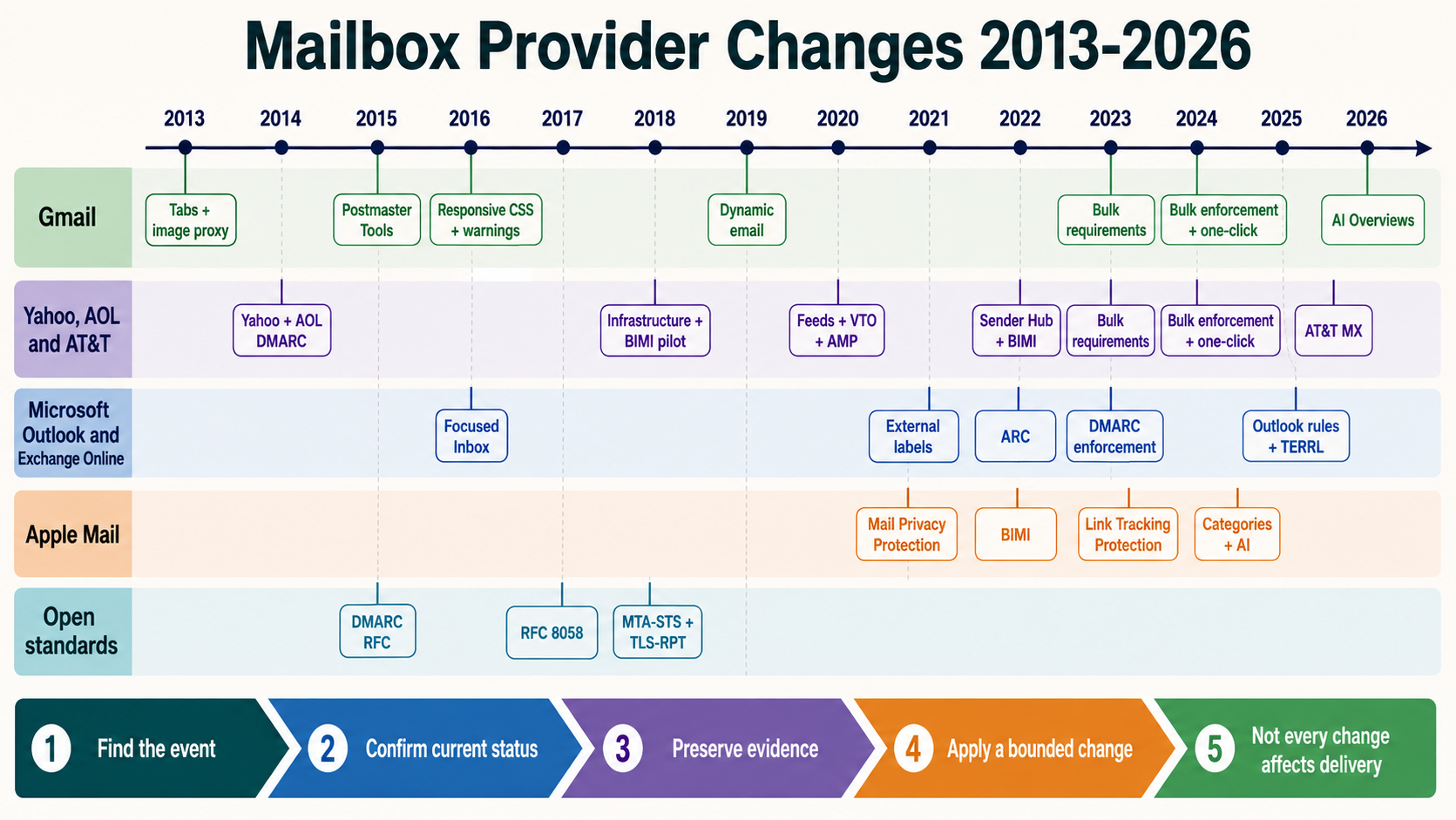
The tabbed inbox remains part of Gmail’s default inbox model, with Primary, Promotions, Social, Updates and Forums documented as available categories. The implementation has evolved through machine-learning classification, mobile experiences, Promotions annotations, relevance ranking and other Gmail surfaces. The 2013 event should therefore be presented as the beginning of a continuing presentation system, not as a frozen rule set.
Current operations must also account for changes that arrived later: image proxying altered open telemetry, bulk-sender requirements established authentication and complaint controls, one-click unsubscribe became mandatory for qualifying promotional traffic, and Manage Subscriptions increased frequency-based opt-out visibility. These changes do not replace tabs, but they change how a marketer should interpret and operate within them.
The durable conclusion is narrow and important. Category placement is not equivalent to delivery, inbox placement is not equivalent to Primary, and recipient attention is not proven by an image load. A mature program keeps those layers separate and makes decisions using provider evidence, controlled observations and business outcomes.
Operator checklist
- Display May 29, 2013 as the historical provider-change date, separate from the NitWings publication date.
- Classify the message stream by purpose before interpreting its likely inbox presentation.
- Confirm SMTP acceptance, authentication and spam indicators before investigating category visibility.
- Document seed settings and history and avoid turning seed observations into population percentages.
- Compare Gmail cohorts by stream, audience, frequency and business outcome over an appropriate window.
- Keep promotional identity and content truthful instead of attempting to imitate personal correspondence.
- Maintain current Gmail authentication, complaint and one-click-unsubscribe requirements.
- Review clicks, conversions, revenue, replies, complaints and unsubscribes in addition to opens.
- Record the hypothesis and accept no change when evidence does not justify intervention.
- Revisit the analysis when Gmail introduces new inbox, subscription or ranking surfaces.
Primary and contemporaneous references
- Google: A new inbox that puts you back in control: The May 29, 2013 announcement and original recipient controls.
- Google: How to choose the best Gmail inbox type: Current explanation of Gmail inbox configurations and default categories.
- Google: Gmail AI features: Current description of tab classification using multiple signals.
- Google: Email sender guidelines: Current authentication, reputation and unsubscribe requirements.
- Google: Postmaster Tools: Current provider telemetry entry point for qualified senders.