Google Postmaster Tools: Read the Signals and Investigate Changes
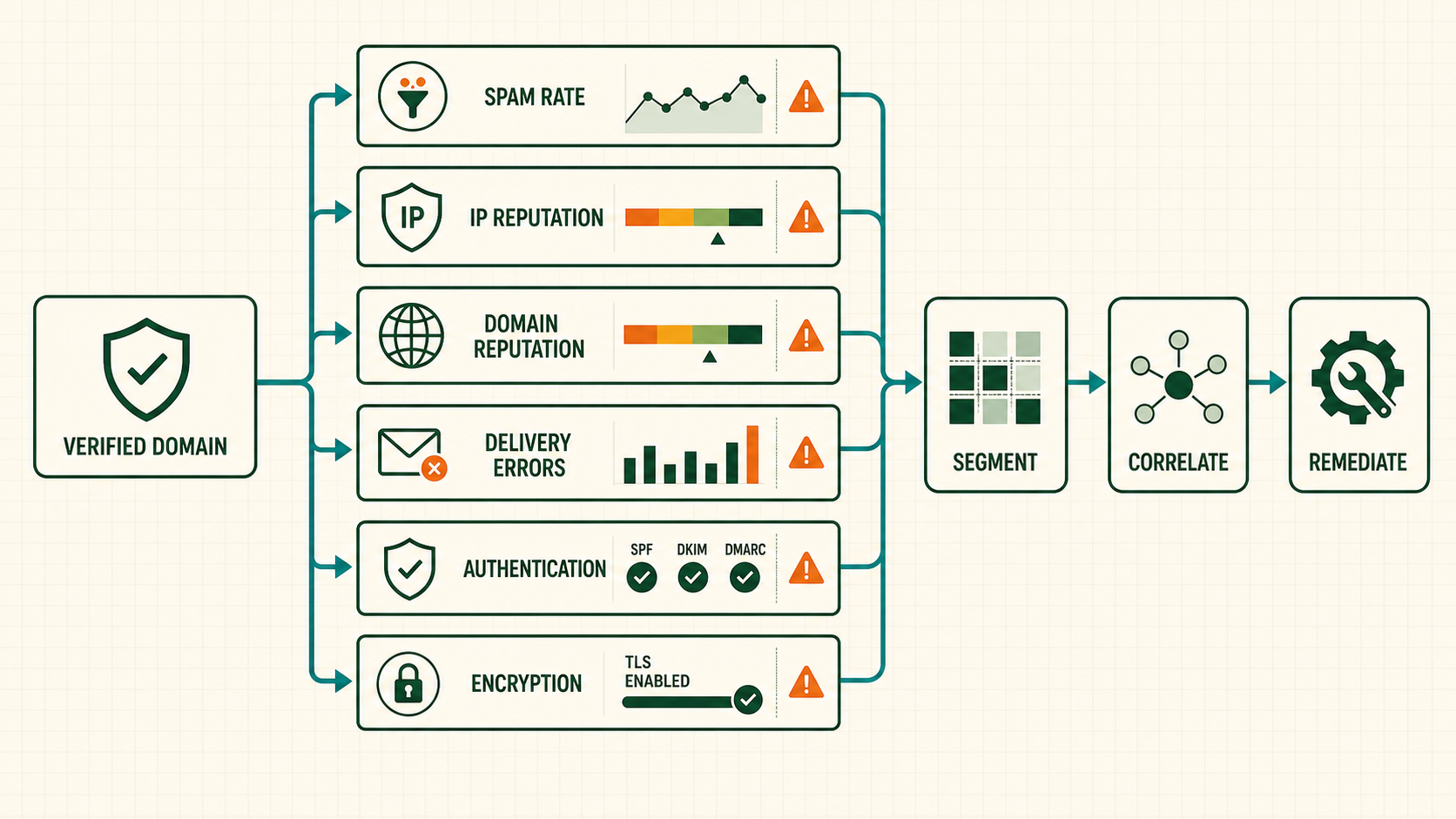
Gmail Postmaster Tools provides aggregated telemetry for mail sent to personal Gmail accounts. It is valuable because it reflects Google’s view, but it is not a message-level inbox tracker and sparse traffic can produce missing data. The correct operating model is to verify the exact authentication domain, preserve internal SMTP and campaign evidence, then correlate changes by date, stream, IP, audience and configuration.
Verify the domains that actually authenticate mail
Add the DKIM or SPF authentication domain used by production mail, publish the supplied DNS TXT verification record and confirm ownership. A parent-domain verification can provide access to subdomain data according to Google’s documented behavior, but teams should inventory every From, DKIM and return-path domain so nothing is assumed.
Use role-based accounts or a governed access group, require MFA, document owners and review access. Verification authorizes telemetry access; it does not improve reputation or authentication by itself.
Operate below the spam-rate warning zone
Google recommends keeping spam reported by users below 0.1% and avoiding 0.3% or more. Do not use 0.29% as a target. A small numerator can move the rate sharply on low-volume days, and dashboard data can lag. Compare acquisition source, form, campaign, inactivity and frequency before choosing remediation.
Suppress complaints immediately through available feedback mechanisms and internal reports. A drop in complaint rate after stopping all mail is not evidence that the acquisition problem is fixed.
Correlate delivery errors with full SMTP replies
Export internal Gmail recipient outcomes by response code, enhanced code, text, IP, domain, stream and hour. Postmaster categories show direction; complete SMTP replies show affected attempts. Separate transient 4xx from permanent 5xx and track queue age so retries are not counted as new recipients.
When errors rise, check the earliest boundary: DNS, connection, TLS, authentication, rate, reputation, recipient validity or message policy. Preserve representative replies before opening support.
Use a daily and incident runbook
- Confirm dashboard freshness and traffic coverage.
- Compare seven- and thirty-day baselines by domain and IP.
- Reconcile Gmail attempted, accepted, deferred and rejected recipients.
- Overlay campaign, cohort, volume and configuration changes.
- Pause the narrowest harmful stream or source.
- Validate corrections on controlled traffic and watch independent signals.
Missing data is not a green status. Mark it unknown and use SMTP, complaints, seeds and business outcomes.
Know what Gmail Postmaster Tools covers and what missing data means
Postmaster Tools aggregates data for authenticated mail reaching personal Gmail accounts under eligible traffic and privacy thresholds. It is not message-level telemetry, does not cover Google Workspace mailboxes in the same way, and may omit low-volume days or dashboards. Missing data means insufficient/unavailable observation, not perfect reputation or zero complaints.
| Question | Postmaster contribution | Required companion evidence |
|---|---|---|
| Did Gmail accept a recipient? | Delivery-error trend | Full recipient-level SMTP reply |
| Was a message in inbox? | No message-level folder answer | Controlled panel/recipient observation |
| Which campaign caused complaints? | Aggregate spam rate | Internal message/cohort attribution |
| Did authentication pass? | Aggregate authentication rates | Final received artifact and route tests |
Verify the right domains and govern access
inventory(
  visible_from_domain, dkim_domain, return_path_domain,
  primary_domain, stream, esp_account, outbound_ips,
  postmaster_verified, owner, last_tested_at
)
Verification proves control for telemetry access; it does not improve reputation. Inventory every production DKIM and SPF authentication domain plus visible From and primary-domain relationships. Domain changes or vendor defaults can move traffic outside the dashboard operators are watching.
Use organizational accounts/groups, MFA and at least two owners. Review access when vendors or staff change. Preserve export date and dashboard domain with screenshots or governed data extracts because categories can change later.
Interpret Gmail user-reported spam rate with its denominator and lag
Google recommends keeping spam below 0.1% and avoiding 0.3% or higher. These are warning boundaries, not acceptable targets. The Postmaster denominator is provider-defined and can differ from an ESP’s delivered count. Use Gmail’s metric for Gmail policy while keeping internal accepted-recipient denominators for cohort diagnosis.
| Pattern | Investigation |
|---|---|
| One-day spike after large campaign | Campaign, source, frequency and cohort complaints |
| Rate rises as volume falls | Numerator and population mix, not percentage alone |
| ESP complaints stable, Gmail rises | Metric scope/feedback coverage and Gmail-specific audience |
| Rate drops after stopping mail | Not proof root cause is fixed; validate corrected source |
Analyze provider-hour and acquisition cohorts internally. Gmail does not reveal individual complainants through this dashboard.
Reconcile aggregate authentication with route-level artifacts
route_auth_test(
  route_id, outbound_ip, from_domain,
  envelope_domain, dkim_domain, selector,
  spf_result, dkim_result, dmarc_result,
  aligned_mechanism, received_message_hash,
  tested_at_utc
)
A high aggregate pass can hide a small failing CRM, regional gateway or newly launched subdomain. Compare every authorized route. SPF pass alone may be unaligned; DKIM can pass for a vendor domain; DMARC needs a passing aligned mechanism. Preserve the received Authentication-Results and raw identifiers.
Overlay authentication changes with selector rotation, SPF edits, ESP migration, gateway mutation and domain launches. Publish keys before use and retain old selectors long enough for queued mail.
Correlate Gmail delivery errors with local queues
Group internal events by Gmail receiving organization, outbound IP, stream, hour, SMTP class, enhanced code and full reply. Count unique attempted recipients as well as reply events; retries create several events per recipient. Track oldest queue age and final outcome.
SELECT hour_utc, outbound_ip, stream, enhanced_code,
       COUNT(*) AS reply_events,
       COUNT(DISTINCT recipient_attempt_id) AS recipients
FROM smtp_event
WHERE receiver_org = "gmail-consumer"
GROUP BY hour_utc, outbound_ip, stream, enhanced_code;
Do not put private recipient data or support tokens in broad dashboards. Postmaster categories provide direction; raw replies identify the boundary. Classify unknown codes visibly and version mappings.
Use Postmaster data inside Gmail bulk-sender operations
Bulk compliance includes authentication/alignment, valid forward/reverse DNS, TLS, standards-compliant messages, easy unsubscribe including RFC 8058 where required, and low user-reported spam. Postmaster Tools observes several outcomes but does not configure these controls.
| Release test | Evidence |
|---|---|
| Authentication | Received Gmail artifact with aligned DMARC pass |
| PTR/HELO/TLS | External route probe and certificate |
| One-click | Authorized POST and suppression propagation |
| Audience | Consent/source/suppression trail |
| Volume control | Provider queue and reply-aware ramp |
Re-run after domain, selector, return path, IP, link domain, gateway or unsubscribe changes.
Worked case: good aggregate authentication hides a broken CRM route
Postmaster Tools shows 99.4% DMARC success, yet Gmail policy rejections rise. The main ESP route passes, so operators initially blame reputation. Segmenting internal SMTP events reveals every rejection comes from a CRM connector responsible for only 0.6% of Gmail volume.
The connector signs with the vendor domain and uses an unaligned return path. Both SPF and DKIM pass individually, but neither aligns with the visible brand From, causing DMARC failure. Aggregate success made the small route easy to miss.
The team holds that connector, configures aligned DKIM, verifies the final Gmail artifact and resumes a bounded cohort. It adds per-route authentication fixtures and alerts on any nonzero production DMARC failure for expected aligned routes. The incident closes after Gmail replies normalize and the corrected route appears in aggregate data.
Operate against Postmaster Tools v2, not the former v1 data model
Postmaster Tools API v2 became generally available in February 2026. Google’s migration documentation replaces the v1 trafficStats resource and per-day domains.trafficStats.get/list methods with the v2 domainStats resource and domains.domainStats.query over a date range. It adds compliance status and batch domain queries.
| Former v1 integration | Current v2 integration |
|---|---|
trafficStats | domainStats |
domains.trafficStats.get/list | domains.domainStats.query |
| One-day retrieval model | Start/end date-range query |
| No compliance endpoint | domains.getComplianceStatus |
| Loop domains individually | domainStats.batchQuery |
Do not build a new integration on v1. Google says the v1 API will be retired and developers must migrate. The old web-interface retirement was postponed, but that is not a reason to retain v1 API dependencies.
Do not depend on the former Domain and IP Reputation dashboards
Google’s current deprecation FAQ says the v2 experience carries the old dashboards except Domain and IP Reputation, which are being retired while Google develops more actionable replacements. Therefore, this guide does not require the former reputation categories as an operational input. Use v2 compliance/statistics, spam, authentication, delivery errors, internal SMTP evidence and recipient outcomes.
If an older interface still displays a reputation category during transition, treat it as transitional evidence only. Never convert it into a numeric score, make a release depend on it or show missing v2 reputation as “good.” Record which interface/API produced each historical value so the dashboard transition does not look like a reputation improvement.
Store v2 statistics with query and schema provenance
postmaster_v2_extract(
  domain_name, query_start_date, query_end_date,
  statistic_name, statistic_value,
  compliance_status, deliverability_verdict,
  api_version, extracted_at_utc,
  raw_response_checksum
)

endpoint families:
  /v2/domains
  /v2/{domain}/domainStats:query
  /v2/{domain}/complianceStatus
  /v2/domainStats:batchQuery
Use Google’s current discovery document and client library rather than hard-coding a copied beta schema. Retain raw responses under appropriate access control, record date ranges, and make pagination/batch errors visible. A partial multi-domain query must not silently become a green compliance dashboard.
Domain and user management methods are available in v2, including domain verification and governed users. Use least privilege and review owners/admins. API domain management changes production telemetry access and must be auditable.
Interpret v2 domain statistics without inventing unavailable reputation data
Query the intended domain and a bounded date range. Store returned statistics exactly as defined by the current v2 schema, along with domain, start/end dates, extraction time and API version. Do not join overlapping queries by summing them, and do not substitute zero when a statistic is absent.
| Data state | Dashboard treatment |
|---|---|
| Returned numeric/statistical value | Display with date range and definition |
| Field absent or not applicable | Unavailable/unknown |
| API call partially failed | Mark affected domains incomplete |
| No traffic above privacy threshold | Insufficient coverage, not zero risk |
| Historical v1 reputation category | Archive with v1 provenance; do not continue as v2 |
Maintain schema tests because a reporting pipeline can stay technically successful while mapping the wrong field after migration.
Use v2 compliance status as a release signal, not the only test
The v2 API provides domains.getComplianceStatus for SPF, DKIM and DMARC compliance, and current domain management support can return a deliverability-status verdict. Treat these as Google’s current aggregate/compliance view. Route-level final messages still need independent verification because aggregate compliance can hide a small failing source.
compliance_observation(
  domain, spf_status, dkim_status, dmarc_status,
  deliverability_verdict, observed_at_utc,
  api_version, raw_response_checksum
)
Alert when a previously compliant domain changes, but correlate DNS release, authentication fixtures, Gmail replies and actual route volume. Do not automatically stop security-critical transactional mail from one delayed or unavailable API observation; use a documented incident decision.
Migrate a v1 integration without fabricating continuity
- Inventory v1 jobs, credentials, resources, dashboards and downstream consumers.
- Map
trafficStatsfields to current v2domainStatsdefinitions. - Replace daily get/list calls with bounded date-range queries.
- Add compliance status and multi-domain batch behavior where needed.
- Run v1 and v2 in parallel only while v1 remains accessible and label both versions.
- Reconcile documented definition differences rather than forcing totals equal.
- Switch consumers and remove v1 credentials/jobs before retirement.
Domain/IP reputation does not have a continuity mapping in v2. Preserve historical v1 categories as a closed series and build current decisions from available v2 statistics, compliance, SMTP and audience evidence.
Run a Gmail v2 incident using current evidence
- Confirm v2 query success, date range, domain and coverage.
- Check compliance status and current statistics, with unknowns visible.
- Preserve complete Gmail SMTP replies and queue ages.
- Inspect final received authentication for every material route.
- Overlay volume, campaign, acquisition, frequency and releases.
- Contain the smallest causal cohort, credential or route.
- Resume current wanted traffic gradually and verify independent recovery.
Do not wait for a retired reputation dashboard or move harmful traffic to a new identity. If escalating, provide domain/IP, UTC window, exact replies, compliance observations, remediation and test evidence without recipient data.
Build a Postmaster v2 operations dashboard
- API query success, domain/date coverage and freshness.
- Spam/user-feedback statistics with provider scope.
- SPF, DKIM and DMARC compliance plus route fixtures.
- Delivery-error statistics beside normalized raw SMTP replies.
- TLS/encryption statistics beside external route probes.
- Deliverability verdict when current v2 response supplies it.
- Campaign, cohort, identity and infrastructure annotations.
- No live Domain/IP Reputation category dependency.
Show numerator/denominator or API definition where supplied, and mark unavailable explicitly. An old v1 screenshot cannot serve as the current health tile.
Secure API v2 domain and user administration
Use OAuth scopes appropriate to the operation, organizational identities, MFA and least privilege. Owners/admins can manage domain users; domain creation, verification and deletion affect who can see telemetry. Log these changes and review access after staff/vendor transitions.
| Risk | Control |
|---|---|
| Long-lived credential in script | Managed secret/workload identity and rotation |
| Orphaned vendor admin | Quarterly access review and offboarding |
| Domain deleted accidentally | Change approval and inventory reconciliation |
| Raw responses exposed | Access-controlled storage and retention |
| Partial batch query hidden | Per-domain success/error accounting |
Worked migration: a v1 reputation graph disappears
A team’s executive dashboard depends on v1 IP and domain reputation categories plus daily trafficStats.list. After moving to v2, the old reputation tiles have no current replacement and the query job fails because the resource schema changed. The first implementation incorrectly shows green by treating absent values as zero risk.
Operators remove the green default, close the v1 reputation series with provenance and migrate statistics to domains.domainStats.query over explicit date ranges. They add compliance status, per-domain query health, Gmail SMTP families, queue age and internal campaign/source annotations. Batch queries record partial failures instead of dropping domains.
The new dashboard is not visually identical because v2 is not a drop-in v1 schema. It is operationally stronger: missing data is unknown, authentication compliance is current, and delivery incidents can be traced to routes and cohorts without waiting for a reputation category.
Control date ranges, batching and restatement in v2 extracts
Define an extraction schedule with a maturity delay, bounded lookback and idempotent upsert. Re-query recent dates to capture late restatement without rewriting closed historical periods silently. Store query parameters and response checksum. Batch operations must return status for every requested domain.
for window in mature_date_ranges:
  responses = batch_query(domains, window.start, window.end)
  for domain in domains:
    if response_missing_or_error(domain): mark_incomplete(domain, window)
    else: upsert_versioned_statistics(domain, window, response)
This pseudocode emphasizes completeness; use official client libraries and quota-aware retries. An HTTP success for a batch does not prove every domain produced usable statistics.
Keep Gmail consumer evidence separate from Workspace and other Google-hosted mail
Visible recipient domains do not always identify the receiving product, and personal Gmail Postmaster statistics are not a universal report for every Google-hosted organization. Build receiver mapping from MX and provider knowledge, retain raw recipient domains under privacy controls, and label the dashboard scope accurately.
| Population | Primary evidence |
|---|---|
| Personal Gmail | Postmaster v2 plus Gmail SMTP/internal outcomes |
| Google Workspace tenant | SMTP replies, tenant/admin evidence where available |
| Forwarded Gmail recipient | Final path, ARC/authentication and forwarding behavior |
| Seed accounts | Controlled observation, not population-wide rate |
Do not force statistics from one population to explain another.
Release and monitor a v2 API integration like production data infrastructure
- Validate OAuth scopes and organizational ownership.
- Test domain list, verification state and user permissions.
- Query a fixed domain/date fixture and compare documented fields.
- Test multi-domain partial failure and retry behavior.
- Verify compliance status and raw-response retention.
- Run downstream dashboards with missing fields and unknown state.
- Disable v1 consumers only after every dependency migrates.
Alert on authentication failure, quota exhaustion, schema/enum changes, domain count changes, delayed extraction and partial batches. Keep a rollback to the prior v2 parser, not to a retired v1 dependency.
Worked case: missing v2 data after a domain change
A brand changes DKIM signing from the organizational domain to a new aligned subdomain. Gmail acceptance remains stable, but the team’s v2 dashboard becomes blank because extraction queries only the former verified domain. Operators initially label the blank period healthy.
They change the state to unknown, inventory the final received identities, add and verify the actual production authentication domain, and update governed API users. Historical queries keep domain provenance instead of merging both series blindly. SMTP and complaint evidence covers the transition while v2 statistics mature.
A release check now compares configured query domains with DKIM/return-path identities seen in production. Missing telemetry becomes an inventory incident, not proof of zero spam or full compliance.
Final v2 operational check
Confirm no scheduled job, dashboard, alert or executive report still depends on v1 resources or the former reputation categories. Every production domain must have a current owner, successful v2 query, compliance observation and correlated SMTP evidence. Missing query coverage must page as unknown and remain visible until repaired.
Record the review date
Record the current Google documentation review date and responsible operator.
Primary references
- Google Postmaster Tools
- Google Postmaster Tools help
- Google email sender guidelines
- Google: Migrate to Postmaster Tools API v2
- Google: Postmaster Tools API v2 reference
- Google: Old Postmaster Tools interface deprecation