Microsoft SNDS: Monitor Outlook IP Reputation and Traffic
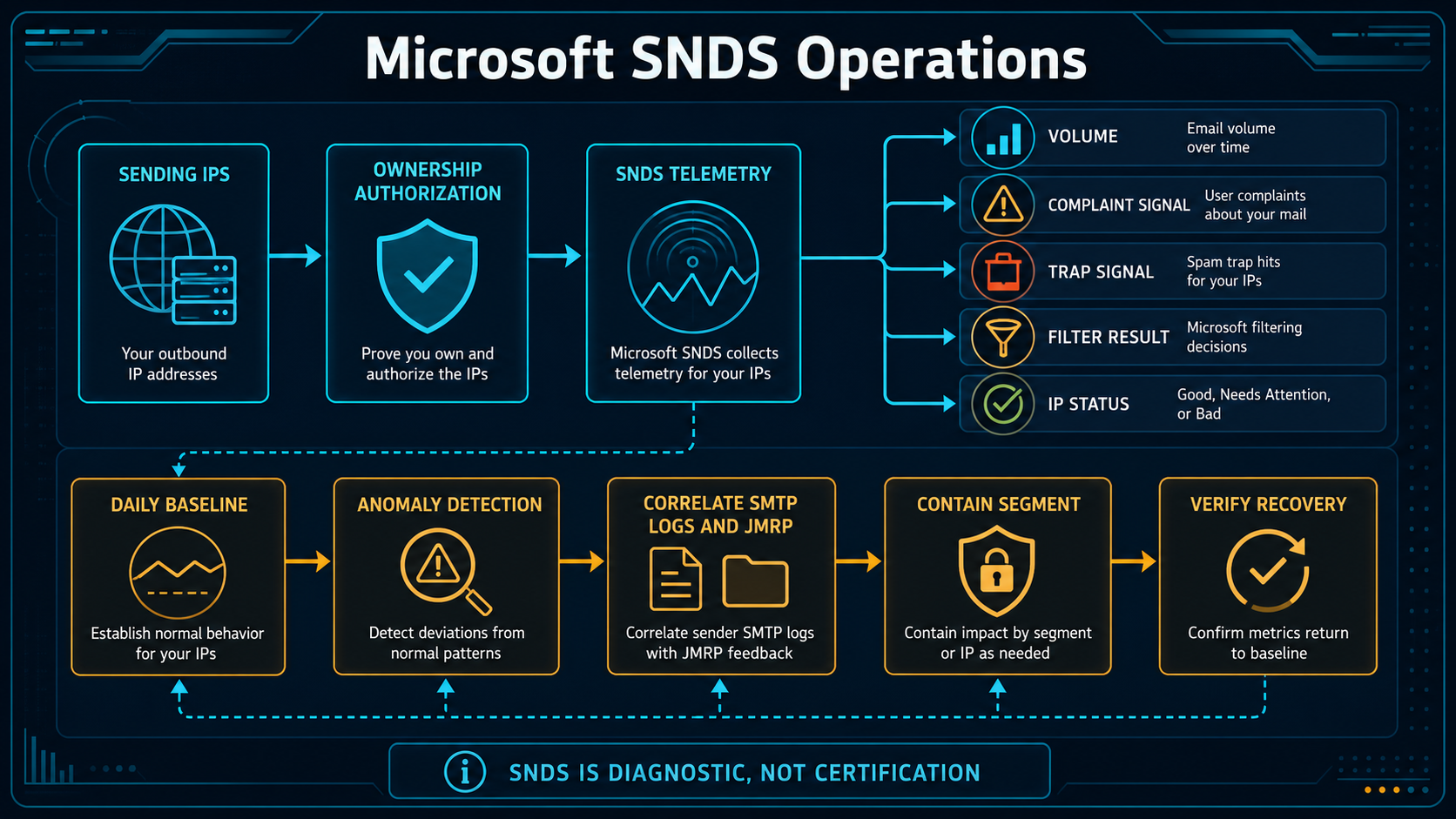
Microsoft Smart Network Data Services gives authorized operators a view of activity Microsoft observes from their sending IP addresses. It is most useful as a trend and incident-correlation source. It is not an allowlist, certification or promise of inbox placement, and a favorable row does not override recipient engagement, domain reputation, authentication or content policy.
What Microsoft SNDS can show about sending IPs
SNDS is IP-oriented telemetry for mail reaching Microsoft consumer services. Access requires proving control or authorization for the address space using the methods offered by the service. Data can include traffic and complaint-related indicators, trap-related observations, filtering results and an overall status presentation. Availability and labels can change, so operators should preserve raw exports and document the fields visible in their account.
Microsoft JMRP is complementary rather than interchangeable. JMRP provides eligible complaint reports for messages that users mark as junk, while SNDS summarizes IP-level observations. SMTP logs show connection and delivery responses. A useful investigation correlates all three with the sender’s own campaign, customer, credential and recipient-cohort data.
Why one SNDS color or day is not a diagnosis
A single day or color is rarely enough to explain a problem. Low volume can make ratios volatile, shared infrastructure can combine unrelated senders, and a daily aggregate can hide a short abusive burst. Establish a normal range for each IP and sending stream, then investigate changes in volume, complaints, trap indicators, filtering and SMTP outcomes together.
Authorization is another operational risk. If access depends on an individual mailbox or stale routing record, the team can lose visibility during an incident. Maintain a controlled role account, document the authorized ranges and review access after provider or network changes.
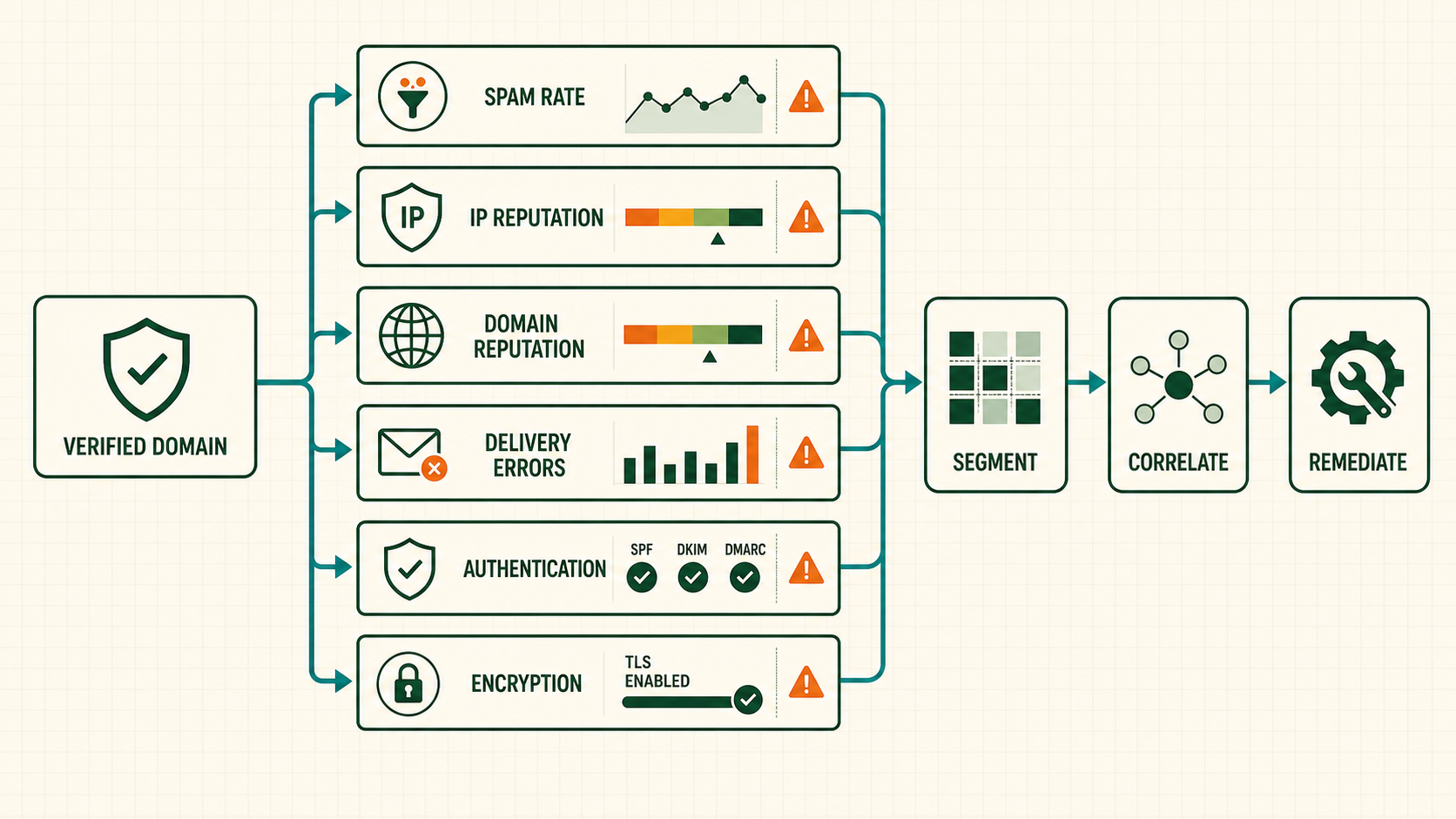
Operate SNDS as part of an email monitoring system
- Inventory the IP estate. List active, warm, standby and retired outbound IPs with provider, reverse DNS, stream, tenant model and operational owner.
- Authorize access safely. Use a controlled organizational account and the supported authorization path for each address or range. Record who approved it and when.
- Build a daily baseline. Export the available SNDS fields and retain dates in UTC. Compare like-for-like weekdays, streams and volume bands rather than one universal threshold.
- Join internal telemetry. Map each IP and day to SMTP accept, defer and reject counts, campaigns, customers, API credentials, complaints, bounces and volume changes.
- Correlate JMRP. Process complaint reports promptly, suppress the recipient for the applicable marketing scope and link the message back to campaign and acquisition source.
- Investigate anomalies by segment. Identify the smallest time, IP, stream, tenant, cohort or template that explains the change. Inspect credential abuse and unexpected automation.
- Contain without evasion. Pause or throttle the affected source. Do not shift the same traffic to another IP merely to escape a poor status.
- Verify sustained recovery. Watch SNDS, SMTP outcomes, complaints and internal metrics after the fix. Increase volume only when the causal signals remain stable.
Correlate SNDS observations before taking action
| SNDS observation | Correlating evidence | Response |
|---|---|---|
| Unexpected volume increase | Internal sends or credentials do not explain it | Treat as possible abuse and contain the source |
| Complaint signal rises for one campaign | JMRP and cohort data align | Suppress complainants and correct targeting, consent or expectations |
| Trap-related signal appears | Recent import or inactive cohort changed | Pause the cohort and audit acquisition and sunset controls |
| Filtering worsens with SMTP deferrals | Remote replies show policy or reputation pressure | Reduce rate, preserve replies and investigate stream health |
| Status improves after remediation | Complaints and SMTP errors also normalize | Resume gradually and keep recurrence monitoring |
Worked SNDS incident: an unexpected credential burst
A sender sees an adverse SNDS change on one of four IPs. Daily total volume looks normal, but hourly SMTP logs reveal a burst from a newly issued API credential. The messages used an unfamiliar template and a stale acquisition segment. JMRP complaints point to the same campaign.
The team revokes the credential, stops the segment, suppresses complainants and audits how the key was exposed. It does not move the campaign to another IP. After corrective controls and a conservative restart, SMTP deferrals, JMRP volume and SNDS indicators return toward the established baseline. Recovery is accepted only because multiple independent signals agree.
SNDS, SMTP and campaign evidence to retain
- IP inventory: address, CIDR, reverse DNS, provider, stream, status, warm-up state, owner and retirement date.
- SNDS observation: reporting date, volume fields, complaint or trap indicators, filtering result, status and export timestamp.
- SMTP correlation: Microsoft MX, accepted recipients, enhanced replies, deferrals, rejections, connection behavior and queue delay.
- Message correlation: campaign, tenant, credential, DKIM domain, From domain, cohort, template and acquisition source.
- Incident record: baseline deviation, containment, root cause, remediation, restart stages and evidence of sustained recovery.
Microsoft SNDS interpretation and access mistakes
- Calling SNDS certification: access and favorable telemetry do not certify a sender or guarantee delivery.
- Reading a daily aggregate alone: short bursts and one abusive tenant can disappear inside the total.
- Ignoring domain-level signals: IP telemetry does not replace authentication, domain reputation and subscriber feedback.
- Moving bad traffic to another IP: this spreads the incident rather than correcting it.
- Depending on one administrator: unmanaged authorization creates a visibility gap during staff or provider changes.
Microsoft SNDS operations checklist
- Maintain a complete active and standby outbound-IP inventory.
- Authorize ranges through controlled organizational access.
- Export and retain SNDS data on a consistent UTC schedule.
- Build per-IP baselines instead of universal color rules.
- Correlate SNDS with SMTP logs, JMRP, campaigns and credentials.
- Suppress complaints promptly for the applicable marketing scope.
- Contain the causal source rather than rotating infrastructure.
- Verify recovery across SNDS, SMTP and internal recipient signals.
Enroll and authorize SNDS access safely
- Use an organizational Microsoft account. Avoid making one employee account the only operational owner.
- Submit the outbound IP address or range. Include only space the organization operates or is authorized to monitor.
- Select an offered authorization address. SNDS derives possible contacts from routing, reverse DNS and network ownership information.
- Complete the verification message. Ensure the selected role address is controlled, monitored and able to receive the authorization link.
- Record the approved ranges and owners. Review them after IP, provider, routing or staff changes.
When an ESP owns the address space, the customer may not be able to authorize the shared pool directly. Obtain relevant telemetry and incident support through the provider instead of presenting another party’s range as your own.
Interpret SNDS data as daily IP-level evidence
| SNDS area | Operational meaning | Required correlation |
|---|---|---|
| Message or recipient activity | Volume Microsoft observed for the IP and reporting period | Internal accepted recipients, campaigns and hourly traffic |
| Complaint-related indication | User feedback associated with observed mail | JMRP reports, eligible denominator, cohort and message |
| Trap-related indication | Microsoft observed traffic to addresses used as quality signals | Acquisition source, import, age and lifecycle changes |
| Filtering/status presentation | Microsoft classification summarized for the IP/day | SMTP replies, delivery timing and prior baseline |
| Sample or command information when exposed | Additional incident context | Queue, tenant, credential and template evidence |
Field names and availability can change. Export the exact columns exposed to your account and version the parser. Do not build an irreversible action around a color label whose definition is not retained.
Build a baseline that survives volume and weekday changes
Store one row per IP and SNDS reporting date, then join internal totals by the same UTC boundary. Add seven-day and comparable-weekday baselines, but keep raw values. A newly warmed IP, low-volume backup IP and mature high-volume IP should not share one threshold.
ip_day(
  ip, report_date_utc, snds_volume, snds_status,
  complaint_signal, trap_signal, filter_result,
  smtp_accepted, smtp_deferred, smtp_rejected,
  internal_volume, top_stream, top_tenant
)
Flag discontinuities: SNDS volume that exceeds internal accounting, an abrupt new tenant share, complaint/trap change after an import, or worsening filtering after a large provider-specific burst. Investigate at hourly resolution internally even when SNDS presents a daily aggregate.
Correlate SNDS with Microsoft JMRP complaints
JMRP complaint messages can identify the mail users marked as junk when the report is available and eligible. Parse the feedback report, authenticate the source, extract the original message identifiers safely, suppress the complainant for the applicable marketing scope and connect the event to campaign, tenant, cohort and acquisition source.
| System | Question answered | Limitation |
|---|---|---|
| SNDS | What did Microsoft observe for this IP and day? | Aggregate and IP-oriented |
| JMRP | Which eligible message generated a user junk complaint? | Not every complaint is necessarily returned |
| SMTP logs | What response did each delivery attempt receive? | Acceptance does not reveal final placement |
| Campaign/customer data | Which source, expectation and audience produced the mail? | Requires reliable internal lineage |
No one source is sufficient. A durable incident conclusion is supported by several independent signals.
Use a scoped SNDS incident runbook
| Time | Action | Evidence |
|---|---|---|
| First 15 minutes | Confirm IP, report date, status change and internal volume | SNDS export, routing inventory and UTC totals |
| 15–30 minutes | Segment hourly by stream, tenant, credential and cohort | SMTP and application logs |
| 30–60 minutes | Correlate JMRP, recent imports, authentication and deployments | Complaint reports, audit trail and message samples |
| Containment | Pause or throttle the smallest causal source | Traffic reduction and queue impact |
| Recovery | Resume gradually only after causal signals stabilize | SNDS trend, SMTP replies, JMRP and business outcomes |
Do not rotate the same traffic to another IP. That loses comparison evidence and can extend the incident to clean infrastructure.
Interpret SNDS carefully on shared infrastructure
SNDS reports what Microsoft associates with the connecting IP. If several customers, applications or business units share that IP, the portal cannot supply internal tenant attribution that the sender failed to log. Maintain message, credential and stream lineage before mail reaches the MTA.
Compare SNDS totals with internal Microsoft-destination attempts and accepted recipients for the same UTC boundary. Differences can reflect definitions, retries or timing, but an unexplained surge may reveal unauthorized traffic or incomplete logging. On provider-managed pools, request incident evidence through the provider rather than claiming authority over IP space you do not operate.
Define SNDS recovery with independent signals
- Unexpected or abusive volume has stopped at the identified source.
- JMRP complainants are suppressed and the causal cohort is corrected.
- Microsoft SMTP deferrals or rejections return toward baseline.
- SNDS observations improve across more than one reporting period.
- No new trap or credential anomaly appears during controlled restoration.
- Authentication, reverse DNS and routing remain stable.
A favorable portal status alone is not enough. Preserve the before-and-after evidence and the time each corrective control was introduced.
Use current SNDS as IP telemetry, not a complete reputation score
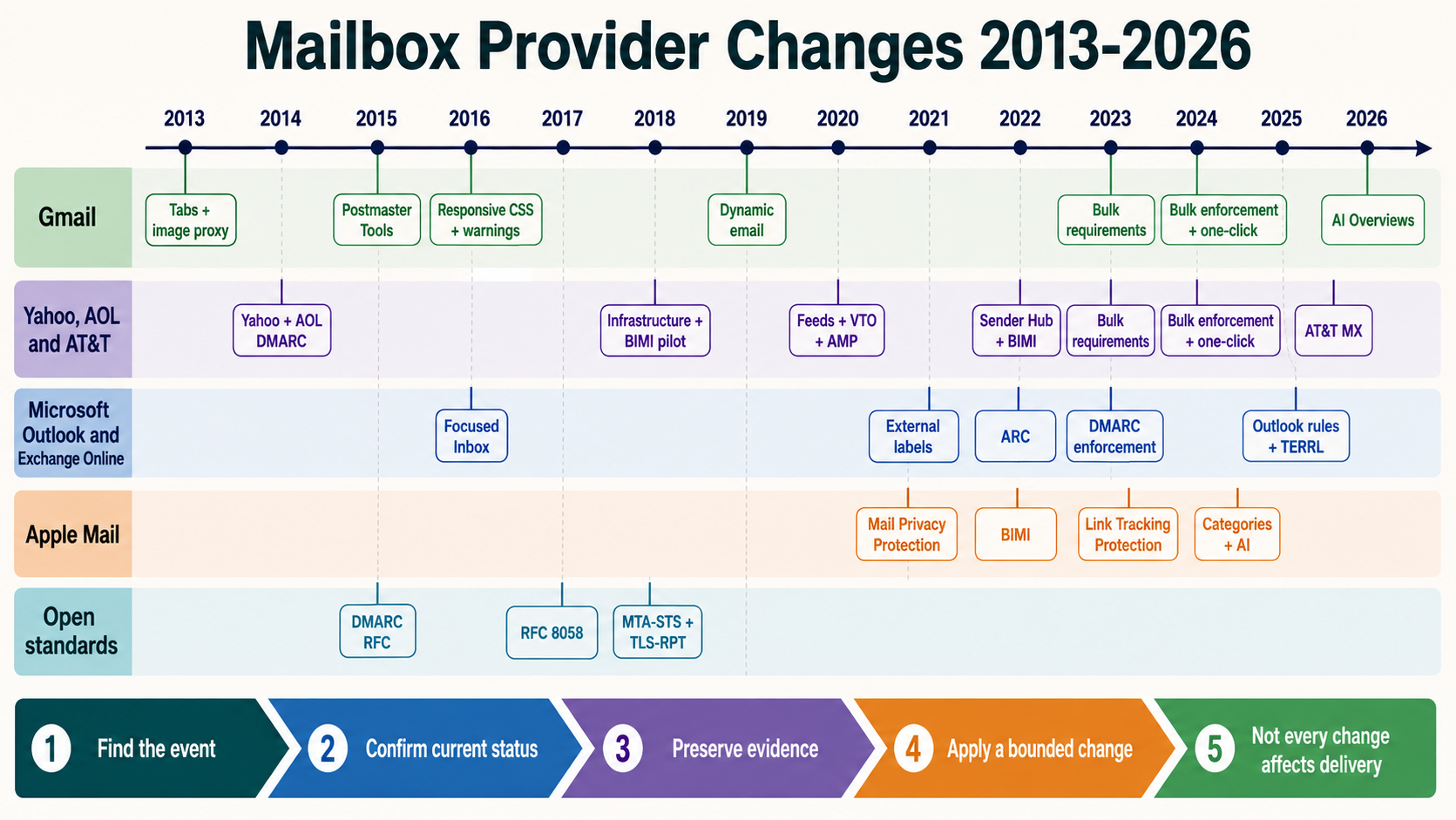
SNDS reports what Microsoft observes for authorized sending IPs. It does not expose every domain, user, content or machine-learning decision, and a favorable status does not guarantee inbox placement. Microsoft moved SNDS to a newer portal in 2026 and changed available fields and automated access. Record portal version and export time rather than assuming an old field will always exist.
Microsoft announced that trap-hit counts would no longer be included beginning 22 July 2026. During transition, old and new portal values could differ. A missing count must not be interpreted as zero traps. Preserve acquisition and lifecycle controls, and use SMTP, JMRP and internal cohort evidence instead of building incident logic around an unavailable field.
Normalize daily SNDS and message evidence for correlation
snds_daily(
  observation_date_utc, sending_ip, message_volume,
  status_or_color, complaint_indicator, filter_result,
  source_portal, exported_at_utc
)
smtp_daily(
  date_utc, sending_ip, microsoft_mx, campaign_id,
  accepted_rcpt, deferred_rcpt, rejected_rcpt,
  enhanced_reply, tenant_id, credential_id
)
Retain raw exports beside normalized data. Definitions, availability and presentation can change. Never backfill a removed value with zero. Mark it unavailable and version dashboards so a graph does not show fictional improvement on the change date.
Join at IP and UTC day, then drill into hour, campaign, customer, credential and cohort through internal logs. SNDS aggregation cannot identify a bad tenant by itself.
Connect JMRP complaints to suppression and source correction
JMRP supplies complaint reports for participating senders. Treat each report as both a recipient instruction and a quality event. Parse safely, map through message identifiers, suppress for the appropriate marketing scope, and record source, template, journey and acquisition age. Restrict access because reports can contain message and recipient data.
| Task | Control |
|---|---|
| Enrollment | Controlled organizational accounts and maintained IP authorization |
| Ingestion | Quarantine malformed reports and deduplicate |
| Suppression | Apply across every marketing route |
| Attribution | Map queue/message ID to campaign and acquisition source |
| Trend | Use accepted denominators and minimum volume |
A complaint rate that looks small globally can be severe in one tenant or hour. Analyze the smallest accountable unit.
Read SNDS beside Microsoft SMTP responses and queues
Aug 29 12:04:31 mta postfix/smtp[24810]: ABC123:
 to=<[email protected]>, relay=outlook-com.olc.protection.outlook.com,
 dsn=4.7.0, status=deferred (host said: 451 4.7.0 ...)
This illustrates fields to preserve, not a universal code meaning. Keep the full remote response, enhanced status, MX hostname, connection timing, recipient domain, queue ID and retries. Microsoft wording and URLs can change. Interpret the exact live response through Microsoft documentation and correlate it with the same IP and period in SNDS.
Separate throttling, recipient policy, authentication failure, nonexistent user and reputation pressure. A daily status cannot explain a specific queue, and a 250 handoff does not prove inbox placement.
Find one customer or credential hidden inside an IP aggregate
For a shared platform, calculate each tenant’s proportion of IP volume, complaints, unknown-user responses, new-recipient exposure and hourly growth. Alert on deviation from tenant and pool history. A small customer can create harmful traffic during a short burst and disappear in daily totals.
| Finding | Action |
|---|---|
| Credential traffic absent from campaign plan | Revoke and investigate compromise |
| One tenant drives JMRP surge | Pause stream, suppress and review acquisition |
| All tenants see simultaneous deferral | Check IP reputation, rate policy and platform changes |
| One DKIM domain suffers while IP is stable | Investigate domain, content and audience evidence |
Moving the same tenant to another IP contaminates comparison and spreads damage. Contain the cause, then restore in measured stages.
Account for daily aggregation, lag and changing populations
Establish a per-IP baseline using comparable weekdays, sending streams and volume bands. A fivefold increase in volume can change the observed state even if a raw complaint count appears stable. Keep send time, SMTP event time, complaint arrival time, SNDS observation date and export time as separate fields. They describe different stages and should not be collapsed into one date.
| Question | Comparison |
|---|---|
| Did traffic change first? | Internal recipients/hour against campaign and credential plan |
| Did Microsoft defer delivery? | Enhanced replies and queue age by Microsoft MX |
| Did recipients complain? | JMRP arrival mapped back to original message time |
| Did SNDS reflect the event? | Subsequent observation periods, not only incident hour |
For recovery, use at least several independent signals: abusive traffic stopped, JMRP complaints were suppressed, Microsoft replies normalized, SNDS moved toward baseline and the corrected cohort remained stable. Avoid a universal “green means safe” rule. A low-volume day may look favorable while hiding the fact that wanted traffic is still deferred.
Document unavailable data explicitly. Product changes, authorization gaps and export failures should create a telemetry warning, never an automatic healthy status.
Keep SNDS authorization aligned with actual route ownership
Maintain active, warming, standby and retired IP ranges with owner, provider, PTR, stream and authorization status. Review access when people or vendors change. A portal gap can result from lost authorization rather than clean traffic, while a retired address can remain visible after control ends. Provider-managed customers should obtain appropriate telemetry through their provider instead of attempting to claim address space they do not operate.
Before incident analysis, confirm the message really used the IP shown in SNDS. Follow the final outbound MTA or ESP event, not an application server address. For multihomed MTAs, NAT or route selection can change the connecting IP by destination. Keep routing version and queue ID so a complaint or SMTP response can be mapped to the correct address.
During a security event, compare SNDS volume with authenticated application submissions and MTA queue admissions. A positive unexplained delta is not automatically malicious because definitions and retry accounting can differ, but it is enough to inspect compromised credentials, relays and unsanctioned hosts.
Run a weekly SNDS review that ends in an accountable decision
Review every production IP, missing export, material volume change, new complaint pattern and Microsoft-specific queue deviation. Assign each anomaly to an owner with a cohort, credential or infrastructure hypothesis. Record why no action is needed when a change is expected. This prevents the portal from becoming a dashboard that operators open only after a delivery incident.