Exchange Online Send From Alias: Configuration and Diagnostics
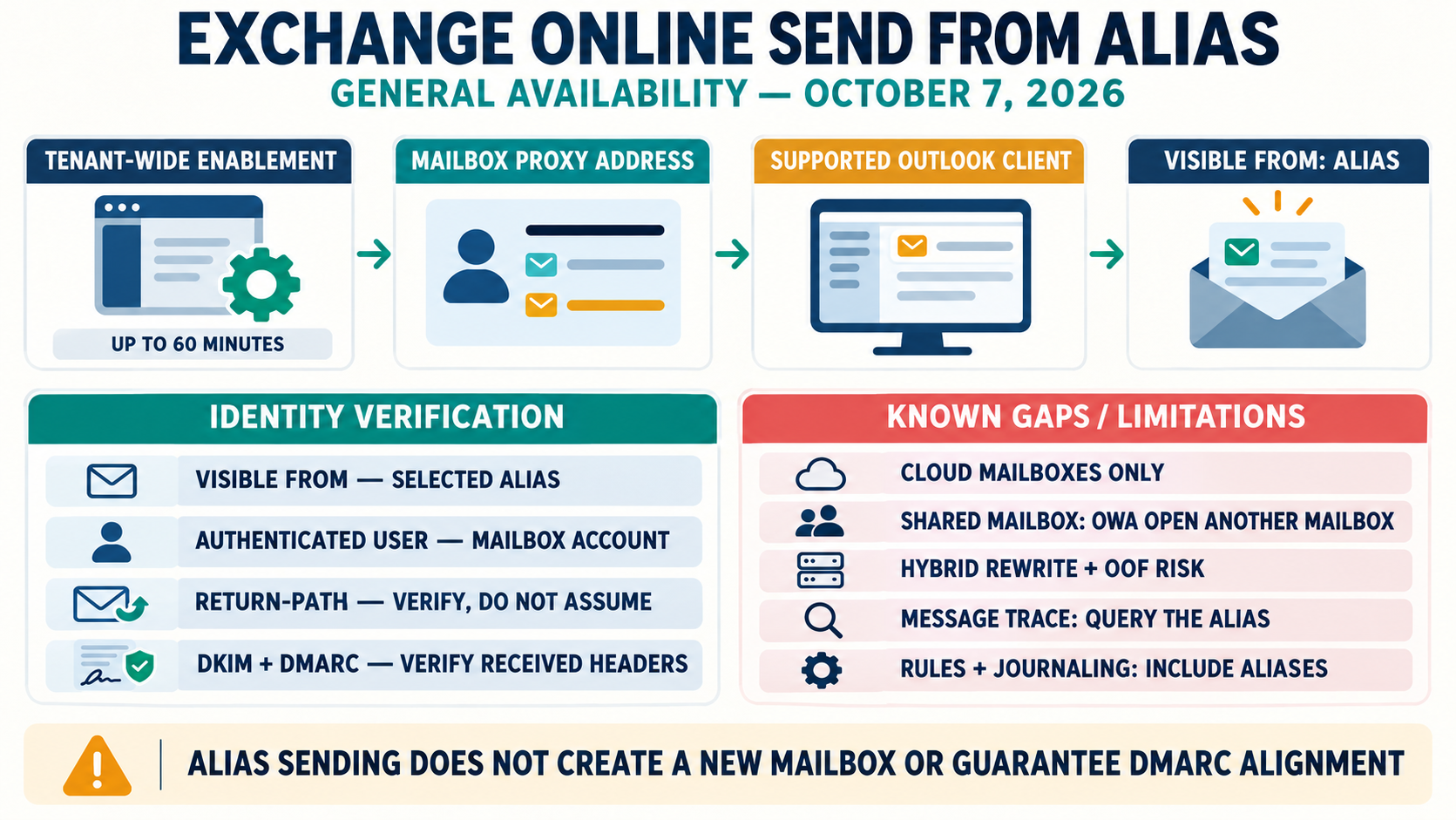
Exchange Online send from alias is a tenant-wide address-preservation feature, not a new mailbox or authentication identity. Microsoft announced general availability on October 7, 2026. When enabled, a supported Outlook client can send from a proxy address attached to an Exchange Online mailbox, and replies can use the alias that received the message. Operators still need to verify envelope identity, DKIM, DMARC, policy matching, client support, hybrid rewriting and message trace by the exact alias.
What became generally available
On October 7, 2026, the Exchange Team moved Sending From Aliases from public preview to general availability. Microsoft says Exchange Online users can send from any configured alias or proxy address, reply using the alias to which a message was addressed, and choose displayed aliases in supported Outlook clients. The announcement was updated November 18, 2026 and retains important known gaps.
Understand the object and identity boundaries
| Object or identity | What it is | What alias sending changes | What it does not create |
|---|---|---|---|
| Exchange Online mailbox | The licensed or shared cloud mailbox that owns the proxy address | Allows a supported composition path to preserve a selected proxy address in visible From | A second mailbox, separate quota, separate credentials or separate Sent Items store. |
| Primary SMTP address | The mailbox’s default uppercase SMTP proxy address in directory representation | No longer forcibly replaces every alias on messages when the feature is enabled | A universal identity for tracing, policies or replies after alias preservation is enabled. |
| Alias or proxy address | A secondary SMTP address attached to the same recipient object | Can be selected as visible From in supported clients | Send As permission for another mailbox or ownership of an unrelated address. |
| Accepted domain | A domain Microsoft 365 has accepted for tenant mail flow | Can supply aliases and can be disabled for sending as a whole domain | Automatic DKIM signing, DMARC alignment or user-level authorization. |
| Authenticated account | The user or application identity that submits the message | Remains the underlying mailbox security principal | A guarantee that every visible alias is permitted by every submission method. |
An alias is another address on the same mailbox recipient. The mailbox security principal, storage, calendar and Sent Items remain the mailbox’s. If the organization needs separate permissions, lifecycle, automatic replies, retention or staff access, a shared mailbox or another supported recipient object can be the correct design instead.
Enable the tenant setting
# Exchange Online PowerShell: capture the current value first.
Get-OrganizationConfig | Format-List SendFromAliasEnabled

# Enable tenant-wide alias preservation.
Set-OrganizationConfig -SendFromAliasEnabled $true

# Microsoft says propagation can take up to 60 minutes.
Get-OrganizationConfig | Format-List SendFromAliasEnabled
Administrators can also use Exchange admin center, Settings, Mail flow, Turn On Sending from Aliases. Microsoft says the change can take up to 60 minutes. Record the previous value, change time, operator and test cohort even though the switch applies tenant-wide.
There is no documented per-mailbox feature switch
The GA control is organizational. A user can select only proxy addresses actually attached to the mailbox, but enabling preservation affects message behavior across the tenant. Use domain send restrictions, address management, mail flow controls and organizational policy for narrower governance. Do not represent these as a native per-mailbox SendFromAliasEnabled switch.
Inventory primary and proxy addresses
# Inventory mailbox proxy addresses.
Get-Mailbox -ResultSize Unlimited |
  Select-Object DisplayName, PrimarySmtpAddress,
    @{Name='SmtpAddresses';Expression={
      ($_.EmailAddresses | Where-Object {$_.PrefixString -eq 'smtp'}) -join ';'
    }}

# Inspect one mailbox. Uppercase SMTP denotes the primary proxy;
# lowercase smtp entries are secondary proxy addresses.
Get-Mailbox -Identity [email protected] |
  Format-List PrimarySmtpAddress, EmailAddresses
Confirm address ownership before enablement. Remove abandoned aliases only after checking inbound use, account recovery, vendors, customer contacts and compliance retention. An address can be business-critical even if the user has never selected it in From.
Supported client surfaces and required testing
| Surface | Microsoft’s GA description | Operator test |
|---|---|---|
| Outlook on the web | Select aliases in compose settings and the From field | Verify new message, reply-to-alias, default address and Sent Items. |
| New or supported Outlook for Windows | Use the From dropdown or enter the alias | Test deployed build and channel; capture the actual received From. |
| Outlook for Mac | Use the From dropdown or enter the alias | Test the exact client version and account type. |
| Outlook mobile | Tap the From field and select an available alias | Test both iOS and Android release channels used by the organization. |
| Shared mailbox | Supported only in OWA when a delegate opens it with Open another mailbox | Do not certify desktop Outlook shared-mailbox alias sending. |
| SMTP AUTH, Graph, third-party clients and applications | Not promised by the GA client matrix | Validate each submission path separately and keep its authentication controls intact. |
General availability does not eliminate build, channel or account-type differences. Treat the published client list as scope, then validate the exact versions deployed in the organization. Community comments are useful as reports, but only reproduced tenant evidence and Microsoft support establish a production defect.
New message and reply behavior
For a new message, the user exposes the From field and selects or enters a configured alias in a supported client. For a reply, Microsoft says the client automatically uses the alias to which the original message was sent. Test both flows because compose preferences, cached autocomplete, default address and delegated mailbox context can differ.
Diagnose an unexpected default alias
# Inspect a mailbox default From choice in OWA and new Outlook.
Get-MailboxMessageConfiguration -Identity [email protected] |
  Format-List SendAddressDefault

# Return to normal default selection while retaining manual alias choice.
Set-MailboxMessageConfiguration -Identity [email protected] \
  -SendAddressDefault $null
SendAddressDefault can cause Outlook on the web and new Outlook to display a secondary address as the default From even when it is not selected in the visible Addresses to send from list. Set it to null or the primary address to restore the intended default without removing manual alias selection.
Shared mailbox support is narrowly documented
Microsoft says a delegate can send from a shared-mailbox alias only in Outlook on the web after opening the shared mailbox with Open another mailbox. The announcement explicitly says Outlook client support for shared-mailbox alias sending is unavailable. Do not turn a successful user-mailbox test into a shared-mailbox claim.
Alias sending is not Send As delegation
Selecting a proxy on one’s own mailbox differs from sending as another mailbox. Shared mailbox and delegated scenarios still require the appropriate Exchange permissions and a supported client flow. Preserve authenticated user, mailbox owner, visible From and audit evidence as separate fields.
Control which accepted domains can send
| Domain state | Receive at aliases | Send from aliases | Use case |
|---|---|---|---|
| Normal accepted domain | Allowed according to recipient configuration | Allowed when tenant alias sending is enabled and the alias is valid | Active organizational brand or role domain. |
| SendingFromDomainDisabled = true | Can remain available for receipt | Blocked for sending from addresses in that domain | Legacy, receive-only or unsafe outbound namespace. |
| SendingToDomainDisabled = true | Delivery to recipients in the domain is blocked | Does not by itself define outbound permission | Unused MOERA or other domain that should not receive. |
| Unverified or non-accepted domain | Not a normal tenant proxy-address namespace | Not made valid by typing it in From | External domains require a different supported authorization model. |
# Review domain-level send and receive controls.
Get-AcceptedDomain |
  Format-Table Name, DomainName, DomainType,
    SendingFromDomainDisabled, SendingToDomainDisabled -Auto

# Example: keep legacy.example receivable but prevent alias sending.
Set-AcceptedDomain -Identity legacy.example \
  -SendingFromDomainDisabled $true
SendingFromDomainDisabled is useful when a legacy or routing domain must still receive but must never appear as outbound From. It is domain-wide. More granular restrictions require carefully tested mail flow rules or organizational controls.
Verify every identity in a received message
| Evidence layer | Expected question | Where to verify | Unsafe assumption |
|---|---|---|---|
| RFC 5322 From | Did the recipient see the selected alias? | Raw received message and recipient client | The compose UI proves the transmitted value. |
| Sender header | Did delegation or a different author identity create a Sender field? | Raw received headers | From and Sender always contain the same address. |
| SMTP MAIL FROM / Return-Path | Which envelope identity handled bounces and SPF? | Return-Path and Authentication-Results smtp.mailfrom | It must equal the visible alias or primary address. |
| Authenticated submitter | Which mailbox account or application submitted the message? | Entra sign-in, mailbox audit and submission evidence | The visible alias is a separate login. |
| DKIM d= domain | Which domain signed the message? | DKIM-Signature header and DNS selector | Exchange automatically signs with every new alias domain. |
| DMARC result | Did aligned SPF or aligned DKIM pass for the visible From domain? | Receiver Authentication-Results and domain policy | Tenant enablement guarantees alignment or placement. |
From: Service Desk <[email protected]>
Sender: <optional and submission-dependent>
Return-Path: <verify actual envelope identity>
DKIM-Signature: ... d=<verify signing domain>; s=<selector>; ...
Authentication-Results:
  spf=<result> smtp.mailfrom=<envelope domain>;
  dkim=<result> header.d=<signing domain>;
  dmarc=<result> header.from=alias.example

Do not fabricate these values. Capture them from an external receiver.
Use an external test receiver because an internal copy can omit or transform authentication evidence. Keep the complete raw MIME, not a screenshot or copied header fragment. The visible alias is the DMARC RFC 5322 From domain, but the pass still depends on aligned SPF or aligned DKIM at the receiver.
Do not promise that Return-Path equals the alias
Return-Path records the final SMTP envelope sender and can be provider-controlled or submission-specific. It is used for bounces and SPF evaluation. Alias preservation concerns message addresses, not a universal promise about the envelope. Verify smtp.mailfrom in Authentication-Results and test bounce processing separately.
Configure DKIM for every alias From domain
# Every alias domain used for visible From needs an authentication review.
Get-DkimSigningConfig |
  Format-Table Domain, Enabled, Status, Selector1CNAME, Selector2CNAME -Auto

# Example only after the required selector CNAME records are published.
Set-DkimSigningConfig -Identity alias.example -Enabled $true
Microsoft’s authentication troubleshooting guidance says to enable DKIM signing for the From domain when SPF passes without alignment and DMARC otherwise fails. Publish the required selectors, enable signing, then verify the actual d= domain and result at independent receivers. Adding an accepted domain or mailbox alias alone is not proof of DKIM readiness.
DMARC evaluates the selected alias domain
DMARC uses the domain in visible RFC 5322 From. At least one aligned SPF or DKIM result must pass. Publish a valid DMARC record for every organizational domain used as an alias, route aggregate reports to an approved processor and segment results by From domain. Do not assume that good primary-domain DMARC covers a different alias domain.
SPF can pass without DMARC alignment
SPF authenticates the SMTP MAIL FROM domain, not automatically the visible alias. Microsoft 365 can produce a legitimate SPF pass using an envelope domain that does not align with the alias From domain. Aligned DKIM can still satisfy DMARC. Diagnose the properties in Authentication-Results instead of reading only pass or fail badges.
Sent Items and display behavior
The message remains activity of the same mailbox, but the stored or displayed From can change when alias preservation is enabled. Microsoft warns that organizations with Outlook aliases or customized display names can see different values on sent messages. Validate archive ingestion, eDiscovery display, user search and support procedures.
Hybrid paths can rewrite or expose routing addresses
The feature is for Exchange Online hosted mailboxes. Microsoft says messages to and from on-premises can be rewritten by those servers. In a hybrid path, the mail.contoso.onmicrosoft.com routing address can be preserved instead of resolving to the primary SMTP address, and OOF can then reply from that routing address.
Test automatic replies separately
Out-of-office messages, calendar responses and system-generated messages do not necessarily use the same compose path as a user message. The GA article identifies hybrid OOF routing-address exposure and lists calendar support as a possible future enhancement rather than a commitment. Test each automated message class and do not generalize from a manual send.
Rules, hygiene and routing need alias-aware conditions
Microsoft warns that address-specific hygiene, journaling and mail flow rules can match the primary address but miss alias messages. Search exports for every affected mailbox and domain, then test both positive and negative controls. Prefer domain or mailbox properties when the policy intent is broader than one literal address.
Prove compliance capture before rollout
Send controlled alias messages through every required journal, DLP, retention, encryption and supervisory path. Confirm the journal copy contains the identity evidence needed by compliance. A delivered external test does not prove internal capture or routing occurred.
Message trace must use the alias
# Query using the exact alias. A primary-address query can omit it.
Get-MessageTraceV2 \
  -SenderAddress [email protected] \
  -StartDate (Get-Date).AddDays(-2) \
  -EndDate (Get-Date)

# Prefer NetworkMessageId or MessageTraceId for message-level follow-up.
Microsoft says a trace query using only the primary SMTP address does not include messages sent from an alias. Query the exact alias. Remember that general message trace sender semantics can derive from SMTP MAIL FROM for some submission paths, so retain NetworkMessageId, Message-ID, recipient and time as additional keys.
Do not enable SMTP AUTH merely for this feature
Modern Outlook clients do not normally use SMTP AUTH. Microsoft recommends disabling SMTP AUTH tenant-wide and enabling it only for mailboxes that still require it. The alias GA announcement documents Outlook clients, not a blanket application-submission guarantee. Test SMTP AUTH, OAuth SMTP, Graph and third-party applications separately without weakening authentication.
Applications need an explicit sender contract
For each application, define authenticated principal, authorized mailbox, requested From, envelope sender, DKIM domain, bounce path and expected trace identity. Reject arbitrary user-supplied From values. An application that can type an alias is not necessarily authorized to use it, and a successful API response is not evidence of the received identity.
Current Microsoft known gaps
| Known gap or behavior change | Operational impact | Required control |
|---|---|---|
| Exchange Online hosted mailboxes only | On-premises Exchange can rewrite aliases before or after the cloud path | Test hybrid ingress and egress separately. |
| Hybrid routing address preservation | mail.contoso.onmicrosoft.com can remain visible and can be used by OOF replies | Inventory routing aliases and test automated responses before tenant-wide enablement. |
| Shared mailbox client limitation | Desktop Outlook does not support the documented shared-mailbox alias path | Use OWA Open another mailbox for the supported case. |
| Rules and hygiene conditions | Address-specific conditions might match the primary but miss an alias | Inventory every rule, exception and connector condition containing mailbox addresses. |
| Journaling and compliance routing | A journal or route condition can omit alias traffic | Test compliance capture with every approved alias domain. |
| Message trace behavior | A primary-address query omits messages sent using an alias | Search using the exact alias and retain NetworkMessageId. |
| Sent message presentation | Different aliases or display names can appear after enablement | Validate user support expectations and archive rendering. |
Controlled pre-production test matrix
| Test | Controlled setup | Evidence retained | Pass condition |
|---|---|---|---|
| New external message | Cloud user selects one approved alias | Raw MIME, trace, Sent Items copy and recipient screenshot | Visible From is the alias and authenticated identities are understood. |
| Reply to alias | External message is addressed to the alias | Inbound headers, reply compose From and returned message | Supported client automatically replies from the addressed alias. |
| Primary-address control | Same user sends the same neutral message from primary | Paired raw headers and trace | Only intended identity fields differ. |
| Shared mailbox OWA | Delegate uses Open another mailbox | Delegate identity, From, audit and received message | Alias is preserved on the documented OWA path. |
| Shared mailbox desktop negative control | Same delegate attempts desktop Outlook path | Client version and observed limitation | Runbook does not claim unsupported behavior. |
| Hybrid and OOF | Message crosses each hybrid direction and triggers automatic reply | Routing address, From, OOF identity and trace | No unexpected MOERA exposure or rewrite remains unowned. |
| Policy and journal coverage | Messages from primary and every alias domain | Rule events, DLP/hygiene action and journal copy | Each required control acts on alias traffic. |
| Authentication | Send to independent receivers that expose raw headers | SPF, DKIM and DMARC properties per alias domain | DMARC has at least one aligned pass where required. |
Keep message content neutral and constant. Change only alias, client or path under test. Use non-production recipients that expose raw headers, and do not send bulk test traffic. A passing case proves that exact combination, not every user, domain, client and hybrid route.
Evidence map
| Source | What it establishes | Limitation |
|---|---|---|
| Get-OrganizationConfig | Tenant SendFromAliasEnabled state | Does not prove propagation to every client or message. |
| Get-Mailbox EmailAddresses | Primary and secondary proxy addresses on the mailbox | Does not show which alias a past message used. |
| Get-AcceptedDomain | Domain type and send/receive disable controls | Does not prove DKIM or DMARC readiness. |
| Get-DkimSigningConfig | Whether Microsoft 365 DKIM signing is configured for a domain | Receiver verification still requires an actual message and DNS. |
| Get-MailboxMessageConfiguration | SendAddressDefault for OWA and new Outlook | Client caches and other clients can behave differently. |
| Message trace queried by alias | Exchange Online processing path and actions for that alias | Trace Sender semantics and visible From can differ by submission path. |
| Raw received headers | Visible, envelope and authentication identities seen by the receiver | One receiver and one message are not universal placement evidence. |
Troubleshooting sequence
1. Record the tenant SendFromAliasEnabled value and last change time.
2. Allow the documented propagation window before declaring failure.
3. Confirm the alias is an SMTP proxy on the intended cloud mailbox.
4. Confirm its accepted domain is allowed for outbound alias use.
5. Identify the exact client, build, account type and submission method.
6. Reproduce with one external recipient that exposes raw headers.
7. Query message trace using the alias, not only the primary address.
8. Compare visible From, Sender, Return-Path, DKIM d= and DMARC result.
9. Inspect rules, journaling, hygiene, connectors and hybrid rewriting.
10. Roll back only the smallest failing boundary and preserve evidence.
Alias missing from the From list
Confirm tenant enablement, propagation time, mailbox proxy address, accepted-domain state and client build. In Outlook on the web and supported Outlook, inspect the configured Addresses to send from. Clear stale client state only after server-side evidence is correct. Manually typing an unrelated address is not a valid test.
Alias is rewritten to primary
Identify where rewriting occurred. The tenant switch might be off or not propagated; an on-premises hybrid hop can rewrite; the client might submit the primary address; or the attempted path might not be supported. Compare Exchange Online trace with final raw headers and each transport boundary.
Alias is visible but DMARC fails
Read header.from, smtp.mailfrom and header.d. If SPF passes without alignment, enable and verify DKIM for the alias domain. If DKIM fails after a gateway modifies the body, diagnose the modification and signing order. Do not replace the alias with the primary merely to hide an authentication defect.
Message is missing from trace
Search by the exact alias, recipient, narrow time range, NetworkMessageId and Message-ID. Confirm whether the message entered Exchange Online and whether another relay submitted it. A primary-address-only search is an expected blind spot after alias preservation.
Production monitoring
- Changes to SendFromAliasEnabled and accepted-domain send restrictions.
- Aliases added or removed from mailboxes and shared mailboxes.
- DMARC failures grouped by exact alias From domain and submission path.
- Rule, journal, DLP and hygiene events for primary versus alias traffic.
- Message trace searches that use only primary addresses.
- Hybrid OOF or system messages exposing MOERA routing domains.
- Support tickets by client, build, shared-mailbox context and alias.
- Applications requesting aliases outside their approved sender contract.
Rollback options
| Rollback target | Action | Residual check |
|---|---|---|
| Tenant feature | Set SendFromAliasEnabled to false | Confirm messages return to primary-address rewriting after propagation. |
| One alias | Remove the proxy address only after inbound dependencies and ownership are reviewed | Check replies, account recovery, subscriptions and historical contacts. |
| One domain | Set SendingFromDomainDisabled to true when it must remain receive-only | Confirm required aliases still receive and no approved outbound workflow is broken. |
| Default From behavior | Clear or set SendAddressDefault to the primary address | Confirm users can still select allowed aliases manually. |
| Policy regression | Restore the prior rule and add explicit alias-aware coverage in a controlled change | Retest journaling, hygiene, routing and DLP outcomes. |
Disabling the tenant feature returns alias rewriting behavior after propagation, but it does not undo messages already sent or repair policies that were incorrectly scoped. Preserve the incident evidence and complete the control gap even if rollback restores user behavior.
Common incorrect conclusions
- “An alias is a second mailbox.” It is another proxy address on the same recipient object.
- “GA means every client and API is supported.” Microsoft publishes a client matrix and explicit shared-mailbox limitations.
- “The alias automatically becomes Return-Path.” Envelope identity is submission-dependent and must be observed.
- “DKIM and DMARC inherit from the primary domain.” The alias From domain needs its own aligned authentication evidence.
- “A primary-address trace covers the mailbox.” Microsoft says alias messages require an alias query.
- “Existing rules still match the same user.” Literal-address rules can miss the alias.
- “Shared mailbox support works in desktop Outlook.” The documented shared path is OWA Open another mailbox.
- “Turning it off cleans up every effect.” Sent mail, archives, reports and external replies persist.
Safe rollout sequence
- Inventory cloud mailboxes, shared mailboxes, aliases, accepted domains and hybrid routing addresses.
- Classify approved outbound aliases and set legacy or routing domains receive-only where appropriate.
- Enable and verify DKIM plus DMARC for every approved visible From domain.
- Audit mail flow, hygiene, journal, DLP, connector and archive conditions for literal primary addresses.
- Capture the organization setting, enable it and allow the documented propagation window.
- Run the controlled matrix with a small support-ready cohort.
- Validate raw headers, message trace by alias, Sent Items, replies, OOF and compliance capture.
- Expand by client and business unit while monitoring authentication and policy divergence.
- Retain a tenant, domain, mailbox-default and rule rollback plan.
Assign ownership
Exchange administrators own the tenant switch, proxy addresses, accepted domains and trace. Identity teams own account and application authorization. Security and deliverability teams own SPF, DKIM, DMARC and abuse monitoring. Compliance owns journaling, DLP and retention coverage. Support owns client-specific instructions and evidence collection. Business owners approve which brands and role addresses users may present.
Current status on November 21, 2026
Sending From Aliases is generally available for Exchange Online hosted mailboxes. Microsoft’s Exchange Team announcement is dated October 7 and was updated November 18, 2026. The tenant switch, supported Outlook paths, up-to-60-minute propagation, domain restrictions and known gaps described here remain in the current official guidance. Future display-name, filter/default and calendar enhancements are investigations, not commitments.
Primary Microsoft references
- Sending From Email Aliases GA: October 7 GA announcement, November 18 update, enablement, clients, domain controls and known gaps.
- Set-OrganizationConfig: SendFromAliasEnabled behavior, default false state and Exchange Online scope.
- Set-AcceptedDomain: SendingFromDomainDisabled and SendingToDomainDisabled controls.
- Default From address troubleshooting: SendAddressDefault diagnosis and reset.
- Configure DKIM for custom domains: Accepted-domain DKIM configuration and selector requirements.
- Troubleshoot Microsoft 365 authentication: From-domain DKIM and DMARC alignment diagnosis.
- Exchange Online message trace: Message trace evidence, sender filters and message-level follow-up.
- SMTP AUTH controls: Modern-client boundary and least-privilege SMTP AUTH configuration.