Gmail Postmaster Tools API v2: v1 migration and data guide
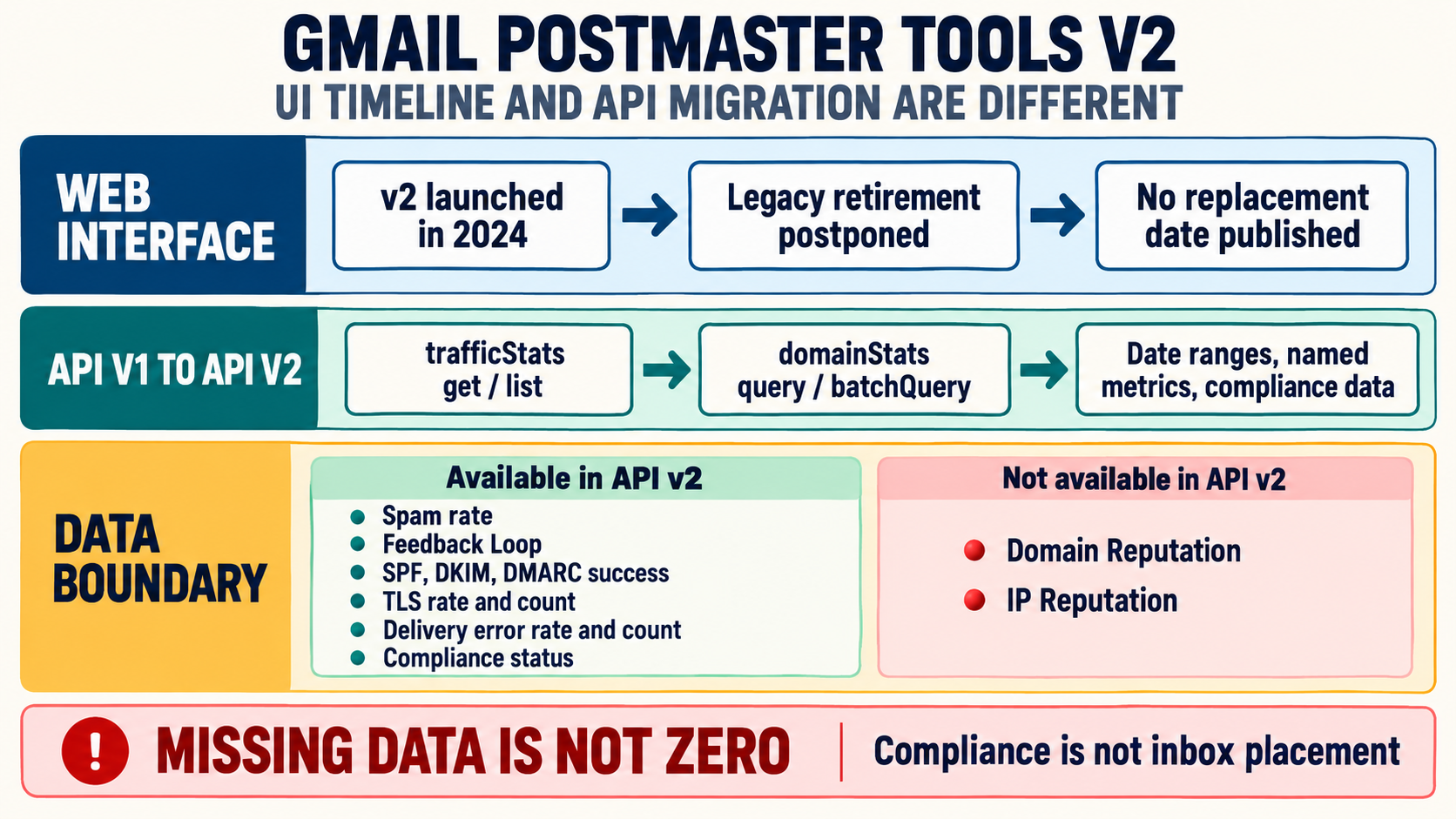
Gmail Postmaster Tools API v2 became generally available on February 3, 2026. This is a real API migration, not a version-number change: trafficStats becomes domainStats, daily get/list calls become date-range queries, batch and compliance methods are added, and Domain and IP Reputation data are not carried into v2. This guide shows exactly what changed, what data v2 returns and what each signal can and cannot prove.
The three dates that must not be combined
Three timelines must remain separate. Google launched the Postmaster Tools web interface v2 in 2024. Google then made the Postmaster Tools API v2 generally available on February 3, 2026. In June 2026, Google expanded v2 domain and user administration and added a deliverability-status verdict to compliance data.
Google later postponed retirement of the legacy web interface and did not publish a replacement deadline. Its help page also says the v1 API will retire and integrations must migrate, but it does not currently provide a final v1 API shutdown date. A runbook must therefore record these as different states instead of inventing one universal retirement date.
How API v1 represented Postmaster data
API v1 exposed a registered domain through domains and returned daily TrafficStats. A client could request one date with domains.trafficStats.get or list available daily records with domains.trafficStats.list. The response used a fixed schema containing user-reported spam ratio, feedback-loop data, SPF and DKIM success ratios, encryption ratios, delivery errors, IP reputation groups and a domain reputation category.
That fixed object was convenient for a daily collector but difficult to query selectively. A client generally retrieved the complete record even when it needed only two signals. Multi-day and multi-domain reporting required repeated requests and local assembly. Reputation categories were available, but their apparent simplicity also encouraged teams to treat a broad category as a complete explanation for delivery.
Exact API v1 and v2 differences
API v2 changes the resource model and makes the requested dataset explicit. A client sends a date range, aggregation granularity and one or more named metric definitions to domains.domainStats.query. The caller chooses a name for each metric, selects the underlying standard metric and supplies the supported filter where required. The response uses those caller-defined names as keys.
| Area | API v1 | API v2 | Migration consequence |
|---|---|---|---|
| Statistics resource | domains.trafficStats | domains.domainStats and top-level domainStats | Replace resource names and response parsing; this is not a base-URL-only change. |
| Read methods | get for one day and list for multiple daily records | domains.domainStats.query for a date range | Build a POST request with a time query and requested metric definitions. |
| Multiple domains | One domain workflow per request sequence | domainStats.batchQuery | Batch only the domains and metrics needed; retain per-domain errors and missing-data states. |
| Metric schema | Fixed fields in one TrafficStats object | Named MetricDefinition objects and returned values | Map by the caller-defined metric name and validate type, unit, filter and aggregation. |
| Compliance | No equivalent compliance-status method | domains.getComplianceStatus | Store requirement-level states separately from traffic statistics. |
| Domain administration | Primarily get and list | create, delete, verify, verification token and access-management methods | Use least-privilege scopes and treat ownership changes as administrative operations. |
| Reputation | Domain and IP reputation fields were exposed in v1 traffic statistics | No Domain or IP Reputation metric in the v2 API | Do not convert an unavailable field to zero, neutral or good. Preserve it as unavailable. |
The migration boundary matters. Updating /v1/ to /v2/ without changing methods, request bodies, response decoding and unavailable-field handling will fail or silently corrupt reporting. Preserve a v1 sample and v2 sample for the same verified domain and overlapping dates, then reconcile every metric before retiring the old collector.
Request model before and after migration
API v1 collection pattern
GET /v1/domains/example.com/trafficStats?startDate.year=2026&...
  -> fixed daily TrafficStats records
  -> local code reads userReportedSpamRatio, domainReputation,
     ipReputations, authentication ratios and deliveryErrors
API v2 query pattern
POST /v2/domains/example.com/domainStats:query
{
  "metricDefinitions": [
    {"name": "spam_rate", "baseMetric": {"standardMetric": "SPAM_RATE"}},
    {"name": "dmarc_rate", "baseMetric": {"standardMetric": "AUTH_SUCCESS_RATE"},
     "filter": "auth_type = \"dmarc\""}
  ],
  "timeQuery": {"startDate": {...}, "endDate": {...}},
  "aggregationGranularity": "DAILY"
}
  -> named DomainStat values plus explicit missing-data handling
Data available from API v2 and what it means
Each v2 request defines its own measurement contract. Store the domain, requested date range, aggregation granularity, metric name, standard metric, filter, API version, retrieval time and response availability. Without that context, a number such as 0.2 cannot be interpreted safely.
| v2 metric or result | What it represents | How to interpret it safely |
|---|---|---|
SPAM_RATE | Gmail user-reported spam rate for the documented population. | A rate needs its date range and population. Missing data is not a zero complaint rate. |
FEEDBACK_LOOP_ID | Feedback-ID values observed for eligible traffic. | Use stable campaign identifiers and do not treat an absent ID as proof that no campaign generated complaints. |
FEEDBACK_LOOP_SPAM_RATE | Spam rate for a selected Feedback-ID, optionally aggregated by From-header domain or all matching DKIM identities. | Compare like-for-like aggregation keys and retain the exact filter used. |
AUTH_SUCCESS_RATE | Success rate selected by auth_type: SPF, DKIM or DMARC. | Authentication success does not prove alignment for every message or guarantee inbox placement. |
TLS_ENCRYPTION_MESSAGE_COUNT | Count of messages covered by the selected inbound or outbound TLS direction. | Use the count as a denominator check; it is not a certificate or policy validation result. |
TLS_ENCRYPTION_RATE | Rate of messages encrypted in transit for the selected direction. | TLS protects a transport hop and does not authenticate the visible From identity. |
DELIVERY_ERROR_COUNT | Count of temporary failures or permanent rejects, optionally filtered by reason. | Join it to SMTP logs. A provider aggregate does not identify an individual message. |
DELIVERY_ERROR_RATE | Rate for selected reject or temporary-failure classes and reasons. | Retain error_type and error_reason; do not combine unlike failure classes. |
| Compliance status | Requirement states for SPF, DKIM, DMARC, alignment, DNS, formatting, TLS, spam rate and unsubscribe controls when available. | A compliant state is a sender-requirement signal, not an allowlist or placement guarantee. |
| Deliverability status verdict | A domain-level status and reason such as low volume, high SMTP errors, non-compliance, high spam rate or user-feedback state. | Treat it as provider evidence with data-availability limits, not as a recipient-level folder verdict. |
Counts and rates answer different questions. A rate can move because the numerator changed, the denominator changed or low-volume privacy thresholds changed availability. When both a count and rate exist, retain both. When data is omitted, mark it unavailable; never insert zero merely to keep a chart continuous.
Domain and IP Reputation are not v2 API data
Postmaster Tools reports receiver-side aggregate evidence for eligible Gmail traffic. It does not send mail, change a Gmail decision, allowlist a domain or expose recipient-level folder placement. A successful API call means the caller was authorized and Google returned available data; it does not mean the sender is compliant or that messages reached the inbox.
The most useful workflow combines v2 statistics with SMTP replies, DKIM and DMARC samples, Feedback-ID ownership, consent evidence and campaign outcomes. For example, a rise in DELIVERY_ERROR_RATE filtered to permanent rejection should be reconciled with exact SMTP enhanced-status codes before infrastructure changes are made.
Domain and IP reputation disappearance is an evidence loss, not a positive result. Preserve the last valid v1 observation with its retrieval date for historical context, but do not carry it forward as a current category after the source stops reporting it.
Practical v1 to v2 migration procedure
- Inventory v1 calls. Record every domain, method, field, date window, retry and OAuth scope.
- Freeze the old schema. Preserve representative v1 responses and current dashboard definitions.
- Map methods. Replace trafficStats get/list with domainStats query and planned batch requests.
- Map metrics. Define the v2 standard metric, filter, unit and unavailable-data rule for each output.
- Remove reputation dependencies. Identify every alert and score using Domain or IP Reputation.
- Build parallel collection. Compare v1 and v2 over an overlapping window without forcing equality where schemas differ.
- Secure new scopes. Separate traffic-read, domain-management and user-management privileges.
- Document rollback. Keep the old collector available until v2 completeness and alert behavior are verified.
Production collection and dashboard controls
- Use the official v2 discovery document and client library. Pin generated code and review schema changes.
- Query only required metrics. Give every metric a stable internal name and documented filter.
- Retain availability state. Distinguish zero, absent, privacy-suppressed, unauthorized and failed requests.
- Monitor API errors. Separate authentication, permission, quota, validation and transient service failures.
- Reconcile provider evidence. Join v2 trends to SMTP logs, raw headers and controlled Gmail observations.
- Use compliance data narrowly. Treat it as requirement evidence rather than placement certification.
- Protect administrative methods. Require approval and audit logging for domain and user changes.
- Version dashboards. Mark the migration date so v1 and v2 series are not shown as one unchanged metric.
- Track retirement notices. Do not invent a v1 API shutdown date or legacy UI deadline.
Worked migration example
A reporting job currently calls v1 trafficStats.list for 40 domains and stores domainReputation, userReportedSpamRatio, authentication ratios and delivery errors. The team first creates a field inventory. Spam, authentication, TLS, feedback-loop and delivery-error outputs receive v2 metric definitions. Domain Reputation is marked unavailable in v2 rather than mapped to a score.
The replacement job uses domainStats.batchQuery for controlled groups of domains and stores request filters beside each value. For two weeks, v1 and v2 collectors run in parallel. The team expects structural differences, but checks date coverage, domain identity, units, missing dates and error classes. Alerts remain disabled until the new denominators and absence behavior are verified.
After validation, dashboards display a migration annotation and separate v1 and v2 schema versions. The v1 collector can be restored briefly if an integration fault occurs, but business decisions use only current documented v2 data. This is a migration with evidence and rollback, not a cosmetic endpoint edit.
Evidence to retain for every API run
- Request evidence: API version, endpoint, method, domain, date range, aggregation and metric definitions.
- Authorization evidence: OAuth client, granted scopes, domain permission and token failure class.
- Response evidence: HTTP status, request identifier, page token, returned dates and typed metric values.
- Availability evidence: zero, absent, insufficient volume, unauthorized, invalid request or service failure.
- Metric provenance: caller-defined name, standard metric, exact filter, unit and internal destination field.
- Mail evidence: SMTP response, Message-ID, Feedback-ID, authentication results and sending identity.
- Migration evidence: v1 sample, v2 sample, mapping version, reconciliation result and cutover time.
- Operations evidence: job duration, quota behavior, retries, partial batch failures and rollback state.
Failure modes that corrupt Postmaster reporting
- Changing only the URL. v2 requires new methods, request bodies and response handling.
- Inventing replacement reputation. No local score is equivalent to Google Domain or IP Reputation.
- Calling missing data zero. Absence can reflect volume, privacy, permission or collection failure.
- Mixing UI and API deadlines. The legacy web-interface postponement is not a published v1 API shutdown date.
- Ignoring filters. Authentication types, traffic direction, aggregation key and error reason change meaning.
- Treating compliance as placement. Requirement state does not reveal recipient-level folder outcome.
- Giving a reporting job admin rights. Domain and user management require a separate trust boundary.
Current retirement and availability status
As reviewed on October 28, 2026, API v2 is generally available. Google directs developers to migrate v1 integrations. The official help page says v1 API will retire but does not publish a final shutdown date. The legacy web-interface retirement is postponed, also without a replacement date.
Google states that the v2 API carries v1 functionality except Domain and IP Reputation and adds date-range statistics, batch operations, compliance status and administrative capabilities. The web UI may introduce replacement reputation dashboards later, but an announced future dashboard is not an API field and must not be represented as current data.
Because this status can change, operators should check the Gmail Help deprecation notice, API migration guide, v2 reference and Workspace release notes before scheduling a cutover.
Migration acceptance checklist
- Record February 3, 2026 as the API v2 general-availability date.
- Keep the 2024 web UI v2 launch separate from the API launch.
- Inventory every v1 trafficStats method and consumed field.
- Map get/list calls to domainStats query or batchQuery.
- Define every v2 metric name, standard metric, filter and unit.
- Store missing and unavailable separately from numeric zero.
- Remove Domain and IP Reputation dependencies without inventing substitutes.
- Use least-privilege OAuth scopes for read and administration paths.
- Run v1 and v2 in parallel over a controlled validation window.
- Version stored data and annotate dashboard schema breaks.
- Do not claim a retirement date Google has not published.
- Recheck official documentation before final production cutover.
Primary and contemporaneous references
- Google Workspace release notes: Primary dated record for API v2 general availability and later domain-management updates.
- Migrate to Postmaster Tools API v2: Official v1-to-v2 resource, method and request migration guide.
- Postmaster Tools API v2 reference: Current service resources, methods and discovery document.
- Postmaster Tools v2 metric definitions: Official metric names, filters and supported error reasons.
- Postmaster Tools compliance status: Official compliance and deliverability-status data model.
- Google legacy interface deprecation notice: Current distinction between postponed web-interface retirement, v1 API retirement and unavailable reputation data.