Exchange Hybrid Update Enforcement: Throttling, Blocking and Recovery
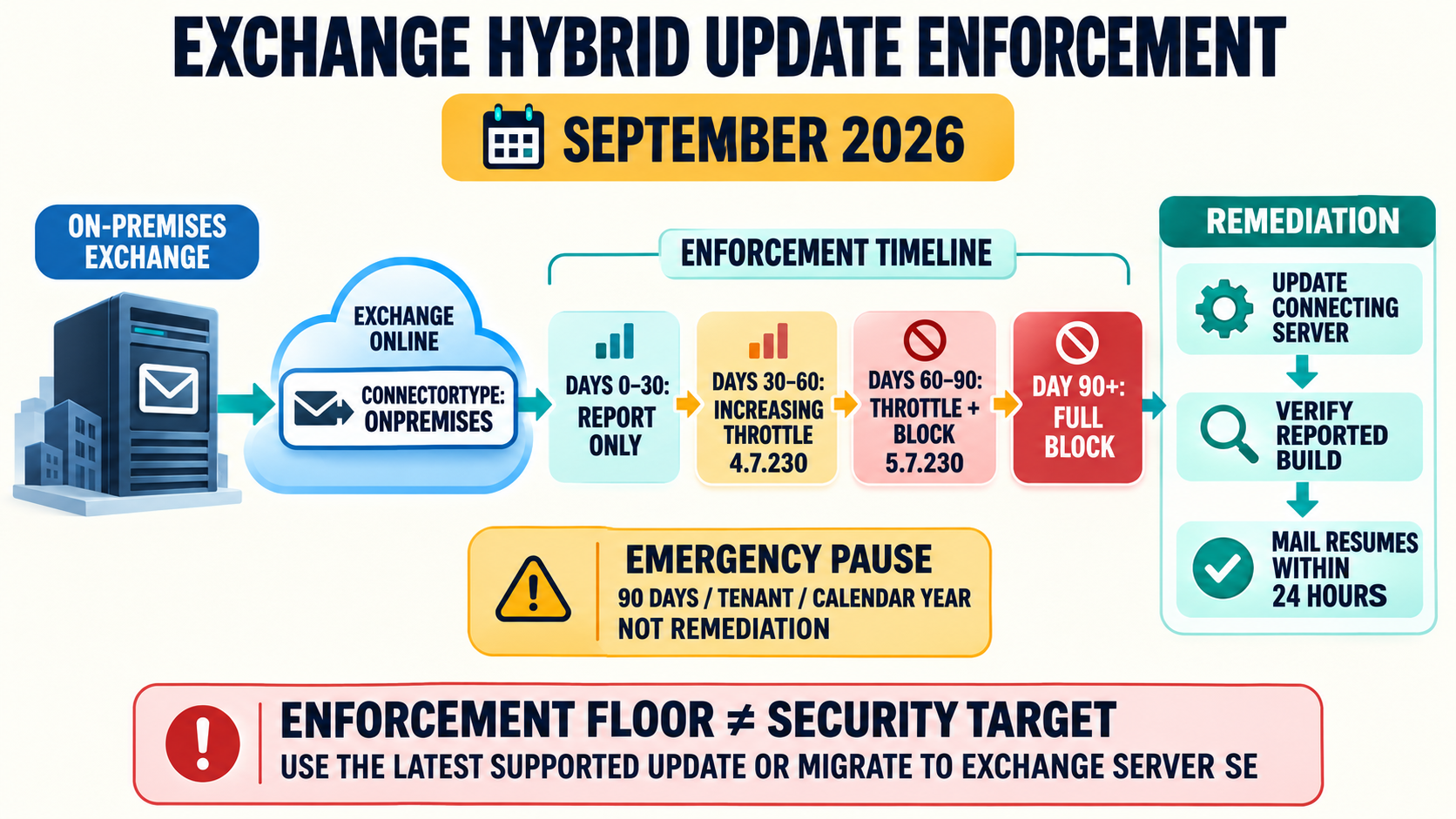
Exchange Online update enforcement is a connector-path control, not a general verdict on every Exchange server or every Microsoft 365 message. Microsoft evaluates Exchange servers that connect to Exchange Online through an inbound connector whose type is OnPremises. A persistently outdated connecting build progresses from reporting to temporary throttling and then permanent blocking. Operators must identify the actual connecting nodes, verify the full installed build, protect queues and update or migrate the path.
The decision in one minute
If a message receives 4.7.230 or 5.7.230, identify the Exchange server that made that SMTP connection. Confirm that the connection reached Exchange Online through an OnPremises inbound connector, read its real ExSetup file version and compare it with Microsoft current build guidance. Drain and update that node, then repeat for every node that can use the route. Use the tenant pause only when an emergency window is required and approved.
What changed in September 2026
Beginning in the second week of September 2026, Microsoft raised the oldest build allowed to carry mail through the scoped hybrid connector path. The minimum became the October 2025 public update for Exchange 2016 CU23 and Exchange 2019 CU14 or CU15. A server below that floor could continue through the established progressive process: report-only visibility first, then increasing periods of throttling and finally increasing permanent blocking.
This was not a newly invented one-day shutdown. It was a movement of the minimum build inside Microsoft’s existing enforcement system. The important production question is not whether the organization owns an old Exchange server. It is whether an old build is the server Exchange Online observes connecting through the scoped connector.
Exact enforcement scope
| Path or system | In this enforcement scope? | Operator consequence |
|---|---|---|
| Exchange Server connects to Exchange Online through an inbound connector whose ConnectorType is OnPremises | Yes | The connecting server build can enter reporting, throttling and blocking. |
| Another Exchange server in the organization that never connects through that path | Not merely because it exists | Inventory the actual connecting nodes before assigning impact. It can still be insecure and unsupported. |
| SMTP AUTH client submission, Microsoft Graph or another documented submission path | No, not this control | Those paths have their own authentication, limits and retirement schedules. |
| A partner connector or ordinary Internet delivery to Exchange Online | No, not this connector type | Do not interpret every Microsoft 365 rejection as hybrid update enforcement. |
| Devices and applications relay to an on-premises Exchange server that then uses the OnPremises connector | Indirectly yes | Their messages depend on the build and availability of the final connecting Exchange node. |
| Exchange 2016 or 2019 server kept only for recipient management | Only if it sends through the scoped path | Management-only does not make an obsolete server safe; move to supported Exchange Server SE management tools. |
The narrow scope prevents two common errors. First, an administrator should not call all hybrid mail blocked when only one old egress node is affected. Second, a management-only or dormant server should not be declared safe merely because this control does not currently observe it. Support and vulnerability status are separate questions.
Why ConnectorType matters
The Hybrid Configuration Wizard normally creates an inbound connector in Exchange Online representing authenticated mail from the on-premises organization. Microsoft identifies the relevant connector by ConnectorType: OnPremises. The connector commonly has ConnectorSource: HybridWizard and a name such as Inbound from <TenantGUID>, but operators should inspect properties rather than depend on a display name.
# Exchange Online PowerShell
Get-InboundConnector |
  Select-Object Name, Enabled, ConnectorType, ConnectorSource,
    TlsSenderCertificateName, SenderDomains, SenderIPAddresses

# Hybrid Configuration Wizard connectors normally show:
# ConnectorType   : OnPremises
# ConnectorSource : HybridWizard
# Name resembles  : Inbound from <TenantGUID>
Hybrid mail flow normally uses certificate-based identity. Do not replace it casually with an IP-only connector as an enforcement workaround. That changes the trust design, can create relay or spoofing risk and does not remediate the obsolete server.
What this control does not evaluate
This mechanism does not inspect inbox placement, sender reputation, spam complaint history, DKIM alignment or user engagement. It does not mean every 5.7.x response is an update block. It also does not assess whether SMTP AUTH, Graph submission, a partner connector or direct Internet delivery is configured correctly. Diagnose the exact connection path and exact enhanced status code.
The September 2026 floor versus a safe build
| Exchange branch | September 2026 enforcement floor | Latest listed build reviewed November 19, 2026 | Correct interpretation |
|---|---|---|---|
| Exchange 2016 CU23 | October 2025 SU, 15.1.2507.61 | October 2026 SU, 15.1.2507.77 | The older floor may stop this enforcement event, but Exchange 2016 is out of support. |
| Exchange 2019 CU14 | October 2025 SU, 15.2.1544.36 | October 2026 SU, 15.2.1544.50 | CU14 is an old branch. Passing the floor does not make the branch a security target. |
| Exchange 2019 CU15 | October 2025 SU, 15.2.1748.39 | October 2026 SU, 15.2.1748.55 | Use the latest applicable update while completing migration, not the minimum accepted build. |
| Exchange Server SE | Not the named September 2026 minimum-build row | November 2026 SU, 15.2.2562.57 | SE is the supported destination and must also remain current. |
The middle columns answer different questions. The enforcement floor asks whether this Exchange Online mechanism permits the scoped path. The latest build column asks what Microsoft had released for that branch when this article was reviewed. Product support asks a third question. A build can exceed the old floor and still be obsolete, unsupported or missing later security corrections.
Only Exchange Server SE is supported now
Microsoft’s current build page states that Exchange 2016 and 2019 reached end of support and remain permanently vulnerable when new flaws are found. Their final public updates were released in October 2026. Period 2 of the Extended Security Update program has ended. An organization still operating those products needs a migration plan to Exchange Server SE, not a recurring decision to remain barely above a connector threshold.
The next floor is expected to move again
Microsoft estimated that the next minimum-version movement could occur in January 2027. It also explained that avoiding the future enforcement state requires a build newer than the earlier public baseline, which points operators toward Exchange Server SE after the final 2016 and 2019 update cycle. Treat January as an estimate, not a contractual cutoff. Monitor the maintained Exchange Team announcement and current build page.
How progressive enforcement escalates
| Stage | Approximate detection age | Enforcement behavior | Mail-flow meaning |
|---|---|---|---|
| 1 | Day 0 through day 30 | Report only | Microsoft reports the vulnerable connecting build without throttling or blocking under this control. |
| 2 through 4 | After day 30 through day 60 | Throttling begins and increases about every ten days | Temporary 4.7.230 responses reduce available sending time; the on-premises queue should retry. |
| 5 through 7 | After day 60 through day 90 | Throttling continues and blocking begins, increasing about every ten days | Some connections are temporarily deferred and others are permanently rejected. |
| 8 | After day 90 | 100 percent block | The scoped path is rejected until compliance, a permitted pause or another supported route changes the condition. |
The age is based on Microsoft detecting vulnerable connecting activity, not on when an administrator first opens the report or ticket. Exact throttled and blocked minutes vary by stage. Do not build an alert that assumes every connection fails immediately at day 30 or that the path remains partially available indefinitely.
Stage 1 is warning time, not healthy time
During the report-only period, mail can continue while Microsoft exposes the vulnerable server in reporting. This is the safest remediation window because queues and users have not yet been disrupted by this control. Treat first detection as an incident with a deadline, assign an owner and schedule the update before throttling begins.
Throttling is a queue event
A 4.7.230 response is temporary. The on-premises transport service should keep the message in its queue and retry according to configured behavior. The immediate risk is not only delay for one message. Queue age and depth can increase faster than the remaining service windows can drain them, especially when several applications converge on the same hybrid route.
Blocking creates permanent failures
A 5.7.230 response is permanent for that SMTP attempt. Exchange Online does not accept and hold the message for later delivery. The submitting system receives a failure path, and a human sender can receive an NDR. Once the connector issue is fixed, messages rejected with 5xx replies must be generated or submitted again by the responsible source.
Read the complete SMTP reply
| Reply | Class | What Exchange Online is saying | Required handling |
|---|---|---|---|
| 4.7.230 | Temporary 4xx deferral | The connecting Exchange build is out of date and this connection is throttled for part of the hour. | Keep the message queued and retry with normal backoff. Alert on age and queue growth. |
| 5.7.230 | Permanent 5xx rejection | The connecting Exchange build is out of date and this connection is blocked for part or all of the hour. | Expect an NDR. Exchange Online does not hold the rejected message; resend after remediation. |
| 4.7.x without 4.7.230 | Temporary response from another control | The message may be rate-limited, reputationally deferred or affected by another policy. | Preserve the complete enhanced status and text before assigning cause. |
| 5.7.x without 5.7.230 | Permanent response from another control | Authentication, relay, policy or recipient controls can also use 5.7.x replies. | Diagnose the exact code and connector path; do not assume update enforcement. |
# Temporary enforcement response: keep queued and retry.
451 4.7.230 Connecting Exchange server version is out-of-date;
connection to Exchange Online throttled for n mins/hr.

# Permanent enforcement response: NDR; resend after remediation.
550 5.7.230 Connecting Exchange server version is out-of-date;
connection to Exchange Online blocked for n mins/hr.
Store the numeric reply, enhanced status, response text, remote host, local server and UTC time. A monitoring rule that searches only for the word “throttled” can confuse reputation deferrals, tenant limits and update enforcement. The 230 subcode is the decisive indicator in this workflow.
One old node can make the failure intermittent
Hybrid organizations often have several Exchange nodes behind load balancing, connector routing, sites or disaster-recovery plans. If three nodes are current and one is old, only connections made by the old node may receive enforcement replies. A user can observe success and failure minutes apart even though the recipient, content and domain are unchanged.
Inventory active, standby, maintenance and DR nodes. Compare the server reported by Microsoft with on-premises send-connector protocol logs and message tracking. Do not close the incident after patching the first hostname that appears in an NDR.
Devices and applications inherit the final Exchange path
Scanners, line-of-business applications and internal SMTP relays may submit to an on-premises Exchange server, which then makes the scoped connection to Exchange Online. The device itself is not being version-checked by this mechanism. Its mail is affected because its final Exchange hop is throttled or blocked.
Build a source-to-egress map showing application, relay, receive connector, routing group, final Exchange node and Exchange Online inbound connector. That map identifies transactional messages that need recovery after a permanent block and prevents an application owner from repeatedly resending into the same failed route.
Use the Exchange Online report
In the Exchange admin center, open Reports, Mail flow and Connecting on-premises Exchange servers. The report presents servers Microsoft observed, versions and enforcement information. Export the evidence before maintenance. A server that becomes compliant can disappear from the EAC presentation, so the absence of a row after remediation is expected and should be paired with the before record.
# Exchange Online PowerShell
Get-OnPremServerReportInfo

# Preserve the returned server, version, first-seen, last-seen and status
# fields with a UTC export before and after remediation.
Get-OnPremServerReportInfo |
  Export-Csv .\onprem-server-report.csv -NoTypeInformation
PowerShell can retain historical vulnerable builds
Get-OnPremServerReportInfo can retain previously detected vulnerable-build records even after the currently connecting build is compliant. Interpret server name, version, first-seen and last-seen fields together. A historical row is not proof that the old binary is still sending at this moment. Conversely, no recent row is not proof that a disconnected old server is secure.
Verify the full installed build locally
# Run on every server that can connect through the scoped path.
# The ExSetup file version includes the SU/HU build.
Get-Command ExSetup.exe | ForEach-Object { $_.FileVersionInfo }

# Useful inventory, but AdminDisplayVersion normally identifies the CU only.
Get-ExchangeServer |
  Format-List Name, Edition, AdminDisplayVersion

# Microsoft recommends the Exchange HealthChecker for a broader assessment.
Get-ExchangeServer AdminDisplayVersion is useful for inventory but normally reflects the cumulative-update level. A security update or hotfix can change the ExSetup file build without changing the displayed CU label. Use Microsoft’s HealthChecker and the ExSetup file version when deciding whether the connecting server actually meets the target.
HealthChecker is more than a version command
Run the maintained Exchange HealthChecker from Microsoft’s official repository and preserve its report for each node. It evaluates build currency and many configuration or operating conditions that can make maintenance risky. Review unsupported .NET, certificate, TLS, component, vulnerability and configuration findings instead of extracting only a green version line.
Evidence map for a defensible diagnosis
| Evidence | Where to collect it | What it proves | Important limitation |
|---|---|---|---|
| ConnectorType and ConnectorSource | Exchange Online PowerShell | Which enabled inbound connector represents the on-premises hybrid path | A connector definition alone does not show which node connected recently. |
| Reported server name, build and last-seen activity | EAC Connecting on-premises Exchange servers report and Get-OnPremServerReportInfo | What Microsoft observed on the scoped connection | PowerShell can retain historical vulnerable-build records after a server becomes compliant. |
| ExSetup.exe file version | Each connecting Exchange server | The installed Exchange binary build, including security and hotfix level | AdminDisplayVersion normally shows the CU but can omit the installed SU or HU. |
| 4.7.230 or 5.7.230 response | On-premises transport logs, queues and NDRs | That enforcement affected a specific SMTP attempt | A report warning without the SMTP response is not evidence that this message was rejected. |
| Queue age and retry history | Get-Queue, Get-Message and message tracking | Operational effect of temporary throttling | A 5xx-rejected message is not waiting in Exchange Online. |
| Patch and service health | HealthChecker, setup logs, event logs and component state | Whether the server is updated and healthy enough to resume | A successful installer exit alone does not prove mail flow. |
The strongest incident record joins these layers by UTC time and hostname. It does not infer the server from the user who sent the message or infer the connector from the recipient domain alone.
Protect queues before and during remediation
# On-premises Exchange Management Shell
Get-Queue |
  Sort-Object MessageCount -Descending |
  Format-Table Identity, Status, MessageCount, NextHopDomain,
    LastError, LastRetryTime, NextRetryTime -Auto

Get-Message -Queue "SERVER\QueueIdentity" |
  Select-Object Identity, FromAddress, Status, DateReceived,
    LastError, RetryCount, Recipients
Capture queue identity, next-hop domain, oldest message age, message count, retry schedule and last error. Define an alert on age as well as depth because a low-volume critical stream can be severely delayed without producing a large queue. Do not delete queues to make a dashboard look healthy.
Queue lifetime is a business deadline
A temporary reply is useful only while the source or Exchange queue keeps retrying. Compare the maximum retry or expiration interval with the maintenance window and business requirement. If the queue expires first, a theoretically recoverable deferral becomes a delivery failure. Do not extend retry lifetime globally without capacity, duplication and application-owner review.
A controlled multi-node update runbook
| Phase | Required action | Go or stop evidence |
|---|---|---|
| Discover | Map every server that can egress through the OnPremises connector, including failover and DR nodes. | No unknown connecting hostname or address remains. |
| Prepare | Run HealthChecker, verify prerequisites, backups, free space, certificate state, queue state and maintenance ownership. | Known issues have an approved disposition and rollback route. |
| Drain | Move active transport away from one node and prevent the load balancer or routing layer from returning traffic early. | Queues are empty or intentionally transferred and another current node carries service. |
| Update | Install the required CU and latest applicable SU or migrate the function to Exchange Server SE. | Setup and component checks pass; the exact ExSetup file version matches the target. |
| Validate | Restore the node gradually, send controlled messages and inspect Microsoft reporting and SMTP results. | No 4.7.230 or 5.7.230, normal queue age and expected TLS or connector identity. |
| Close | Watch for up to 24 hours, retain evidence and update the asset inventory. | All connecting nodes are current and no stale route reintroduces an old build. |
Use the vendor-supported update sequence for the deployed topology. A security update is not rolled back casually. Operational rollback usually means keeping a validated current node in service, draining the unhealthy node and restoring the prior routing state, not uninstalling a required security correction without Microsoft guidance.
The tenant pause is an emergency bridge
| Pause property | Documented behavior | Operational control |
|---|---|---|
| Allowance | Up to 90 days per tenant per calendar year | Reserve it for an emergency remediation window, not planned patch deferral. |
| Requested duration | The requested days are consumed from the annual allowance | Choose the smallest defensible window. |
| Cancellation | Microsoft says a pause cannot be cancelled and unused requested days are not refunded | Obtain change approval before requesting it. |
| Security effect | It pauses this Exchange Online enforcement action | It does not patch the server, restore support or remove compromise risk. |
| Expiry | Enforcement resumes when the pause ends if the server remains noncompliant | Set alerts before expiry and maintain a dated patch or migration plan. |
# Inspect the remaining or current exemption state first.
Get-TenantExemptionInfo -BlockingScenario UnpatchedOnPremServer

# Emergency example only. Requested days cannot be cancelled or refunded.
New-TenantExemptionInfo `
  -BlockingScenario UnpatchedOnPremServer `
  -NumberOfDays 7
The EAC exposes Pause Enforcement from the same connecting-server report. PowerShell can request a bounded number of days. Record the approver, reason, requested duration, remaining allowance, expiry timestamp and remediation ticket. Never advertise the pause as a permanent exception.
A pause does not reduce server risk
Pausing throttling and blocking changes only this Exchange Online enforcement action. It does not make an unsupported Exchange build supported, remove known vulnerabilities, repair a failed update or protect credentials. If Internet exposure or compromise evidence exists, follow the security incident process independently of mail-flow restoration.
Recovery can take up to 24 hours
Microsoft’s November 2026 update says that after the connecting server is updated to at least the accepted baseline, enforcement should stop within 24 hours. That is a maximum operational expectation, not permission to send an uncontrolled flood immediately. Reintroduce the node gradually, watch queues and controlled messages, and keep the incident open through the observation window.
Recover permanently rejected messages explicitly
Temporary 4xx messages normally remain in a queue. Permanent 5xx messages do not. Build a recovery list from NDRs, application logs and message tracking. Ask each source owner whether the business event is still valid before resending. Password codes, one-time links, duplicate invoices and repeated alerts can become harmful when replayed blindly.
When Microsoft reports a build you cannot find
Compare the reported hostname, build, last activity and connector with protocol logs, load-balancer members, decommission records and DR systems. Search for a node that was restored from a snapshot, left powered on after migration or still used by one application. If current activity and local evidence genuinely conflict with the Microsoft report, preserve both records and open Microsoft support rather than deleting connector trust.
Do not solve a suspected false positive with weaker trust
Changing the hybrid connector to a generic partner or IP-based path, disabling certificate validation or relaying through an unrelated host can weaken security and hide the true topology. A false-positive investigation needs evidence: exact observed version, source node, connector identity, timestamps and SMTP replies. Keep the supported authentication design while Microsoft investigates.
Production alerts that matter
- New or changed rows in the connecting on-premises server report.
- Any
4.7.230or5.7.230response, grouped by connecting server and connector. - Queue age, depth and retry growth by next hop and business stream.
- A server whose ExSetup build is below the approved current baseline.
- Nodes rejoining load balancing after maintenance without a passing validation record.
- Emergency pause requests, remaining allowance and expiry within seven days.
- NDR volume requiring application-level replay after permanent blocking.
- Unexpected mail from a server marked retired, management-only or disaster-recovery standby.
Incident response sequence
1. Capture the complete SMTP response, UTC time and sending server.
2. Confirm the exact reply is 4.7.230 or 5.7.230.
3. Identify the Exchange Online inbound connector used by that connection.
4. Match Microsoft report data to the connecting server and observed build.
5. Verify ExSetup.exe on that server, not only AdminDisplayVersion.
6. Check every active, standby and disaster-recovery node on the same route.
7. Drain, update and validate one node at a time, or use an approved pause.
8. Monitor queues, NDRs, Microsoft reporting and controlled delivery for 24 hours.
9. Resend permanently rejected business messages from the source system.
10. Close only after every possible connecting node meets the current target.
This order prevents three expensive mistakes: changing reputation controls for a version failure, updating a server that never made the failing connection and forgetting messages already rejected permanently.
Distinguish enforcement from reputation and capacity
A reputation deferral can affect a sending IP, domain or traffic pattern even when the Exchange build is current. Tenant external-recipient limits can reject mail because of recipient volume. Connector authentication can fail because a certificate or subject changed. Update enforcement has its own codes and report. Keep those signals separate before changing IPs, domains, volume or content.
Test the complete path without creating noise
Use a small controlled message from each important source class: a mailbox, a scanner or application relay and a failover node where applicable. Record source queue ID, sending node, Exchange Online response, received message ID and UTC time. A successful test from one node does not certify every node. Do not send bulk test traffic to prove recovery.
Minimum accepted does not mean safely patched
Microsoft can permit a build at the enforcement floor while recommending or requiring later updates for security. Treat the current build table and HealthChecker as the patch source, and this enforcement article as the mail-flow consequence. Security teams should never approve an older patch merely because SMTP resumed.
Plan the Exchange Server SE destination
Organizations retaining Exchange only for hybrid recipient management should assess Microsoft’s supported management-tools path and whether an on-premises server is still required. Organizations retaining mailboxes or transport need an Exchange Server SE design, licensing, prerequisites, backup, monitoring and upgrade runbook. The migration project and the immediate enforcement incident can run in parallel, but the incident cannot wait for a distant project date.
Assign cross-team ownership
| Owner | Accountability | Evidence retained |
|---|---|---|
| Exchange operations | Build currency, maintenance, component health, queues and connector routing | HealthChecker reports, ExSetup versions, setup logs and queue snapshots. |
| Microsoft 365 administration | Inbound connector inventory, EAC report, PowerShell report and pause governance | Connector export, report export and exemption history. |
| Security | Unsupported-server exposure, vulnerability response and exception approval | Risk decision, compensating controls and migration deadline. |
| Application owners | Identify scanners, applications and services that depend on the hybrid relay path | Source inventory, business criticality and controlled test messages. |
| Service desk | Recognize NDR codes and avoid misclassifying the event as recipient or reputation failure | Ticket template, UTC timestamps, full SMTP reply and escalation owner. |
The connector belongs to Microsoft 365 administration, the binary to Exchange operations, the risk to security and the queued business event to its application owner. A single generic “email team” ticket often loses one of these responsibilities.
What the change record must contain
Record every possible connecting node, starting and target build, HealthChecker findings, queue state, maintenance order, certificate state, connector export, pause decision, test recipients, stop threshold and accountable approver. Attach timestamps and raw output. A screenshot of a green EAC page without hostname, build and time is weak evidence.
Common failure modes
- Patching only the first server named in an NDR. A standby or load-balanced node later recreates the failure.
- Using AdminDisplayVersion as the SU verdict. The CU is visible while the required SU or HU state remains unknown.
- Treating 4.7.230 as permanent. Operators resend and create duplicates while the original remains queued.
- Treating 5.7.230 as queued at Microsoft. The business message is never replayed after the fix.
- Calling the enforcement floor secure. Mail resumes on an unsupported or missing-later-updates build.
- Spending all 90 pause days automatically. The tenant loses future emergency flexibility and the server remains vulnerable.
- Changing connector trust to avoid the control. The workaround introduces relay, spoofing or certificate risk.
- Ignoring application relays. User mail recovers while invoices, alerts or scanner messages continue to fail.
Closure criteria
Close the incident only when every node capable of using the scoped path has an approved current build, HealthChecker and component checks pass, connector identity is unchanged or intentionally updated, no new 4.7.230 or 5.7.230 appears, queues return to normal age, controlled messages pass, and permanently rejected business events have an owner. Preserve the before and after reports.
Current status on November 19, 2026
The October 2025 builds remain the published September enforcement floor in Microsoft’s announcement. Microsoft’s maintained build page lists later final builds for Exchange 2016 and 2019 and a current November 2026 build for Exchange Server SE. Exchange 2016 and 2019 are out of support. Microsoft estimated another enforcement-baseline movement around January 2027, so operators should monitor the current announcement rather than encode a permanent minimum.
Primary Microsoft references
- September 2026 minimum-build announcement: October 2025 floor builds, connector scope and expected future baseline movement.
- Progressive enforcement system: Report, throttle and block stages, SMTP codes, report behavior and current recovery guidance.
- Exchange Server build numbers: Maintained CU, SU and HU build numbers and support state.
- Pause throttling and blocking: Ninety-day annual allowance, EAC and PowerShell process, and non-refundable requested days.
- Inbound connector FAQ: Hybrid connector type, certificate identity and supported relay purpose.
- Exchange 2016 and 2019 ESU Period 2: Final October 2026 update boundary and migration direction.
- Exchange HealthChecker: Maintained Microsoft diagnostic guidance for Exchange server health and build review.