Microsoft SNDS Portal: Access, Data and Reattestation Retirement
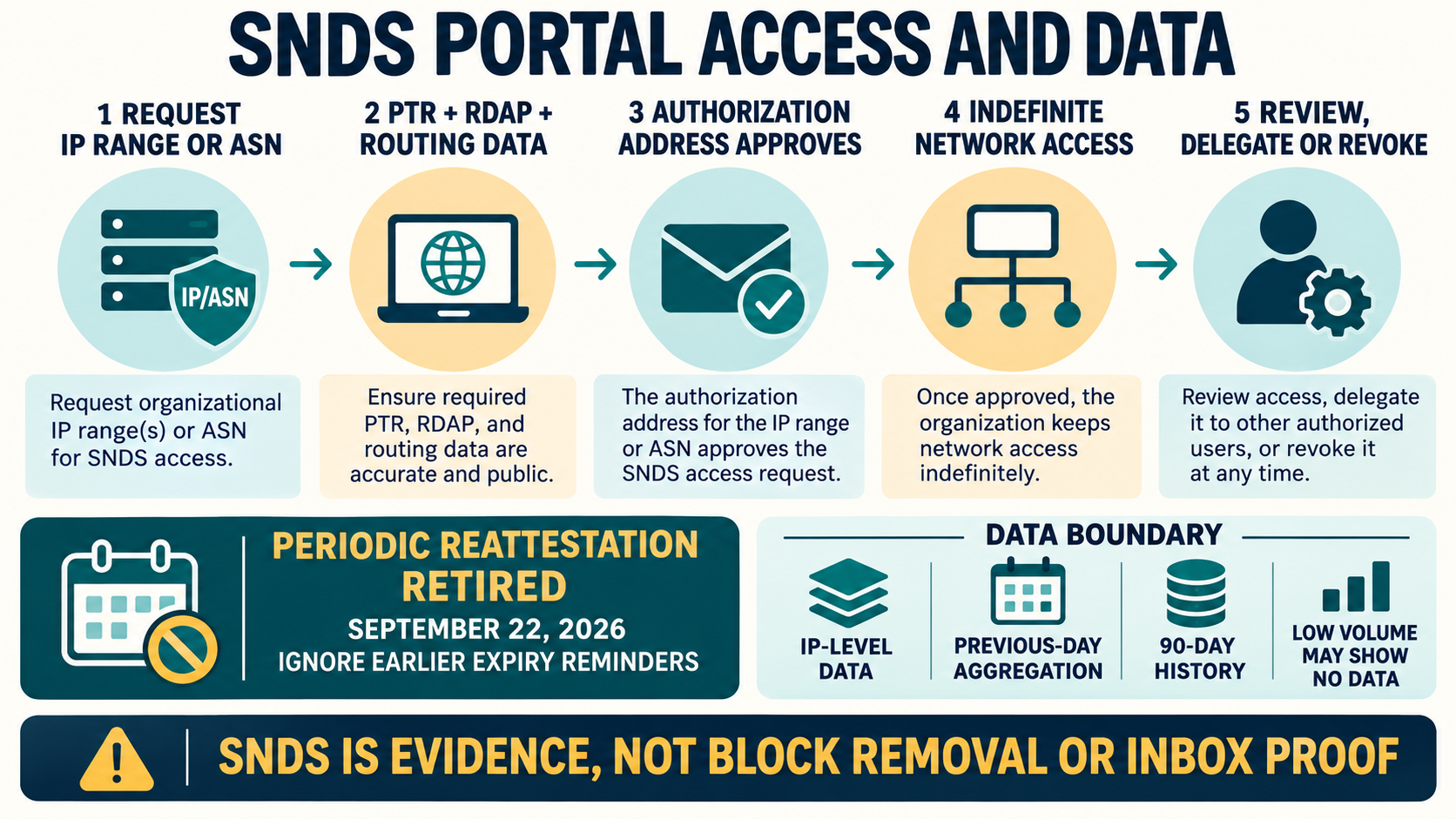
Microsoft SNDS access no longer follows the 10-month periodic reattestation cycle. On September 22, 2026, Microsoft announced that the replacement SNDS portal supports indefinite network access and instructed users to disregard access-expiration information in earlier reminder emails. Initial authorization still depends on authoritative IP or ASN evidence, and operators still need deliberate delegation, revocation, secret handling and evidence-based interpretation.
What changed and what operators should do
| Subject | Earlier documented state | Current state reviewed November 19, 2026 | Operator action |
|---|---|---|---|
| Portal location | Legacy sendersupport.olc.protection.outlook.com SNDS site | New substrate.office.com IP and domain management portal replaces it | Update bookmarks, runbooks and approved automation origins. |
| Periodic ownership reattestation | Access expired after 10 months unless reattested | Microsoft announced indefinite network access and says periodic reattestation is no longer required | Ignore earlier expiry reminders, but continue internal access review. |
| Old FAQ text | Still describes the 10-month reminder and renewal cycle | Conflicts with the dated September 22, 2026 landing-page announcement | Use the newer announcement for periodic expiry and record the documentation conflict. |
| Owner-triggered reauthorization | Access Control can require another user to reauthorize within seven days | Not explicitly retired by the indefinite-access announcement | Keep revocation and forced reauthorization available for security events. |
Indefinite access removes the automatic calendar expiry. It does not remove the responsibility to revoke former staff, vendors or customers. Organizations should replace the retired provider reminder with their own quarterly or role-change access review.
The new portal replaces the legacy SNDS site
Microsoft’s new SNDS surface is part of the substrate.office.com/ip-domain-management-snds portal. It combines IP data access and Junk Email Reporting Program management in one service. Update documentation and browser bookmarks, but do not assume an old automated data URL or session will migrate without validation.
Authentication and authorization are different
A Microsoft Account authenticates the person. It does not prove that the person owns or manages a sending network. SNDS authorization separately decides which IP ranges that identity may see. Access is granted only after an offered address tied to PTR, RDAP or ASN evidence approves the request.
How SNDS selects authorization addresses
| Request type | Discovery source | Candidate authorization identity | Important boundary |
|---|---|---|---|
| Single IP or IP range | Reverse DNS and RDAP, with ASN context when one ASN owns the range | postmaster or abuse at consistent PTR domains, and contacts found in the most specific RDAP allocation | PTR sampling is documented only up to a /23; request smaller coherent ranges when discovery fails. |
| ASN | RDAP for the ASN plus subnets advertised in global routing data from RouteViews | Email addresses in the ASN registration record | Approval grants access to advertised subnets, not every asset an organization informally associates with the ASN. |
| Delegated operational user | An existing authorization message and approval by the network owner | The user signs in with a Microsoft Account, then the owner forwards or approves the authorization link | Delegation is access to network evidence, not transfer of network ownership. |
| Hosted or ESP customer | Provider-controlled PTR, RDAP or ASN records | Usually the hosting provider or ESP network contact | A customer cannot manufacture authority by placing its own address in ordinary domain DNS. |
The candidate list is generated automatically. Microsoft says the SNDS team cannot manually adjust authorizations. The reliable solution is to correct authoritative network records, request a smaller coherent range or obtain delegation from the network owner.
Reverse DNS authorization
For an IP range, SNDS samples PTR hostnames. When the tested addresses share a registrable domain, it can offer postmaster@domain and abuse@domain. When a consistent subdomain is present, corresponding addresses at that subdomain can also be offered. Microsoft documents a /23 maximum for this PTR sampling method.
# Inspect the public PTR for one sending IP.
dig +short -x 192.0.2.25

# Query RDAP through the IANA-bootstrap-aware rdap.org redirector.
# Replace the documentation address with the actual sending IP.
curl --fail --silent --show-error --location \
  "https://rdap.org/ip/192.0.2.25"

# Preserve the authoritative RIR response, allocation range and contact roles.
A PTR record should describe the sending infrastructure accurately and align with mail operations. Do not change reverse DNS solely to capture SNDS access without network-owner approval; the same identity affects SMTP diagnostics and reputation.
RDAP authorization
SNDS queries the most specific allocation record covering the first IP and verifies that the requested range does not extend beyond that allocation. Candidate addresses come from contacts in the authoritative record. If a hosting provider owns the allocation, the provider may be the only party that can approve or delegate access.
ASN authorization and routing scope
For an ASN request, SNDS uses ASN RDAP contacts and RouteViews routing information. Approval provides access to subnets advertised by that ASN. Microsoft says newly advertised subnets require another ASN authorization request to be added, while subnets no longer advertised are removed automatically.
Run the authorization workflow deliberately
1. Sign in with the accountable Microsoft Account.
2. Request the smallest coherent IP range or the owned ASN.
3. SNDS evaluates PTR, RDAP and applicable routing data.
4. Select an offered authorization address you can receive.
5. The authoritative recipient opens the approval link.
6. Confirm the exact IP ranges now visible in Access Control.
7. Delegate only to named operational users with a business need.
8. Export baseline data and configure secure automation if required.
9. Review and revoke access after role, provider or ownership changes.
Preserve the request value, authorization address, approver, approval time and resulting range list. The evidence matters when a provider changes, a subnet moves or two teams claim responsibility for the same egress IP.
When no usable authorization address appears
First follow the portal diagnostics and request smaller allocation-aligned ranges. Then inspect PTR consistency and the applicable RDAP record. If the records correctly identify an upstream provider, ask that provider to approve or delegate. Microsoft registration support can investigate system problems, but the FAQ says staff cannot manually override ownership authorization.
Delegate access without sharing accounts
The operational user should sign in with their own Microsoft Account and submit the same range request. The authoritative recipient can forward the approval message or open the link on that user’s behalf. Do not share one Microsoft Account or mailbox password across employees and vendors.
What indefinite access means
Indefinite means the portal no longer requires periodic ownership reattestation merely because ten months passed. It does not mean irrevocable or anonymous access. Network ownership can change, routes can change, delegated people can leave, and an owner can require reauthorization or revoke access.
Retire the 10-month calendar workflow
Remove operational reminders that tell staff to complete ordinary 10-month reattestation. Preserve earlier reminder emails only as historical evidence. Replace them with a policy-controlled access review covering current IP inventory, users, providers, secret URLs and accountable owners.
Do not confuse forced reauthorization with retired periodic reattestation
The FAQ says an owner who sees another user’s access in Access Control can request reauthorization; failure to complete it within seven days removes that user’s access to the specified IPs. The September announcement retires periodic ownership expiry, but it does not say this security action was removed. Use it when access is disputed or the relationship has changed.
Build an internal access-review cycle
Review access after staff termination, vendor offboarding, IP transfer, ASN routing change, acquisition and security incident. A quarterly review is a reasonable internal control, not a Microsoft requirement. Record who confirmed each user, range, automation secret and business purpose.
SNDS is IP-level provider evidence
| SNDS field or surface | What Microsoft documents | Useful interpretation | Do not conclude |
|---|---|---|---|
| Activity period | First and last hour of Microsoft’s Pacific local reporting day when activity was observed | Approximate period in which the IP reached Outlook.com infrastructure | A message-by-message timeline or UTC event log. Preserve the source day and seasonal UTC offset. |
| RCPT commands | Number of SMTP RCPT commands issued | Recipient attempts, including requests that do not become accepted message recipients | Unique people, delivered messages or inbox placements. |
| DATA commands | Number of SMTP DATA commands | How often message content transfer began after envelope processing | Number of recipients or successful deliveries. |
| Message recipients | Recipients on messages transmitted by the IP | Denominator used for some aggregate interpretation | Human reads, inbox delivery or business outcomes. |
| Filter result | Green below 10 percent spam verdicts, yellow between 10 and 90 percent, red above 90 percent | Broad Microsoft filtering severity for the IP and day | A precise score, a block state or the final folder for every recipient. |
| Complaint evidence | Aggregate complaints and JMRP-related comments or counts when applicable | Recipient negative feedback associated with the shared IP population | A domain-specific complaint rate on a shared IP unless independently attributed. |
| IP status | Current recent abnormal state such as Blocked, Bot or Junked | An operational signal requiring investigation | Historical trend data or a substitute for the SMTP rejection. |
| Security comments | Virus, malware-hosting or open-proxy observations can appear | Possible compromise or abuse requiring security response | That cleanup has propagated immediately or that email reputation is restored. |
SNDS observations describe traffic Microsoft associated with a public egress IP. They do not automatically identify the visible From domain, DKIM signer, customer, application or campaign. On NAT and shared ESP infrastructure, internal attribution is essential.
Understand timing, retention and missing rows
| Property | Documented behavior | Monitoring consequence |
|---|---|---|
| Aggregation | Previous-day data processing starts around midnight Pacific time and can take hours | Do not alert on missing current-day data before the normal availability window. |
| History | Daily SNDS data is retained for 90 days | Export and store approved evidence if investigations need a longer history. |
| Low volume | Mail and spam data may be absent for IPs below roughly 100 messages for that day | Missing data is unknown or below reporting volume, not green and not zero. |
| IP Status freshness | The status view is current within roughly the last 24 hours and has no historical view | Snapshot state with retrieval time if change history is required. |
| Complaint timing | Complaints are shown on the day reported, not moved back to the original send day | A daily complaint percentage can exceed 100 percent and should not be discarded automatically. |
Microsoft describes the activity period as the first and last hour of its Pacific reporting day, including daylight-saving adjustments. Preserve that source-local date exactly and record whether the applicable offset was PST or PDT. Derive UTC timestamps in separate fields. Do not label every source day as PST, overwrite the source date with UTC, or force complaints arriving later into the original campaign date.
RCPT, DATA and recipients are not interchangeable
RCPT measures recipient commands attempted. DATA measures message-content transactions. Message recipients measure recipients on transmitted messages. A growing gap between RCPT commands and recipients can point to stale addresses or namespace-mining-like behavior, but compare the established baseline and exact SMTP responses before assigning cause.
Interpret green, yellow and red correctly
Microsoft documents green as less than 10 percent spam verdicts, yellow as between 10 and 90 percent, and red as greater than 90 percent. The yellow band is intentionally broad and does not disclose a precise score. The published inequalities also do not specify exact equality behavior at 10 or 90 percent, so do not invent it in a parser.
Filter result is not inbox-placement proof
Microsoft explicitly says the aggregate filter result does not directly represent Inbox or Junk delivery. User safelists and other recipient controls can alter final presentation. A green cell does not prove all mail reached Inbox; a red cell does not reveal the folder or disposition of each message.
Complaint evidence has a different clock
The complaint rate is complaints divided by message recipients, but complaints are displayed on the day users report them rather than moved back to the send day. The daily value can therefore exceed 100 percent. Retain it, label the timing difference and compare multi-day windows rather than rejecting it as corrupt.
Shared IP data needs internal attribution
On a shared IP, SNDS aggregates every customer and sending identity that used that address. Join the provider day to ESP tenant, envelope sender, DKIM domain, visible From domain, campaign ID and queue logs. Never penalize every customer because one aggregate IP cell changed.
Missing does not mean zero or healthy
Microsoft says data may not appear below roughly 100 messages on an IP for the day. Rows can also be missing because data is delayed, authorization is incomplete, the wrong egress IP was queried or collection failed. Store a reason code and keep the health verdict unknown until evidence distinguishes these cases.
IP Status is a recent snapshot
The View IP Status surface identifies recent abnormal states such as Blocked, Bot and Junked. Microsoft says it reflects roughly the last 24 hours and provides no historical information. If history matters, capture authenticated snapshots with retrieval timestamps and access controls.
Security signals require security response
Virus, malware-hosting, bot or open-proxy evidence can indicate compromised infrastructure or abused relay. Isolate the source, preserve forensic artifacts, stop unauthorized sending and rotate exposed credentials. Reputation tuning is not a substitute for containment and eradication.
Join signals before declaring cause
| Observed pattern | Likely question | Evidence to join | Safe first action |
|---|---|---|---|
| No row for an active IP | Is volume below disclosure threshold, data delayed, access incomplete or traffic using another IP? | MTA egress logs, current authorization scope, provider day and actual Outlook recipient count | Confirm source IP and wait through the normal aggregation window before escalating. |
| Green filter result but deferrals | Is the response caused by rate, connection, authentication or a different reputation layer? | Complete SMTP reply, queue logs, domain authentication and current IP status | Diagnose the enhanced response instead of treating green as an allowlist. |
| Red filter result with few complaints | Were messages filtered before users could complain, or is complaint data delayed? | JMRP, filter trend, recipient counts, list source and SMTP responses | Contain the affected stream and review acquisition, content and compromise evidence. |
| Complaint spike on a shared IP | Which tenant, domain or campaign caused the shared signal? | ESP tenant logs, DKIM domain, return path, campaign ID and JMRP samples | Segment internally before changing every customer or rotating the IP. |
| Blocked status after apparent cleanup | Has Microsoft observed the remediation and is sender support required? | Current SMTP rejection, cleanup evidence, subsequent clean traffic and support case | Use the documented sender-support path; SNDS itself does not remove blocks. |
SNDS and JMRP answer different questions
SNDS supplies aggregate IP evidence. JMRP supplies reports for messages users marked as junk when available and enrolled. Use JMRP samples to identify audience, source, campaign and permission problems. Protect message content and recipient information, restrict access and suppress recipients according to the approved feedback process.
SNDS does not remove blocks
The SNDS team displays relevant evidence but does not process deliverability remediation. For blocking or persistent Outlook.com delivery problems, follow Microsoft Postmaster policies and sender support. Submit the complete SMTP rejection, sending IP, domains, recent SNDS evidence and the corrective action already completed.
Manual CSV export
The portal can export CSV from data pages and requires browser cookies and JavaScript for normal interactive use. Record the selected ranges, source day and retrieval time. Store the export only as long as the operational or security purpose requires.
Optional automated data URL
Microsoft documents an optionally enabled data-access URL that returns the same data as the manual CSV without Microsoft Account authentication. This convenience makes the URL a bearer secret. Anyone who obtains it may be able to retrieve authorized network data.
# SNDS_DATA_URL is the private data-access URL enabled inside SNDS.
# Load it from a secret store; never commit or print its value.
curl --fail --silent --show-error --location \
  --output snds-raw.csv \
  "$SNDS_DATA_URL"

sha256sum snds-raw.csv
date -u +'%Y-%m-%dT%H:%M:%SZ'
Secure the collector
| Automation control | Required implementation | Failure to avoid |
|---|---|---|
| Secret handling | Treat the optional data URL as a bearer secret; keep it in a secret store and redact it from logs and tickets | Publishing the URL in source control, monitoring output or browser analytics. |
| Fetch cadence | Fetch after the previous-day aggregation window with bounded retries and jitter | Polling every minute even though the source is daily. |
| Raw evidence | Store retrieval UTC, HTTP status, content hash and immutable raw CSV before normalization | Losing the source file and being unable to explain a parser result. |
| Schema handling | Parse headers by name, tolerate optional fields and quarantine malformed rows | Binding production alerts permanently to a column position. |
| Missing data | Represent missing, unavailable, below-volume and genuine zero separately | Converting a blank row into a healthy zero. |
| Access response | Disable or replace the automated URL when ownership, vendor or credential scope changes | Assuming indefinite portal access means an integration secret should also live forever. |
Never scrape the interactive portal when the account exposes the documented data URL. Automation should fetch once per completed source window, not generate unnecessary requests against a daily dataset.
Normalize without erasing source meaning
source              = "microsoft_snds"
retrieved_at_utc    = required timestamp
provider_day        = source Pacific local date, never overwritten by UTC date
provider_utc_offset = source-day PST or PDT offset when known
sending_ip          = validated IPv4 or IPv6 literal
activity_start      = nullable source value
activity_end        = nullable source value
rcpt_commands       = nullable non-negative integer
data_commands       = nullable non-negative integer
message_recipients  = nullable non-negative integer
filter_result       = green | yellow | red | unknown
complaint_evidence  = nullable source value
comments            = retained and access-controlled
missing_reason      = none | below_volume | delayed | unauthorized | fetch_error | unknown
raw_sha256          = hash of immutable source file
Keep raw and normalized data separate. Parser upgrades should be replayable against retained test fixtures, and a source field change should fail visibly rather than silently shifting columns.
Alert on actionable, persistent evidence
CRITICAL
  - IP status becomes Blocked, Bot or Open Proxy
  - malware or virus observation appears
  - automated access fails for two completed source windows

HIGH
  - filter result becomes Red for two provider days
  - complaint evidence increases with sufficient recipients
  - RCPT-to-recipient gap changes materially for an established stream

INFORMATIONAL
  - no row for a low-volume or newly added IP
  - a single Yellow result without corroborating deterioration
  - current-day data is absent before aggregation completes
Thresholds beyond Microsoft’s documented color definitions must come from the sender’s own baseline and risk model. Do not present an internal alert threshold as a Microsoft rule.
Incident-response workflow
1. Freeze the raw SNDS row and retrieval timestamp.
2. Identify the exact egress IP, customer, stream and authenticated domains.
3. Collect Microsoft SMTP replies for the same provider day.
4. Compare RCPT, DATA, recipients, filtering, complaints and comments.
5. Check JMRP evidence and security indicators independently.
6. Contain the smallest unsafe stream or compromised source.
7. Repair list, authentication, application or host root cause.
8. Resume a bounded cohort and watch complete provider-day windows.
9. Contact sender support only with current rejection and remediation evidence.
10. Close after sustained recovery, not after one green cell.
Assign the response by signal
| SNDS or mail signal | Owner | Immediate response | Exit evidence |
|---|---|---|---|
| Blocked | Deliverability and sending platform | Preserve rejection, stop invalid retransmission and follow Microsoft sender support | Accepted controlled traffic and closed root cause. |
| Junked or red filter result | Deliverability and program owner | Contain the affected stream and inspect recipients, complaints, authentication and content | Sustained clean provider trend plus acceptable downstream outcomes. |
| Bot, virus or open proxy | Security and network operations | Isolate the system, preserve forensic evidence, remove abuse and rotate exposed credentials | Security validation and no recurring provider observation. |
| Authorization contact unavailable | Network owner or provider | Correct authoritative PTR or RDAP data, split the request, or use owner-approved delegation | Access approved through an authoritative address. |
| Portal or lookup failure | Automation and SNDS registration owner | Preserve HTTP or UI error and retry with bounded cadence | Successful fetch or Microsoft registration support resolution. |
Assign durable ownership
| Role | Responsibility | Review evidence |
|---|---|---|
| Network owner | Maintain accurate RDAP, ASN routing and reverse-DNS authority; approve legitimate access | Allocation records, route ownership and authorization history. |
| Deliverability operations | Review SNDS data, correlate sending identities and open support cases with complete evidence | Daily snapshots, SMTP responses and incident timelines. |
| Security | Investigate bot, virus, malware-hosting and open-proxy signals; approve persistent access | Incident record, containment, eradication and access-review decision. |
| ESP or hosting provider | Attribute shared-IP observations to the responsible customer or stream | Tenant, DKIM, return-path, campaign and egress logs. |
| Automation owner | Protect the data URL, parser, retention and alert semantics | Secret inventory, last successful fetch, schema tests and retention rule. |
Indefinite provider access increases the importance of internal ownership. Every SNDS user and integration needs a named owner, approved purpose, offboarding event and review record.
Quarterly audit checklist
[ ] Microsoft Account owner and recovery method documented
[ ] Authorized IP ranges and ASN compared with current egress inventory
[ ] PTR, RDAP and routing contacts verified
[ ] Delegated users have named owners and business purpose
[ ] Former staff and vendors removed from Access Control
[ ] Data URL stored as a secret and absent from logs/source control
[ ] Last successful daily fetch, raw hash and parser status visible
[ ] Missing data represented separately from zero and green
[ ] JMRP and sender-support ownership documented
[ ] Ninety-day source history exported only under an approved retention rule
Common incorrect conclusions
- “SNDS access still expires every ten months.” The September 22 announcement explicitly retires periodic reattestation.
- “Indefinite means no access review.” It removes provider-driven calendar expiry, not organizational accountability.
- “The FAQ says ten months, so the newer announcement is wrong.” The pages conflict; the dated announcement is the current instruction.
- “Green means Inbox.” Microsoft says the filter color is not direct Inbox or Junk placement evidence.
- “No row means zero complaints.” Low volume, delay, access and source-IP mismatch can all produce missing data.
- “SNDS will unblock the IP.” Blocking remediation goes through Postmaster guidance and sender support.
- “One shared-IP complaint rate identifies our campaign.” Attribution requires internal identity and tenant logs.
- “The automated URL is safe because it has no password field.” The URL itself is the credential and must be protected.
How this guide differs from the SNDS data-field change article
This article owns portal migration, network authorization, retired reattestation, delegated access, collection security and interpretation. The separate SNDS spam-trap-count removal article owns the field-level reporting change and how monitoring should adapt when a previously visible signal is removed. Keeping those scopes separate prevents duplicate content while preserving useful internal links.
Current status on November 19, 2026
The new SNDS portal is active and replaces the legacy site. Its landing page, last updated September 22, 2026, says network access is indefinite and periodic ownership reattestation is no longer required. The FAQ still contains the earlier 10-month text. Initial IP or ASN authorization, delegation, revocation, owner-triggered reauthorization, daily IP evidence and the optional automated data URL remain documented.
Primary Microsoft references
- Microsoft SNDS portal: New-portal announcement, September 22, 2026 retirement of periodic reattestation, current access entry point and sender-support boundary.
- Microsoft SNDS FAQ: IP and ASN authorization, PTR and RDAP discovery, delegation, access control, data definitions, timing, export and automation.
- Microsoft Postmaster policies: Outlook.com sender requirements, permanent-response handling, authentication and reputation-management services.
- Microsoft Postmaster troubleshooting: Sender-support path, reputation factors and documented SMTP response examples.