by Anil Jalela | Apr 21, 2026 | Linux
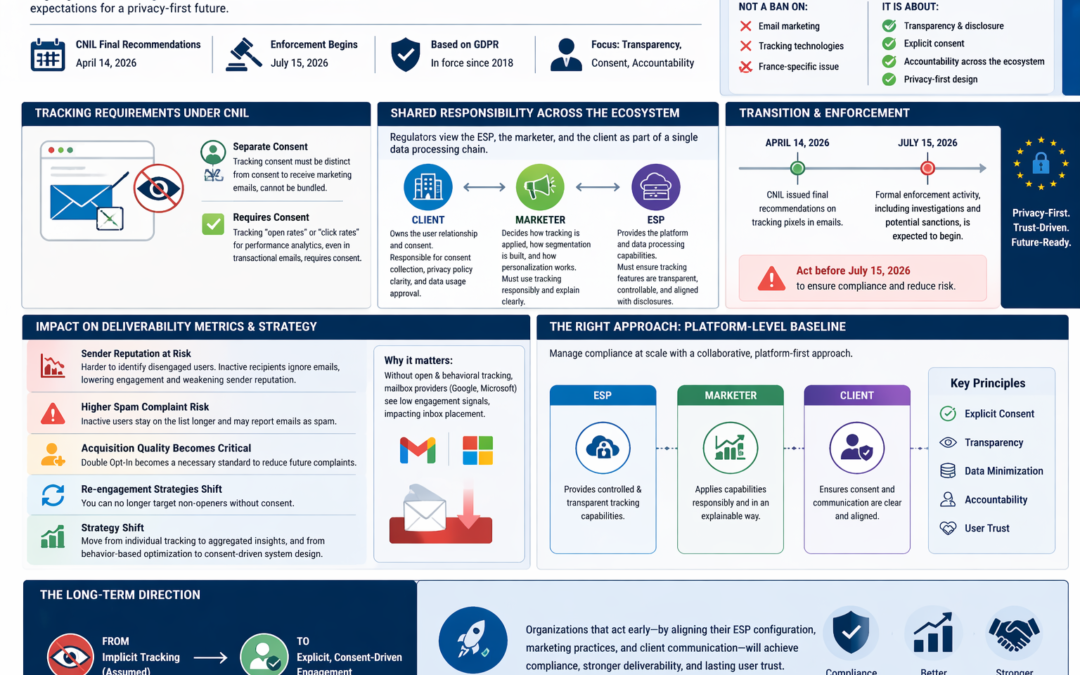
The CNIL released its final recommendations regarding tracking pixels in emails on April 14, 2026. While these rules are technically based on GDPR requirements in force since 2018, the CNIL has established a formal transition period for compliance. July 15, 2026: Formal enforcement activity, including investigations and potential sanctions, is expected to begin.
Separate Consent: This tracking consent must be distinct from the consent to receive marketing emails; you cannot “bundle” them together.
Requires Consent: Tracking “open rates” or “click rates” for performance analytics, even within a transactional email (like a password reset or order confirmation).
The recent CNIL discussion has created significant attention across the industry, with many ESPs positioning it as a major shift. In reality, this is not a new regulation, but a continuation of an existing direction where expectations around data usage, tracking, and accountability are becoming more explicit.
What is evolving is how responsibility is distributed across the ecosystem.
Historically, the model was relatively simple. The client owned the user relationship and consent, the marketer executed campaigns, and the ESP acted as infrastructure. Compliance was often viewed as primarily a client responsibility.
That model is no longer sufficient.Regulators are increasingly viewing the ESP, the marketer, and the client as part of a single data processing chain, where each plays an active role in how user data is collected, tracked, and used.From an ESP perspective, this means moving beyond the idea of being a neutral platform. Features such as open tracking, click tracking, and data storage are not just technical capabilities. They are part of the data processing layer and must be transparent, controllable, and aligned with how data is disclosed.
From a marketer perspective, the shift is even more operational. Marketers are the ones deciding how tracking is applied, how segmentation is built, and how personalization logic works. This means there is now a clear expectation that tracking and profiling are not only used effectively, but also explained clearly and used in a way that can be justified.
From a client perspective, the responsibility remains foundational. Consent collection, privacy policy clarity, and overall data usage approval sit with the client. If consent is unclear or weak at this level, the entire downstream chain, including marketer and ESP, is exposed.
It is important to be equally clear about what this development does not mean.
This is not a ban on email marketing.
This is not a ban on tracking technologies.
This is not a short-term France-specific issue.
Instead, it aligns with broader global shifts, including privacy-first design and the gradual move away from passive tracking signals.
The practical impact is not immediate disruption, but a structural shift in how email marketing systems are designed and measured.
Open rates are already becoming unreliable due to ecosystem changes. This accelerates the need to focus on stronger, first-party signals such as clicks, conversions, and direct engagement.At the same time, there is increasing pressure to ensure that behavioral tracking and profiling are transparent, disclosed, and explainable.
For organizations operating at scale, this cannot be managed on a client-by-client basis. The effective approach is to establish a platform-level baseline, where:
- The ESP provides controlled and transparent tracking capabilities
- The marketer applies these capabilities in a responsible and explainable way
- The client ensures that consent and communication are clear and aligned
The long-term direction is clear. Email marketing is moving from a model built on implicit tracking to one built on explicit, consent-driven engagement.
Organizations that recognize this early and align their ESP configuration, marketing practices, and client communication accordingly will be better positioned not only for compliance, but also for sustainable deliverability and user trust.
Impact on Deliverability Metrics & Strategy under CNIL Enforcement
- Under CNIL enforcement of the General Data Protection Regulation, user-level tracking is restricted, especially open tracking without consent.
- Sender reputation becomes harder to manage because you can no longer clearly identify disengaged users. Without open and behavioral tracking, inactive recipients remain on your list, and you continue sending emails to them unknowingly. From the perspective of mailbox providers like Google and Microsoft, these users appear to consistently ignore your emails. This lowers your overall engagement rate and generates negative signals, which gradually weaken your sender reputation and can impact inbox placement.
- Spam complaint risk increases, since inactive users remain on the list longer and may eventually report emails as spam.
- Acquisition quality becomes critical, making Double Opt-In a necessary standard to reduce future complaints.
- Re-engagement strategies shift, as you can no longer target non-openers without consent.
- Overall, the strategy moves from individual tracking to aggregated insights, and from behavior-based optimization to consent-driven system design.
CNIL & Email Marketing Compliance Guide
This document explains, in clear and practical terms, how email marketing should be handled under the evolving expectations of CNIL and broader EU regulations. It is written so that both technical and non-technical stakeholders can understand their role and take the right actions without confusion.
The goal is not to stop marketing activity, but to ensure that data usage, tracking, and communication are transparent, justified, and aligned with user expectations.
Understanding the Core Change
Over time, email marketing evolved with heavy reliance on tracking technologies such as open pixels, click tracking, and behavioral analysis. These were often enabled by default and rarely explained clearly to users.
Today, the expectation has shifted.
Instead of tracking first and explaining later, organizations are now expected to clearly explain what data is being collected and why, before any tracking takes place. This is not a sudden regulatory shock. It is a continuation of the same direction seen in cookie regulations, Apple Mail Privacy Protection, and broader privacy-first design.
The Three Key Roles in Email Marketing
To manage compliance correctly, it is important to clearly understand the responsibilities of each party involved.
| Role |
Description |
Example |
| ESP |
Technology platform that sends emails and enables tracking |
SendGrid, Amazon SES |
| Marketer |
Team or individual managing campaigns, targeting, and logic |
Internal marketing team or agency |
| Client |
Business or brand that owns the customer relationship |
eCommerce brand |
Each of these roles plays a part in how data is collected, processed, and used. Responsibility is no longer isolated. It is shared.
What Counts as Tracking (With Examples)
Tracking is not limited to one simple activity. It exists at different levels, each with increasing sensitivity.
| Tracking Type |
Description |
Example |
Risk Level |
| Basic Tracking |
Measures interaction with emails |
Open rate, click rate |
Low |
| Behavioral Tracking |
Tracks user actions beyond the email |
Visiting product pages after clicking |
Medium |
| Profiling |
Uses behavior to predict or influence decisions |
“User is interested in shoes → send shoe offers” |
High |
The “Separation” Rule: You must allow a user to receive emails (Marketing or Transactional) without forcing them to be tracked. Consent to receive the email
Consent to be tracked.
The “Granular” Rule: On your signup forms, you should ideally have two checkboxes: one for the newsletter subscription and one for “personalized experience/tracking.”
The “Retroactive” Rule: If a user clicks “Unsubscribe” or “Stop Tracking,” you must ensure that pixels in old emails still sitting in their inbox stop sending data back to your server.
B2B Context: These rules apply to professional email addresses (e.g., [email protected]) just as strictly as personal ones (e.g., [email protected]).
| Email Type |
Tracking Trigger (The “Why”) |
Category |
Specific Activity Included |
Consent Needed? |
CNIL Requirement Details |
| Transactional |
Security |
Essential |
Detecting login from new IP/Device; bot prevention. |
NO |
Must be strictly for protecting the user account or service. |
| Transactional |
Hygiene |
Essential |
Identifying “Hard Bounces” (invalid address) to clean lists. |
NO |
Allowed to maintain “list health” only; cannot be used to trigger ads. |
| Any Type |
Delivery |
Essential |
Confirming the email physically reached the recipient server. |
NO |
Technical confirmation that the “pipe” worked. |
| Transactional |
Analytics |
Behavioral |
Measuring Open Rates for “Customer Success” or UX stats. |
YES |
If you can provide the service without knowing they opened it, you need consent. |
| Transactional |
Upselling |
Behavioral |
Tracking clicks on “Recommended Products” in a receipt. |
YES |
Considered marketing intent, even inside a transactional message. |
| Transactional |
Behavioral |
Behavioral |
Tracking “Time Spent Reading” an invoice or statement. |
YES |
Individual reading habits are never considered “strictly necessary.” |
| Marketing |
Analytics |
Behavioral |
Individual Open Rates & Click-through Rates (KPIs). |
YES |
Standard marketing metrics now require an explicit opt-in. |
| Marketing |
Optimization |
Behavioral |
A/B testing different subject lines/content for individuals. |
YES |
Measuring which version “performed” better on a user requires consent. |
| Marketing |
Optimization |
Behavioral |
“Best Time to Send” (tracking when a user usually opens). |
YES |
Monitoring habits to time future messages is a behavioral track. |
| Marketing |
Profiling |
Profiling |
Building a profile of user interests based on click history. |
YES |
High-level data enrichment; requires the most transparent disclosure. |
| Marketing |
Profiling |
Profiling |
Dynamic content (changing offers based on past tracking). |
YES |
You cannot use past tracking data to alter future emails without consent. |
| Marketing |
Retargeting |
Profiling |
Abandoned Cart triggers or cross-channel ad syncing. |
YES |
Linking email clicks to website behavior or social media ads. |
Example If a user clicks a link in an email and lands on a product page, and later receives emails based on that product category, this moves from basic tracking to profiling.
Where Disclosure Must Happen
A common misconception is that tracking disclosures need to appear in every email. This is not correct.
Disclosure must happen at the point of data collection and in supporting documentation.
| Location |
Purpose |
Example |
| Signup Form |
Inform user before they subscribe |
“We track opens and clicks to improve communication” |
| Privacy Policy |
Provide full explanation |
Details on tracking, profiling, and data usage |
| Email Body |
Not required for tracking disclosure |
Only unsubscribe and identity needed |
Example (Recommended Consent Line)
“We send marketing emails and track interactions such as opens, clicks, and website visits to understand your interests and provide personalized communication.”
This line is clear, simple, and covers both tracking and personalization.
ESP Responsibilities (Platform Perspective)
Platforms such as SendGrid and Amazon SES provide the infrastructure that makes tracking and email delivery possible.
They are no longer considered neutral tools. They are part of the data processing chain.
| Function |
What Happens |
Example |
| Open Tracking |
Pixel added to email |
Detects when email is opened |
| Click Tracking |
Links rewritten |
Tracks user clicks |
| Data Storage |
Engagement data stored |
Click history, open logs |
| Segmentation Support |
Enables targeting |
Audience filtering |
Practical Example
A link like: https://tracking.domain.com/click?user_id=123&campaign=abc
This is not just a link. It is a tracking mechanism. The ESP must ensure that such tracking is controlled and understood.
Marketer Responsibilities (Operational Control)
The marketer is the decision-maker. This role defines how data is used in real campaigns.
Key Responsibilities
| Area |
Responsibility |
Example |
| Consent |
Ensure user clearly agrees |
Clean signup forms |
| Tracking |
Use only what is disclosed |
Avoid hidden tracking |
| Segmentation |
Keep logic explainable |
“Clicked shoes → send shoe offers” |
| Campaign Logic |
Avoid unexpected behavior |
No surprise targeting |
Example
If a marketer builds a segment like: Users who visited high-value products in last 7 days”
This must be: Disclosed in policy and Understandable if questioned.
Client Responsibilities (Ownership)
The client owns the relationship with the end user.
Even if the marketer and ESP do everything correctly, weak consent or unclear communication at the client level creates risk.
Key Responsibilities
| Area |
Responsibility |
Example |
| Consent Collection |
Must be clear and valid |
No pre-checked boxes |
| Privacy Policy |
Must reflect actual practices |
Includes tracking + profiling |
| Data Use Approval |
Align with business purpose |
No unnecessary data use |
Tracking Configuration (What Should Be Done)
Most ESPs enable tracking by default. This must be managed intentionally.
| Tracking Type |
Recommended Approach |
Example |
| Open Tracking |
Keep enabled but reduce reliance |
Do not use as primary KPI |
| Click Tracking |
Keep enabled with transparency |
Track engagement clearly |
| Behavioral Tracking |
Use only if disclosed |
Website visit tracking |
Key Rule If a feature cannot be clearly explained to a user, it should not be used.
Data Retention (Simple but Critical)
Many systems store data indefinitely. This is no longer acceptable without justification.
Recommended Approach
| Data Category |
Action |
| Active Users |
Keep relevant engagement data |
| Inactive Users |
Reduce or clean periodically |
| Old Data |
Archive, anonymize, or delete |
Profiling and Personalization (High Attention Area)
Profiling is when you use user behavior to influence communication.
Examples:-Recommending products based on past clicks or Sending category-specific offers or Predicting user interests
Requirements
| Requirement |
Explanation |
| Transparency |
User must know profiling exists |
| Logic clarity |
You must explain how it works |
| No hidden decisions |
Avoid silent classification |
Automation Flows (Real Use Case)
Automation is common in eCommerce marketing.
Examples
| Flow Type |
Trigger |
| Cart Abandonment |
User adds product but does not purchase |
| Browse Abandonment |
User views product but leaves |
| Re-engagement |
User inactive for a period |
Unsubscribe and Suppression
This remains a core requirement.
Expectations
| Requirement |
Description |
| Clear Unsubscribe |
Visible and easy |
| No Login Required |
Simple process |
| Immediate Action |
Stop sending instantly |
Important Note After unsubscribe: Tracking and profiling must stop.
Managing Compliance at Scale (1000+ Clients)
It is not practical to review each client manually. Instead, control must be built into the system.
Scalable Model
| Layer |
Approach |
| Templates |
Standard consent and policy text |
| Onboarding |
Mandatory compliance checks |
| ESP Settings |
Global tracking configuration |
| Audits |
Focus on high-risk clients |
Example Instead of checking 1000 privacy policies, you: Provide one approved template and Require all clients to use it.
Common Mistakes
| Mistake |
Why It’s Risky |
| Vague consent language |
Not transparent |
| Over-reliance on open rate |
Unreliable + sensitive |
| Hidden profiling |
High regulatory risk |
| Unlimited data storage |
Not justified |
| Ignoring signup forms |
Risk starts here |
Final Summary
Email marketing is not being restricted. It is being refined.
The direction is clear: Be transparent , Be intentional and Be accountable .
Final Thought
Trust is becoming the foundation of email marketing. Organizations that clearly explain what they do, and why they do it, will not only meet regulatory expectations but will also build stronger and more sustainable relationships with their users.
CNIL & Email Marketing Compliance Guide
Practical A–Z Guide for ESPs, Marketers, and Clients
This document explains, in clear and practical terms, how email marketing should be handled under the evolving expectations of CNIL and broader EU regulations. It is written so that both technical and non-technical stakeholders can understand their role and take the right actions without confusion.The goal is not to stop marketing activity, but to ensure that data usage, tracking, and communication are transparent, justified, and aligned with user expectations.
by Anil Jalela | Feb 6, 2026 | Linux
Gmail’s Quiet Address Change Feature and What It Really Means for Email Marketers
1. What changed and what didn’t
“This is not email forwarding; it’s an alias on the same Google Account.”
Over the past few months, discussions across technology blogs and marketing forums have suggested that Google is allowing some Gmail users to change their @gmail.com address without losing their mailbox history or account data. At first glance, this appears to be a simple cosmetic change for users who no longer like the email name they created years ago. In reality, this change introduces a subtle but important shift in how subscriber behavior will appear to email marketers and deliverability teams.
This is not a story about bounces or broken lists. It is a story about silent disengagement that can be easily misunderstood if you rely only on traditional hygiene signals.
Google’s documentation explains that eligible users may be able to change the local part of their Gmail address while keeping the same Google Account, the same inbox, and the same data history. The old Gmail address does not disappear. It becomes an alternate address on the same account, and messages sent to that old address continue to arrive in the same mailbox. The user can even sign in using either the old or the new address.
This is not account migration. This is identity replacement inside the same mailbox.
| Aspect |
What changed |
What did not change |
| Gmail identity |
User can change local part |
Same Google Account, same mailbox |
| Old address |
Becomes alias |
Does not bounce |
| Mail delivery |
Continues normally |
Inbox still possible |
| Account data |
Fully retained |
No migration |
| Technical validity |
Same |
User perception changes |
For years, when a Gmail user wanted a fresh start, they created a new account and abandoned the old one. Eventually, marketers saw inactivity or hard bounces and removed those addresses from their lists. The signal was clear and technical. Now, a user can change their Gmail identity while the old address remains fully deliverable. Your system continues to show successful delivery, but the user may no longer consider that address to represent who they are.
This is where confusion begins for marketers.
A user who changes their Gmail identity often does so because they want to separate their past digital footprint from their present life. They may be tired of spam, concerned about privacy, or simply embarrassed by an old username. When that user sees messages arriving at the old address, even though they technically still receive them, they may treat those messages as belonging to a past version of themselves.
They may create filters that archive mail sent to the old address. They may ignore those emails completely. In some cases, they may even report them as spam because they no longer recognize that address as part of their active identity.
From your ESP dashboard, everything appears normal. Delivery rates remain high. Bounce rates remain low. What changes quietly is engagement.
2. Rollout reality
Gradual visibility; many users still won’t have the option.
It is also important to understand that this feature is still rolling out gradually. Many users will not have the option to change their Gmail address and will continue to create new accounts when they want a fresh start. This means marketers will face two parallel realities at the same time. Some subscribers will abandon old addresses and eventually bounce, while others will keep old addresses technically alive but mentally inactive. Both patterns will exist in the same database.
Consider a simple example. A subscriber originally signed up as [email protected]. Years later, the same person updates their Gmail identity to [email protected]. You continue sending mail to the original address. The email is delivered successfully. However, the user has set up a Gmail rule that automatically archives any message addressed to [email protected].
The inbox placement you believe you have achieved is no longer meaningful, because the user has mentally and technically detached from that identity.
This situation creates a new type of churn that is not visible through bounce metrics. The subscriber has not left Gmail. The subscriber has not unsubscribed from you. The subscriber has simply stopped identifying with the address you have on file.
Why open rate and click rate can drop even though mail is in the same inbox
The message is delivered into the same mailbox, but not into the same attention space. Gmail allows filtering based on the recipient address. Users can automatically archive, label, or ignore emails sent to the old identity. The email is delivered successfully, but it never reaches the user’s primary attention.
This is why opens and clicks decline without any technical delivery failure.
The consent lifecycle problem nobody is talking about
Consent was originally given to [email protected] as an identity the user associated with themselves. Years later, the same mailbox belongs to [email protected] as an identity.
Technically the inbox is the same. Psychologically the consent context has changed. From a compliance perspective, you are mailing a valid address. From a user perspective, you are mailing a past version of them.
This is where disengagement and complaints begin.
3. Four user paths
| User Path |
What the user does |
What you see |
What is really happening |
| Alias Continuity |
Changes address, keeps mailbox |
Normal delivery |
Filters/ignores old identity |
| Selective Detachment |
Stops checking old identity |
Delivered, no bounce |
Silent engagement drop |
| Identity Reset |
Cleans subscriptions |
Complaints rise |
Removes legacy brands |
| New Account Anyway |
Creates new Gmail |
Inactivity then bounce |
Traditional churn |
The result is a gradual decline in open rates and click rates on older Gmail segments, accompanied by an increase in complaint behavior from users who are actively cleaning their inbox during this identity transition. The change does not create delivery failures. It creates engagement failures, and Gmail’s filtering systems are far more sensitive to engagement patterns than to technical delivery success.
4. Impacts by metric
| Metric |
What you see |
What is actually happening |
| Delivery rate |
Remains high |
Alias keeps address valid |
| Open rate |
Gradual decline |
User ignores old identity |
| Click rate |
Slight drop |
Only relevant brands survive |
| Spam complaints |
Increase |
Inbox cleanup behavior |
| Bounce rate |
Lower than expected |
Address still valid |
| Inbox placement |
Engagement driven |
Gmail reacts to inactivity |
Shared family inbox example (real-world issue)
In many households, one Gmail address has been used for years by multiple family members for shopping, schools, apps, and subscriptions.
Suppose a shared address like [email protected] is used by everyone. One person changes the primary identity to [email protected]. Google keeps [email protected] as an alias, and all emails still arrive in the same inbox.
Now the wife or children read marketing emails sent to familymail@… even though they never subscribed to those brands. They click Report spam.
From the sender’s side, the address has perfect history and consent. From the reader’s side, there is no consent. This is how “wrong person” spam complaints begin.
5. Marketer playbook
Preference centers must allow subscribers to update their email address easily. Gmail-specific re-confirmation campaigns can convert old identities into new ones. Hygiene logic must start using engagement signals instead of bounce signals. Clear unsubscribe links and frequency controls reduce complaints from users cleaning their inbox.
6. Security and compliance
Phishing attempts pretending to be Gmail update notifications will increase. Any email update process must require authentication and confirmation on both old and new addresses. Clear communication helps users trust legitimate update flows.
None of these outcomes are dramatic on their own. The risk lies in their gradual and cumulative effect on engagement metrics and complaint rates, which are key inputs into Gmail’s inbox placement decisions.
The most important realization for marketers is that this feature does not change how email is delivered. It changes how users relate to the email address you have stored for them.
A Gmail address can now be technically valid while representing a version of the user that no longer exists.
In the end, Gmail is asking a simple question through this rollout. If a user no longer identifies with the email address you have on file, should you still be sending to it?
by Anil Jalela | Nov 7, 2025 | Linux
TL;DR
-
Gmail’s bulk-sender compliance rules move into full enforcement in November 2025.
-
Domains sending 5,000+ messages/day to personal Gmail accounts must meet all authentication and compliance requirements.
-
Missing or failing SPF, DKIM, DMARC, or List-Unsubscribe headers can now cause hard rejections (5xx) or deferrals (4xx).
-
Gmail will display specific bounce codes to indicate the reason for non-delivery.
-
Treat this as a mandatory compliance deadline, Gmail is enforcing, not warning.
Background & Definitions
Google’s bulk-sender guidelines have been in motion for some time:
-
As of February 2024, senders of 5,000+ messages/day to Gmail were required to adopt full authentication and best practices.
-
Beginning November 2025, the enforcement phase starts in earnest for domains sending to personal Gmail accounts (addresses ending in @gmail.com or @googlemail.com).
-
Note: These rules do not apply in the same way to inbound mail sent to Google Workspace domains (corporate addresses such as @yourcompany.com hosted under Workspace).
Terminology you should keep straight:
-
Bulk Sender: Any domain sending roughly 5,000 or more messages per day to personal Gmail addresses. Once classified as “bulk,” that status is persistent.
-
Authentication Protocols:
-
SPF (Sender Policy Framework) :- authorizes IPs via DNS.
-
DKIM (DomainKeys Identified Mail) :- signs messages with a private key.
-
DMARC (Domain-based Message Authentication, Reporting & Conformance) :- aligns SPF/DKIM with the visible “From:” domain.
-
Alignment: The “From:” domain must align with either the DKIM d= domain or the SPF domain for DMARC to pass.
-
One-Click Unsubscribe / List-Unsubscribe Header: Marketing mail must include a valid List-Unsubscribe: header (RFC 8058) so Gmail can display an unsubscribe button.
Technical Deep Dive
1. DNS & Authentication
Create a DMARC record such as:
-
Move to p=quarantine or p=reject after confidence increases.
-
Ensure alignment between “From:” and DKIM/SPF domains.
-
Maintain valid PTR (reverse DNS) for all sending IPs.
-
Require TLS 1.2+ for SMTP connections to Gmail.
2. Sending Infrastructure & Hygiene
-
Keep complaint rate under 0.3 %; Gmail’s filters react quickly to spikes.
-
Warm up new IPs gradually.
-
Include the List-Unsubscribe: header in all commercial email.
-
Validate contact lists — avoid purchased or stale data.
-
Segment transactional vs. promotional traffic.
3. Monitoring & Bounce Codes
Key Gmail bounce codes to watch:
| Code |
Meaning |
Action |
| 421 4.7.26 |
SPF/DKIM failed |
Fix authentication or DNS |
| 421 4.7.40 |
Missing DMARC policy |
Publish a DMARC record |
| 550 5.7.26 |
Blocked due to alignment/auth failure |
Verify DKIM/From domain match |
| 421 4.7.32 |
High spam or poor reputation |
Improve list hygiene and engagement |
Monitor logs, set up alerts, and use Google Postmaster Tools to track authentication and spam rates.
4. Escalation & Support
If compliant yet facing rejections:
-
Verify all DNS and alignment settings.
-
Gather logs, headers, and Postmaster metrics.
-
Submit a request via Google’s Sender Contact Form.
Note: Senders without compliance are ineligible for mitigation.
Provider-Specific Behavior (Gmail)
-
Gmail now rejects rather than silently spam-filters non-compliant bulk mail.
-
Personal Gmail addresses (@gmail.com / @googlemail.com) are in scope.
-
Business Workspace domains behave differently — but best practice is to comply universally.
-
Gmail’s “Unsubscribe” banner only appears when the List-Unsubscribe: header exists; missing it can reduce deliverability.
-
Updated bounce wording now explicitly states why a message was deferred or rejected.
Implementation Steps
1. Audit all sending domains
-
-
Confirm SPF, DKIM, DMARC, PTR, TLS, and alignment.
Test authentication by sending to a Gmail account and checking “Show original.”
2. Fix issues
-
Publish missing DNS records.
-
Configure MTA DKIM signing (Postfix, Exim, or ESP-side).
-
Add unsubscribe headers for all marketing streams.
3. Monitor continuously
-
-
Track Gmail Postmaster Tools daily.
-
Alert on 4xx/5xx bounces.
-
Rotate DKIM keys periodically.
4. Warm and segment
5. Document everything
-
-
Keep change logs, authentication keys, and DMARC reports.
-
Record unsubscribe SLAs and complaint handling workflows.
Validation & Monitoring
-
Use Google Postmaster Tools for:
-
Set automated alerts for bounce codes(4.7.26, 4.7.40, 5.7.26).
-
Review DNS records monthly.
-
Track unsubscribe handling — Gmail expects requests honored within 48 hours.
Reputation Thresholds and Complaint-Rate Impact
Gmail evaluates not only technical compliance but also recipient engagement and complaint patterns.
Complaint-Rate Reference
| Complaint Rate |
Classification |
Gmail Reaction |
| < 0.08% |
Healthy |
Normal inbox placement |
| 0.10–0.30% |
Warning zone |
Inbox ↔ Promotions/Spam mix |
| > 0.30% |
Risk threshold |
Throttling or Spam filtering |
| > 0.50% |
Major issue |
Domain/IP reputation drop |
| > 1.0% |
Critical |
Gmail blocks sender traffic |
How Gmail Responds When Complaints > 0.30%
| Complaint Level |
Gmail Response |
What You See |
| 0.10–0.20% |
Reputation warning |
Inbox → Promotions/Spam mix |
| 0.20–0.30% |
Throttling / Greylisting |
4xx soft bounces |
| > 0.30% |
Traffic flagged unwanted |
Spam placement + 5xx rejects |
| > 0.50% |
Domain reputation declines |
Multiple streams impacted |
| > 1.0% |
Sender deemed abusive |
Domain/IP blocks |
Behavioral Signals Monitored
| Signal |
Positive |
Negative |
| Opens |
✅ |
❌ No opens |
| Clicks |
✅ |
❌ No engagement |
| “Not Spam” clicks |
✅ |
❌ Frequent “Spam” reports |
| Deletes unread |
✅ / Neutral |
❌ High ratio → unwanted |
| Replies / Forwards |
✅ |
❌ None across list |
Transition to Enforcement
| Complaint Range |
Pre-Enforcement (2024–2025) |
After Nov 2025 Enforcement |
| 0.10–0.30% |
Inbox ↔ Spam fluctuations |
Deferrals (4xx) |
| > 0.30% |
Throttling / Spam placement |
Spam + Permanent reject (5xx) |
| > 1.0% |
Heavy Spam placement |
Domain-level blocks |
Common Pitfalls & Fixes
| Pitfall |
Risk |
Fix |
| Missing DMARC |
Mail deferred/rejected |
Add _dmarc record with p=none |
| Weak DKIM (≤1024 bit) |
Failures, 4.7.30 errors |
Generate new 2048-bit key |
| From-domain misalignment |
DMARC fail |
Align DKIM/SPF to match From: |
| No List-Unsubscribe header |
Spam risk |
Add header + working unsubscribe URL |
| Poor hygiene / high spam rate |
Reputation loss |
Clean lists, segment, throttle |
| TLS misconfiguration |
Security downgrade |
Verify certificate + ciphers |
FAQ
Q1. Does this apply to Google Workspace recipients?
Not directly — enforcement targets personal Gmail accounts. Still, the same authentication improves Workspace delivery.
Q2. What if I send under 5,000 emails/day?
You may not be flagged as “bulk,” but authentication and unsubscribe best practices still apply.
Q3. What happens if I temporarily fail DKIM?
Expect deferrals (4xx) or rejections (5xx). Fix immediately; Gmail tracks trends.
Q4. Are transactional messages exempt from unsubscribe requirements?
Yes, transactional messages (password resets, invoices) are exempt, but authentication is still mandatory.
Q5. What’s the best DKIM key size?
Use 2048-bit keys; shorter keys may be rejected in future policy rounds.
Q6. Can multiple ESPs share one domain?
Yes, if each is properly authorized via SPF/DKIM and aligns under DMARC.
Q7. How should I monitor deliverability post-November 2025?
Through Google Postmaster Tools, internal bounce analytics, and reputation dashboards.
Q8. Can Gmail block compliant senders?
Rare, but possible if complaint rate or spam classification spikes. Compliance ≠ immunity , maintain reputation.
Conclusion / Next Steps
November 2025 marks the moment Gmail moves from guidance to enforcement. If you manage outbound infrastructure or send at scale:
-
Audit all domains, DNS, and MTAs now.
-
Fix SPF/DKIM/DMARC alignment issues.
-
Ensure unsubscribe headers, TLS, and list hygiene.
-
Monitor Gmail feedback daily.
-
Document compliance , because Gmail’s filters now expect proof, not promises.
Strong authentication and transparent unsubscribe flows aren’t optional anymore and they’re the baseline for inbox trust.
by Anil Jalela | Oct 13, 2025 | Linux
- Yahoo’s Sender Insights introduces genuine transparency for DKIM-authenticated senders.
- The dashboard aggregates data across all sending domains under the same DKIM domain, not per From: domain.
- Metrics like spam complaint rate are now calculated based on inbox-delivered messages only.
- Engineers can finally spot early deliverability decay before enforcement or throttling kicks in.
- A long-awaited counterpart to Gmail Postmaster Tools — but with a DKIM-first architecture.
Background: Yahoo’s Step Toward Postmaster Transparency
For years, Yahoo Mail operated as one of the least transparent large mailbox providers. Deliverability teams had to infer Yahoo’s behavior from indirect signals — rising deferred rates, FBL complaints, and traffic throttling patterns.
That’s changing.
In 2025, Yahoo introduced Sender Insights, part of the Yahoo Sender Hub, giving domain owners authenticated visibility into message delivery and complaint performance. It’s a significant milestone: Yahoo now provides first-party data for postmasters and no third-party intermediaries, no feedback loop dependence.
Unlike Google’s Postmaster Tools, Yahoo’s approach is rooted in DKIM identity, not From: domain identity. That’s a major shift — one that better reflects how serious senders operate across multiple sub-brands, ESPs, or shared infrastructure.
Technical Deep Dive: What Yahoo Sender Insights Measures
Yahoo’s Sender Insights provides metrics that finally allow a DKIM domain owner to understand sender health holistically.
| Signal |
Description |
Key Notes for Engineers |
| Delivered |
Total messages accepted and delivered to Yahoo-managed domains |
Includes Yahoo Mail (.com, .fr, .co.uk, .ca, etc.) |
| Spam Complaint Rate |
Complaints as a % of inbox-delivered messages |
Excludes spam-foldered mail — isolates genuine user dissatisfaction |
| Delivery Volume |
Total volume by DKIM domain per selected timeframe |
Enables traffic pattern validation vs. MTA logs |
| Timeframe Comparison Delta |
% change vs. previous period |
Helps monitor trend degradation (rolling 7-day window) |
| Timezone Consistency |
Data reported in UTC |
Supports global coordination of deliverability monitoring |
| DKIM-Domain Aggregation |
Data rolled up across all subdomains using the same DKIM domain |
Ideal for centralized monitoring across multiple ESPs |
The emphasis on DKIM-domain aggregation means that if you operate multiple subdomains (like mail.brand.com, alerts.brand.com, and marketing.brand.com), all traffic signed with the same DKIM domain (e.g., d=brand.com) appears in one unified dataset.
That’s a fundamental design improvement over systems that segment per-From domain, especially in environments using shared ESP infrastructures or distributed sending clusters.
Yahoo vs. Gmail: Philosophical Differences in Data Design
While Gmail’s Postmaster Tools remain the gold standard for reputation monitoring, Yahoo’s approach solves a different pain point.
| Aspect |
Gmail Postmaster Tools |
Yahoo Sender Insights |
| Identity Basis |
Envelope From / DKIM / IP |
DKIM Domain only |
| Complaint Rate Source |
Global spam complaint ratio |
Inbox-only complaint rate |
| Data Freshness |
~24h delay |
~24–48h delay |
| Granularity |
Domain and IP-level charts |
Aggregated DKIM domain-level charts |
| Access Model |
Gmail account verification |
DKIM-based domain verification |
| Spam Filtering Insight |
Reputation categories |
Complaint delta trends |
Yahoo’s Inbox-only metric is especially valuable. It filters out the “false noise” created by spam-foldered mail. That means you’re measuring real dissatisfaction from real recipients and a far more reliable quality signal.
Accessing Yahoo Sender Insights
Access is handled via the Yahoo Sender Hub:
- Visit yahoo.com and log in with a Yahoo account.
- Add and verify your DKIM domain (not From: domain).
- Verification is completed by publishing a TXT DNS record that Yahoo provides.
- Once confirmed, Yahoo starts populating deliverability metrics within a few days.
Verification Example
# Example TXT record (synthetic)
selector._domainkey.brand.com. IN TXT “v=DKIM1; k=rsa; p=MIIBIjANBg…”
yahoo-verification.brand.com. IN TXT “yahoo-domain-verification=abcdef123456”
After validation, Yahoo links your account to all traffic signed with d=brand.com in the DKIM header.
Core Benefits for Deliverability Engineers
The engineering value of Sender Insights goes beyond marketing analytics. It enables:
- Proactive reputation management before large-scale throttling or filtering occurs.
- Unified reporting across multi-ESP environments using consistent DKIM keys.
- Historical baselining for complaint rates, ideal for post-campaign analysis.
- Cross-correlation with MTA-level logs to diagnose acceptance anomalies.
- Alignment verification, since only properly DKIM-authenticated messages are included.
In short, it’s the first real visibility Yahoo has ever given to postmasters who do things by the book — authenticated, compliant, and signed mail.
Implementation Steps: From Setup to Insight
1. Authenticate via DKIM
Ensure all outbound traffic — including transactional and marketing streams — uses a consistent DKIM domain (d=). Avoid mismatched selectors or inconsistent key deployment.
2. Verify in Yahoo Sender Hub
Add your DKIM domain, publish the TXT verification record, and confirm ownership.
3. Wait for Data Propagation
Metrics usually start appearing within 24–72 hours. Historical data is not backfilled.
4. Interpret Trends
- Rising complaint deltas → look for creative fatigue or segmentation issues.
- Volume dips → possible acceptance throttling.
- Stable volume + rising complaints → likely inbox placement degradation.
5. Cross-Validate with Internal Logs
Compare Yahoo’s “Delivered” volume with MTA accepted logs (e.g., Postfix status=sent entries).
Discrepancies may point to bounce loops or DSN mismatches.
Validation & Monitoring Techniques
To monitor Yahoo deliverability in real time:
- Use MTA syslog parsing (Postfix, Exim, KumoMTA) to extract Yahoo response codes (421, 451, 554).
- Match Yahoo’s daily “Delivered” counts with your MTA logs to confirm parity.
- Combine with Feedback Loop (FBL) data for granular user complaint context.
- For DKIM validation, run daily checks using:
opendkim-testkey -d brand.com -s selector -vvv
If the key fails or rotates, your Yahoo Insights data will stop accumulating — a subtle yet critical detail for automation pipelines.
Common Pitfalls & Fixes
| Issue |
Symptom |
Resolution |
| Mismatched DKIM selectors |
Partial data in Insights |
Standardize DKIM selectors across ESPs |
| Rotating ESP keys |
Gaps in Insight data |
Re-register DKIM domain after key rotation |
| Inconsistent signing domain |
Missing traffic in reports |
Align all mail to same d= value |
| FBL-only monitoring |
False sense of health |
Combine FBL and Insights data |
| High complaint delta (>0.3%) |
Precursor to Yahoo filtering |
Reduce frequency, improve targeting |
Yahoo Enforcement Behavior and Thresholds
Yahoo’s ecosystem has long been sensitive to complaint rates. Historically, 0.3% inbox complaint rate has been the informal threshold for risk.
With Sender Insights, postmasters can now see when they’re approaching that boundary and a crucial early warning system. Engineers should automate alerts around deltas exceeding 0.25%, long before complaints hit enforcement-level visibility.
Yahoo’s throttling typically manifests as:
- Temporary 421 4.7.0 [TS01] deferrals
- Followed by hard rejections (554 5.7.9) if sustained over time
- Eventually, long-term domain-level reputation decay
Sender Insights transforms that opaque process into something observable — and manageable.
Frequently Asked Questions (FAQ)
- Does Yahoo Sender Insights include IP-level reputation?
No. It’s DKIM-domain based only. IP insights are not exposed.
- Are spam-foldered messages counted?
No. Complaint rate is calculated only on inbox-delivered mail.
- Can I monitor multiple DKIM domains?
Yes. Each verified DKIM domain has its own dashboard.
- Does historical data appear retroactively?
No. Data starts accumulating post-verification.
- What if my ESP signs with their own DKIM domain?
Then Insights belongs to the ESP, not you. Use a dedicated DKIM domain.
- Is Yahoo Insights replacing the Feedback Loop?
Not entirely, it complements it with aggregated analytics.
- How often is data updated?
Typically every 24–48 hours.
- Can I export data programmatically?
Currently no API ,vmanual CSV export only.
- Does DMARC alignment matter for Yahoo Insights?
Yes. Only properly aligned mail is eligible for DKIM-domain attribution.
10. Are Yahoo subdomains (e.g., ymail.com, rocketmail.com) included?
Yes, all Yahoo-managed TLDs roll into the same dataset.
Conclusion: A New Era of DKIM-Driven Transparency
Yahoo Sender Insights finally bridges the gap between authenticated identity and deliverability observability. For the first time, senders can correlate user complaints, message acceptance, and domain-wide health using native Yahoo telemetry and no guesswork, no third-party proxies.
For deliverability engineers, this is an opportunity to reframe monitoring around authenticated sender identity, not arbitrary domain fragments or per-ESP reporting.
If Gmail set the standard for IP + domain insights, Yahoo just redefined what DKIM-level analytics should look like.
Expect other ESPs to follow this model , because visibility builds trust, and trust is the real currency of email deliverability.
by Anil Jalela | Oct 3, 2025 | Linux
The Ultimate Guide to Unsubscribe and List-Unsubscribe Best Practices.
Email deliverability is built on trust. One of the clearest ways to show respect for your subscribers is to give them a clear, simple, and standards-compliant unsubscribe option.
This isn’t just about compliance with laws like CAN-SPAM, GDPR, or CASL. A frictionless unsubscribe flow lowers spam complaints, improves sender reputation, and aligns you with strict requirements from mailbox providers like Gmail, Yahoo, Microsoft, and Apple.
In this guide, we’ll take a deep dive into:
– The RFC standards that define unsubscribe
– Provider and client support (mailto vs HTTP)
– Why RFC 8058 solved the infamous ‘bot problem’
– GET vs POST unsubscribe methods
– ESP and custom infrastructure requirements
– What the future looks like for unsubscribe management
1. What Is a List-Unsubscribe Header?
A List-Unsubscribe header is an email header that tells inbox providers how a
recipient can unsubscribe. Instead of hunting for a link buried at the bottom of an email, subscribers see a native ‘Unsubscribe’ button or banner inside their client.
Example: Gmail shows ‘Unsubscribe’ next to the sender’s name at the top of the message.
A simple header might look like:
List-Unsubscribe: <mailto:[email protected]>,
<https://example.com/unsub?id=12345>
Modern one-click headers use RFC 8058:
List-Unsubscribe: <https://example.com/unsub?id=12345>
List-Unsubscribe-Post: List-Unsubscribe=One-Click
2. What Do the RFCs Say?
| RFC |
Focus |
Relevance |
| RFC 2369 (1998) |
List-* headers |
Introduced List-Unsubscribe, List-Help, List-Subscribe |
| RFC 2919 (2001) |
List-Id header |
Standardized identifiers for mailing lists |
| RFC 8058 (2017) |
One-Click Unsubscribe |
Defined List-Unsubscribe-Post for safe POST-based unsubscribes |
The big leap came with RFC 8058, which fixed the ‘bot problem.’
3. RFC 8058: Solving the Bot Problem
Before RFC 8058, unsubscribe URLs often used GET. Security scanners, spam filters, and anti-virus bots routinely pre-clicked every link in incoming mail. This meant users could be unsubscribed without ever choosing to opt out.
RFC 8058 defined One-Click Unsubscribe via POST:
1. Sender includes two headers:
List-Unsubscribe: <https://example.com/unsub/opaque-id>
List-Unsubscribe-Post: List-Unsubscribe=One-Click
2. The recipient’s mail client performs an HTTPS POST to the unsubscribe endpoint with a body of:
List-Unsubscribe=One-Click
3. The sender’s server unsubscribes only on valid POST requests.
Why it works:
– GET requests from bots are ignored.
– Only POST requests with the specific body trigger unsubscribes.
– No cookies, redirects, or extra parameters are allowed.
– DKIM signatures must cover the unsubscribe headers for authenticity.
4. Who Supports List-Unsubscribe?
| Provider / Client |
Mailto |
HTTP/HTTPS |
One-Click POST (RFC 8058) |
| Gmail |
Yes |
Yes |
Yes (mandatory since June 2024) |
| Yahoo / AOL |
Yes |
Yes |
Yes (mandatory since June 2024) |
| Outlook.com / Office 365 |
Yes |
Yes |
Partial |
| Apple Mail (macOS, iOS) |
Yes |
Yes |
No |
| Thunderbird |
Yes |
No |
No |
| ProtonMail |
No |
No |
No |
| Zoho Mail |
Yes |
Yes |
No |
| GMX / Web.de |
Yes |
Yes |
No (GET-based) |
| Mail.ru |
Yes |
Yes |
No |
| Fastmail |
Yes |
Yes |
No |
| Hey.com |
No |
No |
No |
5. Mailto vs HTTP Unsubscribe
| Method |
How It Works |
Strengths |
Weaknesses |
| Mailto |
Generates an email to [email protected] |
Simple, universal, legacy-friendly |
Requires inbound parsing, slower, harder to automate |
| HTTP/HTTPS |
Uses a web endpoint |
Fast, supports APIs, enables POST |
Dangerous if GET-only (bot triggers) |
6. GET vs POST Unsubscribe
GET: Quick but unsafe. Bots trigger unsubscribes accidentally.
POST: Requires explicit user action. Safer and compliant with RFC 8058.
Example GET:
GET /unsub?id=12345
Example POST:
POST /unsub/opaque-id
Body: List-Unsubscribe=One-Click
Gmail and Yahoo now enforce POST only.
7. ESP and Custom Infrastructure Requirements
Major ESPs like Mailchimp, SendGrid, HubSpot, and Amazon SES automatically insert unsubscribe headers, manage suppression lists, process feedback loop complaints, and offer preference centers.
If you self-host using Postfix, PowerMTA, or KumoMTA, you must:
– Generate List-Unsubscribe and List-Unsubscribe-Post headers
– Maintain a suppression database
– Accept POST-only unsubscribe endpoints
– Reject or safely handle GET requests
8. The Future of Unsubscribe
Gmail – Moving toward centralized ‘Manage Subscriptions’ dashboard.
Yahoo – Testing an ‘Unsubscribe Folder’ for bulk opt-outs.
Microsoft – Uses unsubscribe signals to sort Focused vs Other vs Junk.
Apple – Prominent unsubscribe banners in Mail, privacy-first focus.
ESPs – Blocking campaigns without headers, expanding preference centers.
9. Best Practices Checklist
– Include both mailto and HTTP unsubscribe
– Implement RFC 8058 one-click POST
– Sign headers with DKIM
– Ignore GET requests for unsubscribes
– Maintain a suppression list with reason codes
– Offer preference centers when possible
– Monitor Gmail Postmaster and Yahoo rules closely
Final Word
Unsubscribe is not the end of a relationship. It is part of a healthy one. By making it easy to leave, you strengthen engagement with those who stay. RFC 8058 gave the industry the tools to separate real human intent from bot noise. Gmail and Yahoo made it a requirement, and the rest of the ecosystem is following.
For any sender serious about inbox placement in 2025 and beyond, unsubscribe is no longer optional. It is mission-critical.